Timed Ticketing on Re-Opening?
Comments
-
Like Paul has already said – you can add the
additional donation button!Go to Web
Go to Manage Donation Forms
Left column under Configuration – click on
Additional donation optionsClick the box “Add an “Additional donation”
option to the shopping cart. This will work for ALL forms –
membership, donation, events, programs, etc.You can format your text – I changed it to
“Please donate! It’s a critical time for us.”Then you can choose the fund you want this to
go to – like a special COVID recovery fund or annual funSave
We reopened April 8 and I customized the
language on this at that time. It has helped TREMENDOUSLY. We are
seeing lots of donations!Good luck!
Laura Schmid | Membership Manager
4949 Tealtown
Road | Milford, OH 45150
(513) 831-1711, ext.
416 | Membership Office (513) 965-4893
www.CincyNature.org0 -
Thanks for making my day! This Community is so helpful. Thanks again!0
-
Dianne Crosby:
Kaelynn Bedsworth:
Dianne Crosby:
Libby Clark:
I wish I had asked this in the web forms webinar I took weeks ago, but if we sell daily admission tickets online, is there always an option for the calendar view? I saw that on some of the examples others provided, but I haven't been able to figure that out. When we sold timed tickets for a program in December, we had individual links for each day and time, which was a lot. I think having a calendar where a visitor can choose a day and then a drop down to choose the time would be much more efficient-- I am just unclear if Altru has that capacity or if it is an overlaying website design/code. Thank you!
If you go to Web/Manage Event Registration Forms you will see a "Parent" for each program with all the dates underneath. Click the double green arrows to the left of the "Parent" program and it will show you the URL for all the dates.
When you go to this URL you will have the option to select "Other dates..." or "Other times:"I am having an issue using that parent link in that instead of defaulting to the next available day (eg, tomorrow right now), it shows the original date of the event and people HAVE to click the Other dates link to get to the calendar. Is there a secret I'm missing to get that link to auto-default to the next available date for tickets?Hi Kaelynn,
I'm confused because the parent link doesn't have a date associated with it. Here are screenshots of what I see: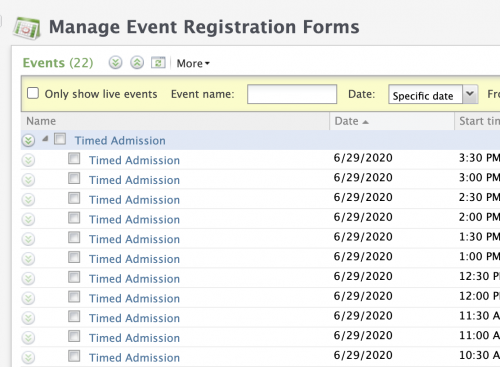

Is that what you are seeing?You are right, Dianne! I thought I had copied that link but when I went back to check...apparently I had not. User error! To be fair I was given approximately 48 hours' notice to get everything set up and under the pressure it's not surprising I made a mistake! Thank you for your kind response and help!
1 -
You're welcome!

0 -
I am setting up my test for timed ticketing and I have a couple of questions:
First, I have a question that relates to Kaelynn's screenshots and other times and events showing up on webforms. I am setting up my test as a preregistered program like Kaelynn.
If I just use the URL from the parent event, other times and dates do not show up until I mark them as approved for website. Is everyone going into each occurrence and doing this?
In the video (https://arts.blackbaud.com/altrusupport/pt-2-timed-ticket-webforms), when he goes into the forms they are already all marked. Is that because he is using program forms and not preregistered program forms?
From the video: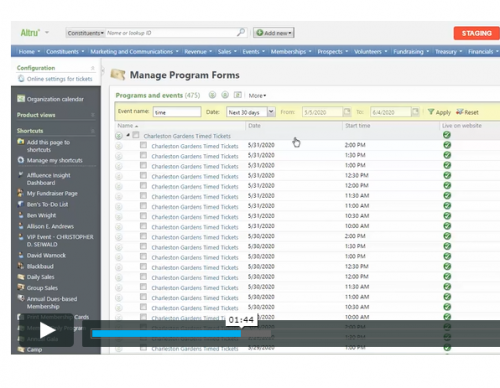
My second question is about timing. The model that I have been asked to work with involves limiting ticket sales to 10 per 1/2 hour (limiting to 1 to 2 families) with start times at 10 am, 10:30 am, 11 am, etc... Visitors will be allowed to stay for 1 1/2 hours. Altru won't let me do that though. I can only make them a 1/2 hour long. Has anyone figured out a work-around for this? How can I make the webform look like they can stay for 1 1/2 hours?
Thanks,
Tamara
1 -
Hi Tamara,
Yes, for pre-registered web forms you will have to approve each event for the web.
As for the 30-min timeslots, the way I've seen other orgs talk about them is that the 30 minute slot is just your arrival time. Then, they talk about how long guests can stay elsewhere on the website and in the confirmation email. You should be able to set up overlapping 1.5 hour program events though... maybe you just can't schedule them all at once. You could do all the 10:00, 11:30, 1:00s at once and then go back in and do all the 10:30, 12, 1:30s, etc. You may have to ignore conflicts if they are using the same location but it will allow you to do that.
Good luck!1 -
Kaelynn Bedsworth:
Dianne Crosby:
Kaelynn Bedsworth:
Dianne Crosby:
Libby Clark:
I wish I had asked this in the web forms webinar I took weeks ago, but if we sell daily admission tickets online, is there always an option for the calendar view? I saw that on some of the examples others provided, but I haven't been able to figure that out. When we sold timed tickets for a program in December, we had individual links for each day and time, which was a lot. I think having a calendar where a visitor can choose a day and then a drop down to choose the time would be much more efficient-- I am just unclear if Altru has that capacity or if it is an overlaying website design/code. Thank you!
If you go to Web/Manage Event Registration Forms you will see a "Parent" for each program with all the dates underneath. Click the double green arrows to the left of the "Parent" program and it will show you the URL for all the dates.
When you go to this URL you will have the option to select "Other dates..." or "Other times:"I am having an issue using that parent link in that instead of defaulting to the next available day (eg, tomorrow right now), it shows the original date of the event and people HAVE to click the Other dates link to get to the calendar. Is there a secret I'm missing to get that link to auto-default to the next available date for tickets?Hi Kaelynn,
I'm confused because the parent link doesn't have a date associated with it. Here are screenshots of what I see:
Is that what you are seeing?You are right, Dianne! I thought I had copied that link but when I went back to check...apparently I had not. User error! To be fair I was given approximately 48 hours' notice to get everything set up and under the pressure it's not surprising I made a mistake! Thank you for your kind response and help!I am having a issue that is similar but a little different. I keep adding events to my main program and now the parent URL is no longer formated like it used to be with a place to select a date and a time and our webform language. Instead the parent URL just lists every even link on a single page and no instructions. Not sure what I did different to throw the parent URL out of whack. It was set up to go to first available and only show future events to select from.
0 -
Erik,
I think that happens if all the program events in the program do not have the exact same name. Did you schedule them under slightly different names? Also is yours a scheduled or preregistered program?0 -
J Kiku Langford McDonald:
Hi Tamara,
Yes, for pre-registered web forms you will have to approve each event for the web.
You do have to approve every event, but you don't have to do them one at a time. Just click the checkbox next to the parent event and click "Approve selected events for website"
1 -
J Kiku Langford McDonald:
Erik,
I think that happens if all the program events in the program do not have the exact same name. Did you schedule them under slightly different names? Also is yours a scheduled or preregistered program?Thanks for the response. I kept the same name as the program. I have these as scheduled programs. I did change things like capacity and price for these newest events, but they all have the same name as the parent program. if I go to one of the event URL's everything looks great and all information is there, Just the parent URL is making everything look wonky.
0 -
Hmmmm... if I had to guess I'd say it's because of the different prices. Most of our program events within one program are NOT the same thing every time so we haven't really made use of the parent program URL much before. In fact, the only program where we do use it, we want to show all the different date options and not have the calendar icons to click through so we intentionally change the names of the program events so they do what your parent URL is doing now. Have you reached out to chat support to find out if they know what's going on?
I haven't set up our timed ticketing yet so it' really helpful to hear what all of you are doing and all the little nuances and glitches in how the system does/doesn't cooperate!0 -
I have another Preregistered Program Parent URL question...
My Options are greyed out. I want to do a lot of customizing as to which price types show up online and such. I don't want to have to go into each program to make the changes. What am I missing? Maybe this is something I need to chat with Altru about?
Thank you!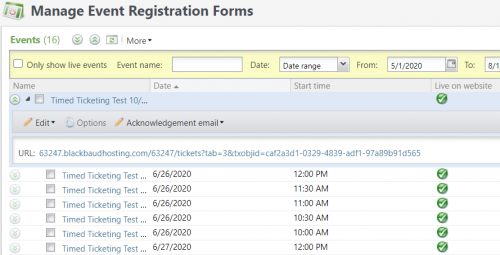
1 -
The options button on my Parent event is greyed out as well.
I asked one of my IT team (who I believe has master permissions) about it, and he said it is greyed out for him too.0 -
Tamara Christensen:
I have another Preregistered Program Parent URL question...
My Options are greyed out. I want to do a lot of customizing as to which price types show up online and such. I don't want to have to go into each program to make the changes. What am I missing? Maybe this is something I need to chat with Altru about?
Thank you!
I just chatted with Altru support about this, and Pre-Registered Programs does not allow for the Options button on the Parent/Master event to work. It's just how the program is. I think this is ridiculous. So Now I have to decide if I need to spend hours making adjustments to each event (every half hour 9-4 Wednesday-Saturday, noon-4 Sunday, and 12-7 Tuesdays, for July 14-August 2, which is what we're going live with to start). It almost makes me want to cry. Or I decide to leave everything the way it is, and have a sub-par experience for my customers.
They're only recommendation was to come here to post and vote to get the attention of the team to get changes made.
0 -
Laura,
That is frustrating to hear! When you go to Web/Manage Program Forms - on the top left a link appears to edit the Online Settings for Tickets. I cannot understand why that same option isn't available when you go to Web/Manage Event Registration Forms.
Dear Altru Employees,
Please understand that COVID-19 is requiring all of us to reinvent how we have to work. We need you to also reinvent how you work. Please re-evaluate what your priority list is right now and focus on the things we need in order to adapt!3 -
Dianne Crosby:
Laura,
That is frustrating to hear! When you go to Web/Manage Program Forms - on the top left a link appears to edit the Online Settings for Tickets. I cannot understand why that same option isn't available when you go to Web/Manage Event Registration Forms.
Dear Altru Employees,
Please understand that COVID-19 is requiring all of us to reinvent how we have to work. We need you to also reinvent how you work. Please re-evaluate what your priority list is right now and focus on the things we need in order to adapt!Yes! Incredibly frustrating! Luckily I have a good team of people here who are helping me divvy up the dates and fix each one. Even if the system would just post the ticket options in the order that I entered them into the event, it would be better, but they're completely jumbled (not in alphabetical or monetary order).
0 -
I created an idea for this to vote on.
https://altru.ideas.aha.io/ideas/ALTRU-I-2103
But this something that needs to be addressed ASAP. Voting takes years...
2 -
Thank you Dianne! I didn't know how to do that. I've gone in and voted. I've also shared with a couple Altru-using colleagues. Hopefully they hear us and make the change. It would be great, since I know this isn't the only time I'll be doing this--we're currently only scheduling through August 2nd, but will continue pre-sale at least through Fall, if not permanently.0
-
Hi all!
I have another question about how everyone is dealing with setting up timed ticketing. We've been using web forms for a long time, but have never set up eTickets or timed ticketing before. I just took another look at the eTicket templates and realized there is no "END TIME" merge field there OR on the acknowledgement emails (only the start time). Normally, this is not a problem but if we are setting up timeslots to manage when people can enter the museum, how are the visitors supposed to know when the END of their timeslot is?
We were planning on 1-hour timeslots on weekends but letting people come in anytime 10-5pm on weekdays. I saw others in this thread talking about 30-minute timeslots for timed tickets. How are you all communicating to the visitors about those arrival timeslots and how long they have AFTER the start time to actually get in? I want to somehow differentiate between a weekday ticket that can be used anytime between 10 and 5 and a weekend ticket where you can only enter from 10 to 11... but both tickets will just say "10:00."
Is anyone actually open and actively selling timed tickets? Has there been any confusion about what times each ticket is good for?
Thanks!!
Kiku1 -
We are selling tickets every 30 minutes. When a customer is on our website and clicks the list of possible times, it only shows the start time. But once they select it, it shows both the start and end time. For example, if they select "2:30 pm" it then displays "2:30 pm to 3:00 pm". So they can arrive anytime between 2:30 and 3:00. Sometimes people arrive a bit early or a bit late, which is fine.
There hasn't been much confusion with customers about their arrival time.
But we still are having quite a few visitors who don't realize we are doing timed ticketing. Sometimes we have space available for these walk-in visitors. If we don't, we'll let them know when our next available time is.
I can imagine if your rules are different between weekdays and weekends, that could cause a fair amount of confusion.0 -
Hi Kiku,
Our plan is to have time slots every 1/2 hour and then the guests can stay for 1 1/2 hours. Since we are starting very low capacity when we open, our current plan is to give the guests stickers so they will know when their time is over.
I still have to figure out how to handle all the different price types for webforms without having to edit each occurrence. We don't currently use discount codes. Does anyone use these and does it help with webforms?
Thanks,
Tamara1 -
Hi Everyone,
I'm wondering how many organization have re-opened and are actively using timed ticketing now. Do you regret and/or have changed any of the decisions you initially made about how to set up your programs? I heard at least one org initially was selling timed tickets but there was so much confusion around needing to choose a time to enter that they now just sell all-day tickets. Was that an isolated experience or have others done something similar? Has anyone had problems with needing to reschedule tickets for people who end up not being able to come at the correct time?
If you're open and willing to share your web form, I'd love to check it out, especially to see how you've instructed your visitors on buying tickets in advance and how you've shared your policies around discounts/refunds/exchanges and COVID-related policies like mask-wearing.
Thanks!
Kiku0 -
We did switch from reserving a day and time to just a day. We do reschedule for some. When we had timed tickets it seemed our members were confused about the 'arrival' time - in what I would say a classic what if situation, they would end up reserving multiple times on one day. We did reopen 07/02. Thursday through Sunday are our operating hours. I think I explained earlier that our ticket reservations are simple, in that you reserve one kind of ticket for one day. No special other programs or shows. I wish more members would register - we are using the sign in portal. And for me I feel that works very well. I do have to help a few along the way - especially if they've moved, etc.
Can you see this?
Let me know if that is what you're looking for or not.
Regina- - Oh, and our covid information is an entire link:: if you visit our website www.marylandsciencecenter.org
it should pop up....we don't repeat this information on every email usually - there are signs everywhere, too.0 -
J Kiku Langford McDonald:
Hi Everyone,
I'm wondering how many organization have re-opened and are actively using timed ticketing now. Do you regret and/or have changed any of the decisions you initially made about how to set up your programs? I heard at least one org initially was selling timed tickets but there was so much confusion around needing to choose a time to enter that they now just sell all-day tickets. Was that an isolated experience or have others done something similar? Has anyone had problems with needing to reschedule tickets for people who end up not being able to come at the correct time?
If you're open and willing to share your web form, I'd love to check it out, especially to see how you've instructed your visitors on buying tickets in advance and how you've shared your policies around discounts/refunds/exchanges and COVID-related policies like mask-wearing.
Thanks!
KikuWe, Old Westbury Gardens, www.oldwestburygardens.org, reopened for members in mid-June and general admissions July 1. We were new to Altru and we knew that we would need to sell only advanced tickets in the COVID-19 world. So in April we started an email and USPS campaign to encourage members to register with the website. In June when we opened only for members the easiest and fastest way for them to obtain tickets was online. We still have some grumblers (just had an email today) but the usually aren't signing in before making reservations. Since we saw that most other cultural institutions in our peer group (botanical gardens) had an all sales final policy, we instituted that (all the stores here on Long Island have all sales final policies now too). We do permit rescheduling since we already have their $ and weather is always an issue with an outdoor institution. And we refund in case of illness (we've only had 2 cases ).
The only thing people "don't get" are the ticket times. We reiterate that these are the entry times and not the time they need to leave. We now know how long people stay and what the turn around time is so we can set the capacity accordingly. Members do grumble about having to make reservations but we don't want different policies, one for weekends when we are busy and reach capacity and another for weekdays when we are under capacity.
1 -
I don't have anything to do with the pricing on tickets or the wording or the policy but I love the all sales final! We also had some flack. But mostly like I probably said below the annoyance was members hopping all over the times and...squatting on one day. It was a little comical.
Now, if someone does approach the ticket desk w/o a reservation we do sell them a ticket. I'm not the policy person on all that either, but did notice some daily sales transactions - even memberships - joins and renewal..I'm ok with that. Our plexiglass ticket desk and masked staff hopefully reassure a safe visit.0 -
We've been happy with our timed ticketing system. But I will say
that ours seems to be a little different than other organizations.
I'm seeing most sell them based on entry time. Ours are "blocks" of
time - 8 - 11 am, 11 am - 2 pm, 2 - 5 pm, and 5 - 9 pm. We are
limiting to 450 members and 50 nonmembers per block. We kindly ask
everyone to stick to their time block and people seem to be
respecting it. We are not "enforcing" the time block and blowing a
whistle when time is up or anything. It's all on the honor
system. We
were open to members only for two months before we added nonmembers
to the mix. It hasn't caused much confusion and I think most of our
members and paid visitors have been happy and have accepted the
system.
We do accept "walk-ins" but only if there is space. We don't
promote or tell anyone that. It's really an internal management
system so can be welcoming to the walk-ins when we can. And when
they arrive and we let them in, our front-line staff is trained to
adamantly tell them that today is their lucky day, they cannot rely
on this happening next time, they must make reservations next time
they visit. People get the message.
If a nonmember pays daily admission and has to cancel, we've
accommodated and rescheduled them. We are living in very
unpredictable times and I think it is really best to be as
flexible as possible right now. No one has asked us for a
refund. We always say sales are final too. If someone asked for a
refund, I would offer them complimentary admission to come back
another day as a makegood.
Yes, we have grumblers. But you can NEVER make everyone happy. The
majority of those who have expressed great dismay are mostly people
who don't have or don't want to deal with the online technology. We
have an internal running list of these customers. When they call,
we take care of them.
Laura
Schmid | Membership
Manager
4949 Tealtown Road | Milford, OH
45150
(513) 831-1711, ext. 416 | Membership Office
(513) 965-4893
www.CincyNature.org1 -
We reopened on July 8 with timed entry tickets available on our website. We went with a capacity set for each 30 minutes and split it between online and onsite sales to account for the many manual discounts that would be difficult to manage in online reservations and some members who would never be able to reserve online (10% of our membership don't even have an email address on file).
We were careful in crafting the language on our ticketing web form and website to avoid any confusion should anyone who reserved see someone else get walk in tickets explaining reserving would ensure being able to visit at the time of their choosing. We worded the language about ticket times to explain they should arrive within this period but can stay as long as they want. The times haven't seemed to have been an issue (as yet).
We've had to help some members with registration but, overall, not a significant number. We've had two "reschedules" so far which were easy to manage. The issue we've seen most is those who reserve tickets but never "view/print" them, which means they don't have tickets to scan when they arrive. We have to ask them to look for the second email while they are standing there. I'm going to try sending a reminder email first thing each morning to remind them to do so before arriving. If they have opened the tickets but didn't print or have them readily available, I have a query set up to allow easy access to the ticket numbers for manual entry.
I'm working on a "ticketing and registration FAQ" page for our website now to put up answers to the questions we've been getting. We'll add new information as we find it necessary.
I also only set up ticket availability through the end of August so we can review and adjust as necessary for the Fall. Or drop timed ticketing altogether, I hope.1 -
We implemented timed ticketing for our re-opening which started July 6th. Here is our ticketing page: https://www.lifeandscience.org/museum-reopening-what-to-know with links to our member and non-member admission web forms. They are set up as scheduled programs in Altru.
It has been a smooth transition for the most part. My biggest issue is having to manually edit the member log-in options for each timeslot separately - 84 separate time slots each week! (The default text with the all caps "MEMBERS ONLY" is a little aggressive and the other "event ticket" default text doesn't really make sense for member admission.)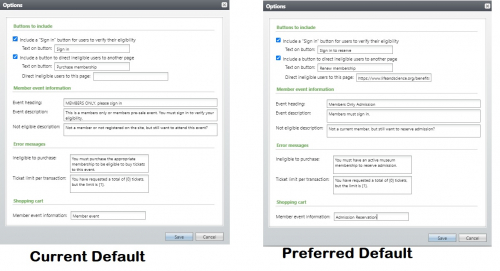
2 -
Does anyone know of a method for preventing the timed entry/ticketing process in daily sales from advancing to the next day when the last tickets are sold for today?0
-
John Ryan,
When you set up the Daily Sales button, you can choose to show one button for the next available time and then check the box next to it to only show today's events:
0




























Categories
- All Categories
- 6 Blackbaud Community Help
- 213 bbcon®
- 1.4K Blackbaud Altru®
- 403 Blackbaud Award Management™ and Blackbaud Stewardship Management™
- 1.1K Blackbaud CRM™ and Blackbaud Internet Solutions™
- 15 donorCentrics®
- 360 Blackbaud eTapestry®
- 2.6K Blackbaud Financial Edge NXT®
- 656 Blackbaud Grantmaking™
- 577 Blackbaud Education Management Solutions for Higher Education
- 3.2K Blackbaud Education Management Solutions for K-12 Schools
- 939 Blackbaud Luminate Online® and Blackbaud TeamRaiser®
- 84 JustGiving® from Blackbaud®
- 6.6K Blackbaud Raiser's Edge NXT®
- 3.7K SKY Developer
- 249 ResearchPoint™
- 119 Blackbaud Tuition Management™
- 165 Organizational Best Practices
- 241 Member Lounge (Just for Fun)
- 34 Blackbaud Community Challenges
- 37 PowerUp Challenges
- 3 (Open) PowerUp Challenge: Grid View Batch
- 3 (Closed) PowerUp Challenge: Chat for Blackbaud AI
- 3 (Closed) PowerUp Challenge: Data Health
- 3 (Closed) Raiser's Edge NXT PowerUp Challenge: Product Update Briefing
- 3 (Closed) Raiser's Edge NXT PowerUp Challenge: Standard Reports+
- 3 (Closed) Raiser's Edge NXT PowerUp Challenge: Email Marketing
- 3 (Closed) Raiser's Edge NXT PowerUp Challenge: Gift Management
- 4 (Closed) Raiser's Edge NXT PowerUp Challenge: Event Management
- 3 (Closed) Raiser's Edge NXT PowerUp Challenge: Home Page
- 4 (Closed) Raiser's Edge NXT PowerUp Challenge: Standard Reports
- 4 (Closed) Raiser's Edge NXT PowerUp Challenge: Query
- 794 Community News
- 3K Jobs Board
- 54 Blackbaud SKY® Reporting Announcements
- 47 Blackbaud CRM Higher Ed Product Advisory Group (HE PAG)
- 19 Blackbaud CRM Product Advisory Group (BBCRM PAG)