Information Source on Add an Individual form





Hi everyone.
Is the Information Source which is mandatory on the Add an individual form, shown anywhere obvious on the individual record?  And where is it hiding in Adhoc Query??!!

Comments
-
I believe it gets put as the information source for the contact information... as well as the "Constituent Source" which you can see on the History -> Origin tab.
Not sure off the top of my head where in query it is.0 -
-
Thanks Rick Root and Lori Thompson
That's what I thought, Rick, but it doesn't
I added a new record in our staging environment and added in the Information Source using the Add an Individual form, but no contact details.
It didn't appear under the History/Origin, although the date added does!
So if you don't add any contact data, such as a phone number, email, on the Add an Individual form, it looks like it doesn't save that info source anywhere.... but it must be in the tables in the background.
(I'm a fan of 'Hamilton' ?)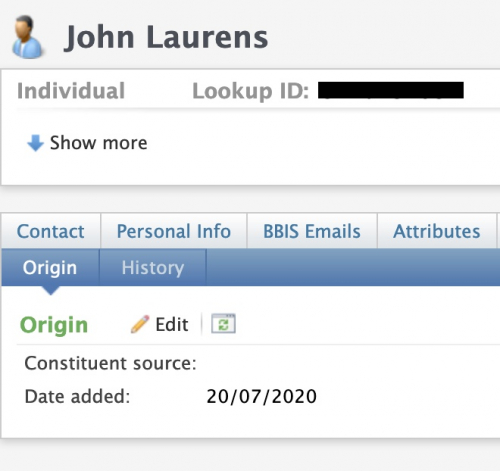
0 -
The Information Source from the Add Individual form only populates on the contact information. Rick Root may have forgotten that we customized the Add Individual and Add Organization forms so that the Information Source populates the constituent Origination info. We thought it was pretty amazing that Blackbaud didn't build CRM to have an Information Source automatically added to the constituent. Seems like a no-brainer to me.1
-
Kelli Crispin:
The Information Source from the Add Individual form only populates on the contact information. Rick Root may have forgotten that we customized the Add Individual and Add Organization forms so that the Information Source populates the constituent Origination info. We thought it was pretty amazing that Blackbaud didn't build CRM to have an Information Source automatically added to the constituent. Seems like a no-brainer to me.Hah, I was just going to ask you about this
0 -
Thank you Kelli Crispin and Rick Root
Kelli, would be interested in how your org customised it to populate the History/Origin field 0 -
Liz Hackett:
Thank you Kelli Crispin and Rick Root
Kelli, would be interested in how your org customised it to populate the History/Origin fieldI can answer that one.
We have done numerous form extensions to the Add Individual and Add Organization forms One in particular adds a Constituency field allowing us to add a Constituency when we add a record. That extension also has a hidden INFOSOURCECODEID field.
The UI Model for the form extensions copies the INFOSOURCECODE from the main form to the hidden field on the extension (plus sets some defaults for certain fields if the user didn't enter them)
The save procedure- Sets a default INFOSOURCECODEID if it's blank and we determine from the app user's roles that they're an events person
- inserts a row into CONSTITUENTORIGINATION
- also sets the infosourcecodeid i the PHONE, EMAILADDRESS, and ADDRESSVALIDATIONUPDATE tables.
1 -
Hi, thanks for the description of your technique. Could you give a bit more detail about how the extension form accesses information from the main form? Or point me to some docs/sample that shows how that is done?The UI Model for the form extensions copies the INFOSOURCECODE from the main form to the hidden field on the extension (plus sets some defaults for certain fields if the user didn't enter them)
0 -
It's OK, I found the example on how to access the parent form
https://www.blackbaud.com/files/support/guides/infinitydevguide/Subsystems/dataforms-developer-help/Content/InfinityDataForms/coAddingEventsToExistingFields.htm
0










Categories
- All Categories
- 6 Blackbaud Community Help
- 211 bbcon®
- 1.4K Blackbaud Altru®
- 402 Blackbaud Award Management™ and Blackbaud Stewardship Management™
- 1.1K Blackbaud CRM™ and Blackbaud Internet Solutions™
- 15 donorCentrics®
- 360 Blackbaud eTapestry®
- 2.6K Blackbaud Financial Edge NXT®
- 655 Blackbaud Grantmaking™
- 576 Blackbaud Education Management Solutions for Higher Education
- 3.2K Blackbaud Education Management Solutions for K-12 Schools
- 940 Blackbaud Luminate Online® and Blackbaud TeamRaiser®
- 84 JustGiving® from Blackbaud®
- 6.7K Blackbaud Raiser's Edge NXT®
- 3.7K SKY Developer
- 248 ResearchPoint™
- 120 Blackbaud Tuition Management™
- 165 Organizational Best Practices
- 240 Member Lounge (Just for Fun)
- 34 Blackbaud Community Challenges
- 37 PowerUp Challenges
- 3 (Open) PowerUp Challenge: Grid View Batch
- 3 (Closed) PowerUp Challenge: Chat for Blackbaud AI
- 3 (Closed) PowerUp Challenge: Data Health
- 3 (Closed) Raiser's Edge NXT PowerUp Challenge: Product Update Briefing
- 3 (Closed) Raiser's Edge NXT PowerUp Challenge: Standard Reports+
- 3 (Closed) Raiser's Edge NXT PowerUp Challenge: Email Marketing
- 3 (Closed) Raiser's Edge NXT PowerUp Challenge: Gift Management
- 4 (Closed) Raiser's Edge NXT PowerUp Challenge: Event Management
- 3 (Closed) Raiser's Edge NXT PowerUp Challenge: Home Page
- 4 (Closed) Raiser's Edge NXT PowerUp Challenge: Standard Reports
- 4 (Closed) Raiser's Edge NXT PowerUp Challenge: Query
- 796 Community News
- 3K Jobs Board
- 54 Blackbaud SKY® Reporting Announcements
- 47 Blackbaud CRM Higher Ed Product Advisory Group (HE PAG)
- 19 Blackbaud CRM Product Advisory Group (BBCRM PAG)