Import assignments wizard





HELP!
Comments
-
Following - this sounds like a nightmare. I imagine I will hear the same concerns when our teachers return later next month. Sigh.2
-
Hi Blackbaud. Please reply to this to give us guidance on how help our teachers with these changes to the import wizzard and the new assignment list interface.
- How can teachers make the import work sortable by due date?
- Point us to the instruction page for using the import tool.
- give us some pointers on why the new import tool and assignment tabs were changed so we can share positives with teachers about the new arrangements.
- Why does the assignment tab filer "in the past" not show assignments from the past?
We need help with this esp. during this time when using the system is more important than ever.
2 -
Hi all, we do have adding the dates (sortable) to the UI planned in the next several weeks sorry for the inconvenience this is causing. Keep an eye out for release notes soon on this one.0
-
Michael Moulton sorry I missed a couple of your asks in my last response. The new designs have simplified menu and filter options which is part of what lends itself to being more mobile friendly as well. And we have sticky view functionality so that if they change their filters and columns to what they typically want to look at it should remember those so they don't have to repeat that every time they go to the assignment center. There is yes a known bug with the past assignments filter not working right now but it is in our upcoming sprint so should be fixed soon!1
-
Thanks Angie,
That broken "past" choice is problematic (makes teachers think the whole thing is broken) so glad it is being fixed soon. Saw the sticky part ;> Like that. The old interface was hard to understand so when this one is done is will be an improvement.0 -
Thank you Michael Moulton !0
-
Hi all! We recently had a new teacher training session on the feature enhancements of Academics this summer. The uproar over being able to import assignments and ESPECIALLY ASSESSMENTS from anyone was very disturbing. Any teacher should not be able to go in and import/view/see other all teachers tests without them being shared. This is troubling for myself and my administrators. Please please give some direction on how we can possibly lock this feature down.
We DO NOT want teachers to see other teachers tests. This could be a huge issue for us!1 -
Help! The "past" filter for importing assignments still doesn't work and the order of assignments in the import list as alphabetic and not by date is really problematic!1
-
It is in our upcoming sprint to add the dates back in.1
-
I have been trying to import assignments for several weeks and am beyond frustrated. Importing topics is so easy...why isn't the process similar? The filter(s) are lame!!!0
-
Hi Angie.
When you say upcoming sprint what does that mean in terms of time estimate? This week?0 -
Michael Moulton dates (sortable) in the assignment import wizard will be going to production in tomorrow's release.1
-
Angie Addison I'm soooo glad to hear this is being fixed tomorrow. I had a teacher in tears while trying to import assignments last week. Our teachers rely on this ability. We tried all sorts of workarounds for her to see her assignments from last year. If the new CSV assignment export was working properly, that would have helped, but it doesn't....1
-
Thanks Megan Day I hope it helps alleviate some pain tomorrow. If the dates being added back in don't do it for them definitely reach out to support and put something in and they'll get it escalated to us up in product/dev. Thanks for your help!0
-
#1. "Import Assignments - Assessment Indicator"
Curious - I just had a teacher ask for this feature and decided to search the idea portal. In July 2015 this was an idea with 26 votes and it got implemented. It seems with the new Import assignments wizard this is not implemented any longer.
It would still be very helpful (necessary almost) to know visually in the import window which are assessments or just assignments.......... Can anyone verify that this is no longer included in the new design? They Type is not very descriptive to the teachers apparently given the feedback i have been receiving the last few weeks.
#2. Also in the new Wizard, if type is blank, it is not in the import at all. You can go to the old import in calendar and see all assignments and type = blank shows there ti choose to import. Not int he new one. ......0 -
Hi Lorrin Saliba that's strange, when I test importing assignments I see them whether type is populated or not. Can you open a support ticket? It may be there is something about the data on the assignments you're not seeing that's a different scenario and we can look into. On the part about displaying whether assignment, assessment or discussion like we do in the assignment list view I can put that in for dev to add. thanks!0
-
This is fantastic news! Yes, I have a teacher that I can provide detail for about the blank (no type entered) for assignments not showing in the new import wizard. I will open a ticket today send in her information about how she was seeing this behavior. Thanks for the quick response!
0 -
Thanks so much Angie! Now if we can have a serious conversation about the importing of anyone and everyones assignments without explicit permission, that would be awesome!
Of any of the recent changes that were made to the assignment center, this is the one that has my teachers in a complete and utter uproar. We feel that the ability for any teacher to import any other teachers tests/quizzes into their gradebooks and view the test format/questions/results should not be standard operating procedure. This opens the door for dishonesty if a teacher is also a parent. We don't want to foster an environment of distrust with our faculty but the potential is there and we dont feel it should be open this freely.
It should either:
1) have a method where the teacher that created the exam/assessment chooses to share (or not share) to the import wizard for others to add or
2) exclude assessments from the import until a better method can be put into place to secure assessments from being seen by other faculty.
This would be for importing other teachers work not for the teacher themselves or those with Academic manager role. If a teacher, leaves mid-year, we would need to import assignments from a previous teacher to the new one. Teachers should of course be able to import anything from their past gradebooks.
0 -
Hi, Lorrin Saliba. You mentioned that you can Import through the calendar view. When I impersonate a teacher, I don't see this option. Is it supposed to be in this area?

Hi, Angie Addison. My teachers are frustrated with the inability to sort assignments by last due date when importing. Is that a bug or something to report?0 -
Yes Kim - from the screen shot below, click on the assignment button the window that appears, you should see add existing at the very top of that window. This is the pathway to the old import assignment wizard. You can not do multiple ones here but you can import one here if you have to......1
-
Kim McAmis we added assigned and due dates to the new import wizard in the 8/18 release (sortable). If you aren't seeing that can you log a support ticket? It should have been released to everyone, I'm not sure if there is something environment specific going on there.1
-
Lorrin Saliba Thank you!!! I will share that tip with my teachers.
Angie Addison Thanks for your quick response. When we click on Last Due to sort the dates within Import Assignments mode, the dates seem to be sorted randomly (see below). I'm happy to submit a ticket for this if it's not normal.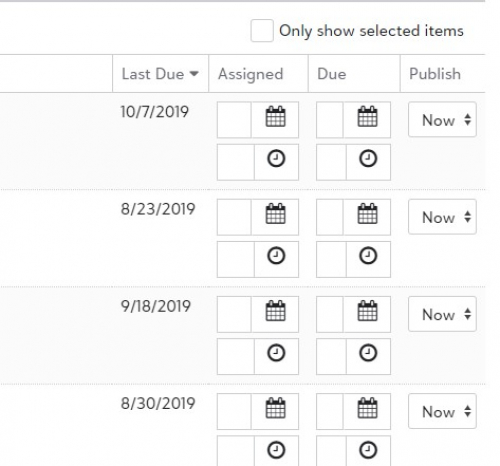
0 -
Hi Kim McAmis oh ick! Sorry, crossed wires I thought you were talking about the dates in the previous screen where you search for assignments. I did not know about this one - of if it is in support already it hasn't made it's way to us yet. Would you mind terribly putting a ticket in? That way they'll rule out any environmental issues that they might be able to resolve more quickly before floating it up to us. Thank you!2
-
@Angie we're still experiencing difficulty with this new feature and are days away from having our students in classrooms.
The issues we are currently having occur at the final stage of importing assignments. After going through the process of selecting assignments and entering due dates, you arrive on the last page, confirm your import, and click "Save and Close." Unfortunately, the window never closes. So you're left wondering, if save and close doesn't close, does it save? After some research, you'll find that it did actually save. It just takes some know-how of a new assignment center to find the imported assignments. Many teachers aren't savvy about this, so they are going back to redo the import. Now we're not only suffering through a clumsy import but also forced to sift through and remove duplicate assignments for teachers. For the worst cases where a teacher imported all of their assignments two or three times, Blackbaud said it would take 7-10 days to help fix this (perhaps with a charge).
On top of this, some teachers get an import window that is zoomed in and hides the ability to select due dates. You can only navigate to the side if you realize there is a hidden scroll for the window. Oddly enough both of these issues happen to some teachers and then not to others. So it is very glitchy and challenging to prepare for. Even my Blackbaud support agent noted how inconsistent her experience was while testing this feature and experiencing what we have gone through the past week or so.
I'm also not certain why Blackbaud would remove the "add existing assignment" option for teachers to import assignments from the add Assignment feature. That was a heavily leveraged option for us.
While I'm asking, are these the best directions from Blackbaud to import assignments?
https://kb.blackbaud.com/articles/Article/949091 -
Just imported assignments from 2019-2020 school year ?0
-
0
-
Hi Anson Kendall I worked with support earlier on trying to reproduce the issues that you're describing with the screen not saving and closing and we tried many scenarios and weren't able to reproduce it, it seems it was specific to one user on assignments with downloads from what they're seeing but we will get it into dev to debug on that particular scenario. I haven't seen any reports come in from other schools on similar issues and I know this is being heavily used right now so I'm optimistic that it's something isolated because of a difference in your environment or data in this particular teacher's case. We'll take a look though. Glad to see reports here of others successfully getting theirs in. Thanks Tracey Kounanis !0
-
Thanks Angie, I'm glad to hear other schools are having success with this tool. We're not in that boat, yet, but we'll continue to use our workarounds.
If it helps, this problem was replicated by tech support and they encouraged me to share the experience here. I'll add that all of our teachers are experiencing the zoomed-in window issue. It occurs while trying to filter a long list of previous assignments and the due date column is lost without scrolling to the right within the import wizard. It makes this tool very clumsy.
Lastly, Blackbaud needs an "undue import" option baked into the import wizard.
Angie Addison:
Hi Anson Kendall I worked with support earlier on trying to reproduce the issues that you're describing with the screen not saving and closing and we tried many scenarios and weren't able to reproduce it, it seems it was specific to one user on assignments with downloads from what they're seeing but we will get it into dev to debug on that particular scenario. I haven't seen any reports come in from other schools on similar issues and I know this is being heavily used right now so I'm optimistic that it's something isolated because of a difference in your environment or data in this particular teacher's case. We'll take a look though. Glad to see reports here of others successfully getting theirs in. Thanks Tracey Kounanis !
0 -
Hi Anson Kendall I'm sorry you're having difficulties, I have a meeting with my dev this morning to see if they can take a look into the issue with the modal freezing on you and if it's possible for us to identify duplicates that were created from the teacher(s) clicking on save more than once. I appreciate your patience.0
-
This was a comment from one of our teachers this afternoon:"If you could just watch us navigate through this process I think you would feel the frustration. Today, every time I finally get to where I can select the assignments it freezes and I can’t go any farther. You have to adjust the screen to be able to see the assignments and dates every time you go into Import. It doesn’t hold the tabs. I hate it so much! It is eating hours of my time."She is trying to import using the new wizard and I think she is trying to include those that do not have a type associated to the assignment. I understand that is linked to the gradebook marking periods and so filtering on Q1, Q2.... will remove those from the available assignments to import.
I haven't gone down to step through the process with her yet but she is mentioning the same behavior of freezing up as mentioned below. I will admit that I'm not sure why she is importing on a daily / weekly basis. I would think that this process would be done either once in the pre-planning process or possibly quarterly (or each term).
1





















Categories
- All Categories
- 6 Blackbaud Community Help
- 211 bbcon®
- 1.4K Blackbaud Altru®
- 402 Blackbaud Award Management™ and Blackbaud Stewardship Management™
- 1.1K Blackbaud CRM™ and Blackbaud Internet Solutions™
- 15 donorCentrics®
- 360 Blackbaud eTapestry®
- 2.6K Blackbaud Financial Edge NXT®
- 655 Blackbaud Grantmaking™
- 576 Blackbaud Education Management Solutions for Higher Education
- 3.2K Blackbaud Education Management Solutions for K-12 Schools
- 941 Blackbaud Luminate Online® and Blackbaud TeamRaiser®
- 84 JustGiving® from Blackbaud®
- 6.7K Blackbaud Raiser's Edge NXT®
- 3.7K SKY Developer
- 248 ResearchPoint™
- 120 Blackbaud Tuition Management™
- 165 Organizational Best Practices
- 240 Member Lounge (Just for Fun)
- 34 Blackbaud Community Challenges
- 37 PowerUp Challenges
- 3 (Open) PowerUp Challenge: Grid View Batch
- 3 (Closed) PowerUp Challenge: Chat for Blackbaud AI
- 3 (Closed) PowerUp Challenge: Data Health
- 3 (Closed) Raiser's Edge NXT PowerUp Challenge: Product Update Briefing
- 3 (Closed) Raiser's Edge NXT PowerUp Challenge: Standard Reports+
- 3 (Closed) Raiser's Edge NXT PowerUp Challenge: Email Marketing
- 3 (Closed) Raiser's Edge NXT PowerUp Challenge: Gift Management
- 4 (Closed) Raiser's Edge NXT PowerUp Challenge: Event Management
- 3 (Closed) Raiser's Edge NXT PowerUp Challenge: Home Page
- 4 (Closed) Raiser's Edge NXT PowerUp Challenge: Standard Reports
- 4 (Closed) Raiser's Edge NXT PowerUp Challenge: Query
- 796 Community News
- 3K Jobs Board
- 54 Blackbaud SKY® Reporting Announcements
- 47 Blackbaud CRM Higher Ed Product Advisory Group (HE PAG)
- 19 Blackbaud CRM Product Advisory Group (BBCRM PAG)