Localhost refused to connect/Port 5000 error
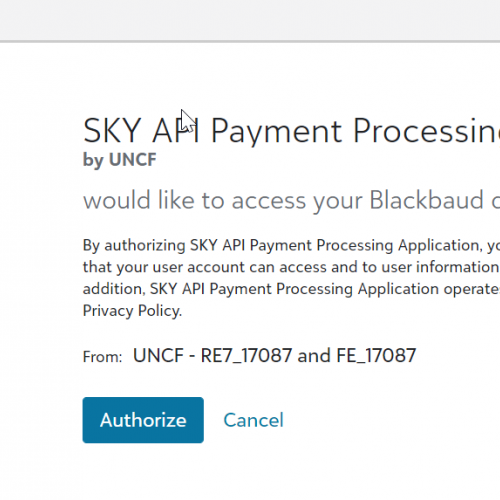



I am looking for some help with generating new sets of access and refresh tokens. We have an integration with FE and Salesforce. In our last integration run, we received errors on the Salesforce side that read: "Error Occured. Message: The required Authorization header was missing or invalid, or the token has expired."
We were provided steps to generate new access and refresh tokens to resolve this type of error. I attempted to go through the steps, following those outlined at https://developer.blackbaud.com/skyapi/docs/authorization/auth-code-flow/tutorial and ran into a connection problem.
I am able to log in (https://oauth2.sky.blackbaud.com/authorization?client_id=0431fbb8-b9d9-4a83-85df-fab80641c57d&response_type=code&redirect_uri=http://localhost:5000/auth/callback/0431fbb8-b9d9-4a83-85df-fab80641c57d) and attempt to authorize the application. However, when I do, I receive the generic error, "This site can't be reached. Localhost refused to connect."
In addition, I have tried everything I could think of (disable, antivirus and firewall, browser settings and clearing cache/dns, proxy settings, etc.) related to my home network and system to see if I could resolve the issue on my end. No luck there either.
As this error is causing a stoppage in processing payments for student scholarships, it is critical that we resolve this quickly. Any help would be greatly appreciated.
We were provided steps to generate new access and refresh tokens to resolve this type of error. I attempted to go through the steps, following those outlined at https://developer.blackbaud.com/skyapi/docs/authorization/auth-code-flow/tutorial and ran into a connection problem.
I am able to log in (https://oauth2.sky.blackbaud.com/authorization?client_id=0431fbb8-b9d9-4a83-85df-fab80641c57d&response_type=code&redirect_uri=http://localhost:5000/auth/callback/0431fbb8-b9d9-4a83-85df-fab80641c57d) and attempt to authorize the application. However, when I do, I receive the generic error, "This site can't be reached. Localhost refused to connect."
In addition, I have tried everything I could think of (disable, antivirus and firewall, browser settings and clearing cache/dns, proxy settings, etc.) related to my home network and system to see if I could resolve the issue on my end. No luck there either.
As this error is causing a stoppage in processing payments for student scholarships, it is critical that we resolve this quickly. Any help would be greatly appreciated.
0
Comments
-
I'm able to see successful Access and Refresh tokens being generated on our end.
A few questions which may help troubleshoot:- Are you using one of our provided code samples or have your own that's handling the callback?
- The URL you showed where you're "able to log in," are you manually typing that in to the browser or are you visiting http://localhost:5000/ and it's redirecting / generating the link? Just trying to figure out if your localhost code is working at all or just not on the callback.
0 -
Thanks so much for your reply, Bobby! This is definitely not my area.
To answer your questions.- I was given instructions by a third-party developer. Instructions were to: Enter this URL in your browser:
https://oauth2.sky.blackbaud.com/authorization?client_id=0431fbb8-b9d9-4a83-85df-fab80641c57d&response_type=code&redirect_uri=http://localhost:5000/auth/callback/0431fbb8-b9d9-4a83-85df-fab80641c57d - I entered (copied and pasted) the url and was taken to the Application Authorization page:
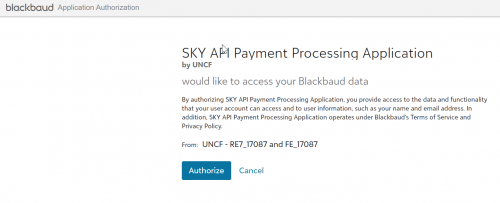
- From there I clicked the Authorize button and received the connection refused error.
Thanks,
John
0 - I was given instructions by a third-party developer. Instructions were to: Enter this URL in your browser:




Categories
- All Categories
- 6 Blackbaud Community Help
- 213 bbcon®
- 1.4K Blackbaud Altru®
- 401 Blackbaud Award Management™ and Blackbaud Stewardship Management™
- 1.1K Blackbaud CRM™ and Blackbaud Internet Solutions™
- 15 donorCentrics®
- 360 Blackbaud eTapestry®
- 2.6K Blackbaud Financial Edge NXT®
- 655 Blackbaud Grantmaking™
- 576 Blackbaud Education Management Solutions for Higher Education
- 3.2K Blackbaud Education Management Solutions for K-12 Schools
- 939 Blackbaud Luminate Online® and Blackbaud TeamRaiser®
- 84 JustGiving® from Blackbaud®
- 6.6K Blackbaud Raiser's Edge NXT®
- 3.7K SKY Developer
- 248 ResearchPoint™
- 119 Blackbaud Tuition Management™
- 165 Organizational Best Practices
- 241 Member Lounge (Just for Fun)
- 34 Blackbaud Community Challenges
- 34 PowerUp Challenges
- 3 (Open) PowerUp Challenge: Chat for Blackbaud AI
- 3 (Closed) PowerUp Challenge: Data Health
- 3 (Closed) Raiser's Edge NXT PowerUp Challenge: Product Update Briefing
- 3 (Closed) Raiser's Edge NXT PowerUp Challenge: Standard Reports+
- 3 (Closed) Raiser's Edge NXT PowerUp Challenge: Email Marketing
- 3 (Closed) Raiser's Edge NXT PowerUp Challenge: Gift Management
- 4 (Closed) Raiser's Edge NXT PowerUp Challenge: Event Management
- 3 (Closed) Raiser's Edge NXT PowerUp Challenge: Home Page
- 4 (Closed) Raiser's Edge NXT PowerUp Challenge: Standard Reports
- 4 (Closed) Raiser's Edge NXT PowerUp Challenge: Query
- 791 Community News
- 2.9K Jobs Board
- 53 Blackbaud SKY® Reporting Announcements
- 47 Blackbaud CRM Higher Ed Product Advisory Group (HE PAG)
- 19 Blackbaud CRM Product Advisory Group (BBCRM PAG)