Reading from a spreadsheet and updating address types...possible?




I'm still new to Power Automate and the Blackbaud connector, but I am trying to open up a .csv or excel spreadsheet that is from AddressFinder, read the constituent's SystemRecordID, and hopefully open the constituent and update their address type so that it is "Former". I do have the AddressID in the file that is from AddressFinder. Is this even possible?
I have gotten a few steps into it. I've uploaded an excel file to One Drive and created a flow that says
1. When a file is created in OneDrive
2. List Rows Present in a Table (I had to pick the file name and table name so these would have to be the same for each file uploaded)
3. Apple to each - A. Get a Constituent (passing it the System Record ID)
Right now I also have it sending me an email with a few of the Constituent fields, just to test that the looping is ok and i am actually getting the constituent data from the database, but these are just baby steps.
One problem I am having is that my flow often fails because somehow the "table" name is getting replaced with a UUID in my flow edit, instead of the name of the table. And I am guessing this UUID is different each time the flow runs, so if I try it a 2nd time, i get a failed message because the table name (with the UUID) is not what is in the file. Is there a way to read from a spreadsheet without having it be inside of a table? I havent figured that one out yet.
Also, can I even go in to the Constituent once I have that constituent opened and update a specific address? I do have some programming background, but its been a long time since I did that full time so I am rusty.
Thanks for any guidance.
I have gotten a few steps into it. I've uploaded an excel file to One Drive and created a flow that says
1. When a file is created in OneDrive
2. List Rows Present in a Table (I had to pick the file name and table name so these would have to be the same for each file uploaded)
3. Apple to each - A. Get a Constituent (passing it the System Record ID)
Right now I also have it sending me an email with a few of the Constituent fields, just to test that the looping is ok and i am actually getting the constituent data from the database, but these are just baby steps.
One problem I am having is that my flow often fails because somehow the "table" name is getting replaced with a UUID in my flow edit, instead of the name of the table. And I am guessing this UUID is different each time the flow runs, so if I try it a 2nd time, i get a failed message because the table name (with the UUID) is not what is in the file. Is there a way to read from a spreadsheet without having it be inside of a table? I havent figured that one out yet.
Also, can I even go in to the Constituent once I have that constituent opened and update a specific address? I do have some programming background, but its been a long time since I did that full time so I am rusty.
Thanks for any guidance.
0
Comments
-
Hi Kristen,
I'm not completely following your description of the problem, but I can confirm that it is possible to update a constituent address using the connector:
https://docs.microsoft.com/en-us/connectors/blackbaudraisersedge/#update-a-constituent-address
(fwiw - that connector action uses the EditConstituentAddress operation in the Constituent SKY API under the hood)
The connector action requires the address ID, which should be the AddressID in the file, and should allow you to change the "Address type" field to be "Former" (assuming that value exists in the Address Types code table). You won't need the constituent's SystemRecordID (at least, you won't need it to update the address - you might need it for some other work you're doing in the flow).
I can't say I've seen the specific UUID problem you described, but you might consider changing your flow so that the trigger is a manual trigger, and the first step in the flow is to List Rows Present in a Table from a well-known file in your OneDrive. Just trying to remove any weirdness that may be from triggering the flow when a file is created in your OneDrive and instead just code the flow so that it opens a specific file that you define in the flow.
Let us know if this helps or if you still have a problem getting it to work.0 -
Hi Kristen,
This is possible, but you're going to have to add a step to get the table ID. I created a sample flow for you to look at here: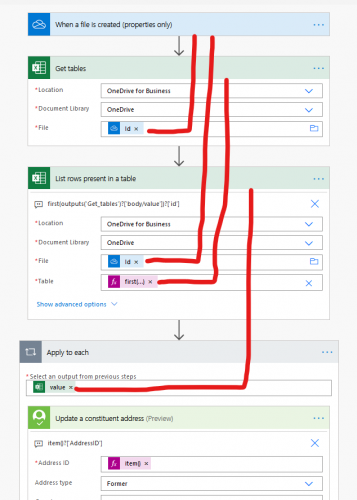
I used the "When a file is created (properties only)" trigger since we'll be getting the file content later.
Next we use a "Get tables" action to get a list of all tables in the spreadsheet.
In the "List rows present in a table" action, we use the ID from your trigger to identify the file we want to use, and we use an expression to specify the table. I assume that any spreadsheets you upload will only have one table, so I'm using this expression to grab the first table ID that is returned in the "Get tables" action:
first(outputs('Get_tables')?['body/value'])?['id']
Now you create your Apply to Each loop, using value from the List rows action.
Add a Blackbaud "Update a constituent address" action, and use the following expression to grab the AddressID from your spreadsheet row:
item()?['Name_of_AddressID_Column']
(of course you'll have to modify that to the actual name that you are using for your address column)
Hope this helps!0 -
Hi Ben,
Thanks. I am going to try this. I actually got my workflow working, but I have to kick it off myself by "testing" it. I think maybe if I use your example to change the way I tell it what table to look at it will work better. I hadnt seen the update Constituent Address action when I had posted originally. But eventually found it by clicking "view more" and scrolling and scrolling thru the blackbaud connector actions. So I have it reading from my file and updating the addresses, which is cool. Thanks again!
Kristen0






Categories
- All Categories
- 6 Blackbaud Community Help
- 213 bbcon®
- 1.4K Blackbaud Altru®
- 401 Blackbaud Award Management™ and Blackbaud Stewardship Management™
- 1.1K Blackbaud CRM™ and Blackbaud Internet Solutions™
- 15 donorCentrics®
- 360 Blackbaud eTapestry®
- 2.6K Blackbaud Financial Edge NXT®
- 655 Blackbaud Grantmaking™
- 576 Blackbaud Education Management Solutions for Higher Education
- 3.2K Blackbaud Education Management Solutions for K-12 Schools
- 939 Blackbaud Luminate Online® and Blackbaud TeamRaiser®
- 84 JustGiving® from Blackbaud®
- 6.6K Blackbaud Raiser's Edge NXT®
- 3.7K SKY Developer
- 248 ResearchPoint™
- 119 Blackbaud Tuition Management™
- 165 Organizational Best Practices
- 241 Member Lounge (Just for Fun)
- 34 Blackbaud Community Challenges
- 34 PowerUp Challenges
- 3 (Open) PowerUp Challenge: Chat for Blackbaud AI
- 3 (Closed) PowerUp Challenge: Data Health
- 3 (Closed) Raiser's Edge NXT PowerUp Challenge: Product Update Briefing
- 3 (Closed) Raiser's Edge NXT PowerUp Challenge: Standard Reports+
- 3 (Closed) Raiser's Edge NXT PowerUp Challenge: Email Marketing
- 3 (Closed) Raiser's Edge NXT PowerUp Challenge: Gift Management
- 4 (Closed) Raiser's Edge NXT PowerUp Challenge: Event Management
- 3 (Closed) Raiser's Edge NXT PowerUp Challenge: Home Page
- 4 (Closed) Raiser's Edge NXT PowerUp Challenge: Standard Reports
- 4 (Closed) Raiser's Edge NXT PowerUp Challenge: Query
- 791 Community News
- 2.9K Jobs Board
- 53 Blackbaud SKY® Reporting Announcements
- 47 Blackbaud CRM Higher Ed Product Advisory Group (HE PAG)
- 19 Blackbaud CRM Product Advisory Group (BBCRM PAG)