Anyone having issues with attaching files to onCampus from google drive?





For some users we are seeing a hang with "Saving..." as soon as the drive file selection is made. Will spin until a cancel is performed. Support is grinding on it for us.
Hope everyone is fairing well!
Best, JT
Hope everyone is fairing well!
Best, JT
1
Comments
-
Hi JT Amirault -
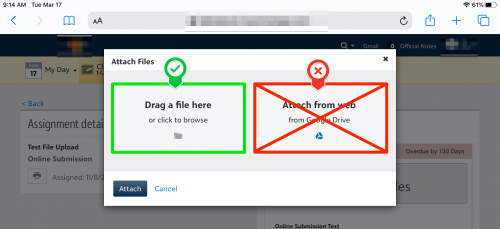
Yes, we're having this issue as well and have a case open. It affects us most with students submitting assignments.- If a student tries to upload a file from "Google Drive," they will get a message that says "Requesting Google file..."
- The workaround, for the time being, is to use the "click to browse" option and browse to Google Drive.
2 -
I notice all of Google Drive is slow. Short video clips are taking 24 hours to process. With the entire education world K-12 and universities all on google drive
all day long, I think this is definitely affecting it.1 -
I've created a document that might help. Ignore the iPad info if it doesn't apply to your situation. Also, make sure your "Google Project" in set up in Core.1
-
Hi All,
The dev team is researching reports of users not being able to attach Google files and will resolve ASAP.
Thanks!
Jackie3 -
I hadn't paid much attention to this discussion when it first popped up because our students weren't having issues. However, this has now become a HUGE headache for our middle school students on iPads. I'll add our info here to hopefully move this along with support.
- Our high school students on laptops (MacBooks) are not having any issues submitting various file types from Google Drive (that we know of).
- Our middle school students (on iPads) using the "Attach from Web - from Google Drive" to submit Google docs also aren't having any issues.
- Our middle school students (on iPads) who are taking photos of their work, turning them into PDFs, and then saving those PDFs to Google Drive are the ones having the issues. If they use the "Attach from Web- from Google Drive" option, it constantly spins and says "Saving..".
2 -
Elizabeth Boyd:
I've created a document that might help. Ignore the iPad info if it doesn't apply to your situation. Also, make sure your "Google Project" in set up in Core.Thank you for sharing this document. We are having huge difficulties with our students and their iPads submitting Word, PowerPoint, PDFs and Google docs. The issues seem to be centralized to our 9th graders with a sprinkling through the other grades.
I will start with your document and see if that helps. A lot of what I'm receiving when the students tell me they have successfully uploaded the file, is a box that says the file couldn't download, Do I want to preview? I click yes to the preview option and then it open a web browser and says it can't open the file. We are at the point where we are all together abandoning file submissions in (what we call Blackbaud) mySMHS.
To clarify, I am a classroom teacher and not a tech director, so please excuse my lack of tech expertise!
Thanks so very much.
1 -
Was wondering too if you all had to ‘share the roster’ for students in order for them to attach files from google drive. So far, we have not been able to have any students successfully attach any google drive.0
-
Wendy Nguyen , we found that we must have class rosters visible in order to allow students to upload their google drive link via the integration.1
-
So does this mean that Student has access to all info on the class roster? or were you able to hide (address, phone etc.) from them?0














Categories
- All Categories
- 6 Blackbaud Community Help
- 213 bbcon®
- 1.4K Blackbaud Altru®
- 400 Blackbaud Award Management™ and Blackbaud Stewardship Management™
- 1.1K Blackbaud CRM™ and Blackbaud Internet Solutions™
- 15 donorCentrics®
- 360 Blackbaud eTapestry®
- 2.6K Blackbaud Financial Edge NXT®
- 655 Blackbaud Grantmaking™
- 576 Blackbaud Education Management Solutions for Higher Education
- 3.2K Blackbaud Education Management Solutions for K-12 Schools
- 939 Blackbaud Luminate Online® and Blackbaud TeamRaiser®
- 84 JustGiving® from Blackbaud®
- 6.6K Blackbaud Raiser's Edge NXT®
- 3.7K SKY Developer
- 248 ResearchPoint™
- 119 Blackbaud Tuition Management™
- 165 Organizational Best Practices
- 241 Member Lounge (Just for Fun)
- 34 Blackbaud Community Challenges
- 34 PowerUp Challenges
- 3 (Open) PowerUp Challenge: Chat for Blackbaud AI
- 3 (Closed) PowerUp Challenge: Data Health
- 3 (Closed) Raiser's Edge NXT PowerUp Challenge: Product Update Briefing
- 3 (Closed) Raiser's Edge NXT PowerUp Challenge: Standard Reports+
- 3 (Closed) Raiser's Edge NXT PowerUp Challenge: Email Marketing
- 3 (Closed) Raiser's Edge NXT PowerUp Challenge: Gift Management
- 4 (Closed) Raiser's Edge NXT PowerUp Challenge: Event Management
- 3 (Closed) Raiser's Edge NXT PowerUp Challenge: Home Page
- 4 (Closed) Raiser's Edge NXT PowerUp Challenge: Standard Reports
- 4 (Closed) Raiser's Edge NXT PowerUp Challenge: Query
- 790 Community News
- 2.9K Jobs Board
- 53 Blackbaud SKY® Reporting Announcements
- 47 Blackbaud CRM Higher Ed Product Advisory Group (HE PAG)
- 19 Blackbaud CRM Product Advisory Group (BBCRM PAG)