Reports for "additional donations" added when using online webforms


Hello!
This year, our org has been hosting a lot of virtual events and webinars (as one does these days), and we've been using the Altru program webforms to track registrations for these online programs. Some are paid and some are free, but many of our participants have been opting to "add a donation" when they check out and complete their registration.
We would love to be able to track these donations by the program registration that prompted the gift, i.e. which webinars and programs have brought in $X in donations for us. I have yet to find a good way of doing this though.
The added donations are currently linked to our General Operating Fund as far as designations go, which isn't that helpful in tracking each program separately. I tried to create a query to find the info I need, but I'm still fairly new with queries and couldn't quite get the information out that I needed.
Has anyone been successful at finding or setting up a way to pull this data out?
This year, our org has been hosting a lot of virtual events and webinars (as one does these days), and we've been using the Altru program webforms to track registrations for these online programs. Some are paid and some are free, but many of our participants have been opting to "add a donation" when they check out and complete their registration.
We would love to be able to track these donations by the program registration that prompted the gift, i.e. which webinars and programs have brought in $X in donations for us. I have yet to find a good way of doing this though.
The added donations are currently linked to our General Operating Fund as far as designations go, which isn't that helpful in tracking each program separately. I tried to create a query to find the info I need, but I'm still fairly new with queries and couldn't quite get the information out that I needed.
Has anyone been successful at finding or setting up a way to pull this data out?
Tagged:
0
Comments
-
Hi Casey,
I'm sure there's a cleaner way to do this, but I use a selection in Query and then output the data to Excel to process.
I would make one really simple Sales Order query called "is_additional_donation_yes" or whatever: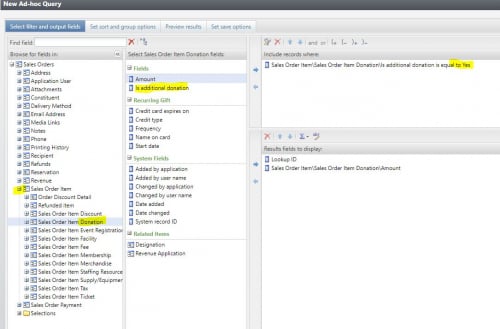
Be sure to save it as a selection and click the box that says "Show this Selection in the Query Designer."
Then, make a second Sales Order query and select 'exists' in the first query: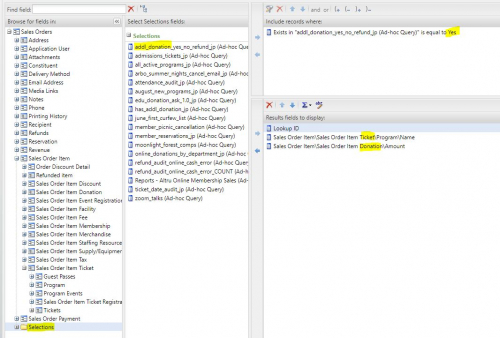
Then, your output will have program name and additional donation amount. There will be duplicate rows because of how Altru structures data. This is where setting up an Export definition in Altru might help, but that seems like a lot of work.
There may be some rows with only the sales order id and null values, and those will most likely be if people have been making additional donations with online membership purchases.
You could use a =SUMIFS() formula in Excel to get the value on the right row. Something like:Lookup ID 8-10676180 8-10676180
=SUMIF(A:A,A2,C:C)
Then, deduplicate and you get a file with sales order id (remove the 8- to search in Altru), the program name, and the amount of the additional donation:
Finally, you can use a pivot table to summarize your donations. In this case, total donation amount for the first program is $5 and the second program, $25.Lookup ID 8-10839934 8-10636774 8-10637716
Hope this helps and good luck.
Jesse0






Categories
- All Categories
- 6 Blackbaud Community Help
- 211 bbcon®
- 1.4K Blackbaud Altru®
- 402 Blackbaud Award Management™ and Blackbaud Stewardship Management™
- 1.1K Blackbaud CRM™ and Blackbaud Internet Solutions™
- 15 donorCentrics®
- 360 Blackbaud eTapestry®
- 2.6K Blackbaud Financial Edge NXT®
- 655 Blackbaud Grantmaking™
- 576 Blackbaud Education Management Solutions for Higher Education
- 3.2K Blackbaud Education Management Solutions for K-12 Schools
- 940 Blackbaud Luminate Online® and Blackbaud TeamRaiser®
- 84 JustGiving® from Blackbaud®
- 6.7K Blackbaud Raiser's Edge NXT®
- 3.7K SKY Developer
- 248 ResearchPoint™
- 120 Blackbaud Tuition Management™
- 165 Organizational Best Practices
- 240 Member Lounge (Just for Fun)
- 34 Blackbaud Community Challenges
- 37 PowerUp Challenges
- 3 (Open) PowerUp Challenge: Grid View Batch
- 3 (Closed) PowerUp Challenge: Chat for Blackbaud AI
- 3 (Closed) PowerUp Challenge: Data Health
- 3 (Closed) Raiser's Edge NXT PowerUp Challenge: Product Update Briefing
- 3 (Closed) Raiser's Edge NXT PowerUp Challenge: Standard Reports+
- 3 (Closed) Raiser's Edge NXT PowerUp Challenge: Email Marketing
- 3 (Closed) Raiser's Edge NXT PowerUp Challenge: Gift Management
- 4 (Closed) Raiser's Edge NXT PowerUp Challenge: Event Management
- 3 (Closed) Raiser's Edge NXT PowerUp Challenge: Home Page
- 4 (Closed) Raiser's Edge NXT PowerUp Challenge: Standard Reports
- 4 (Closed) Raiser's Edge NXT PowerUp Challenge: Query
- 796 Community News
- 3K Jobs Board
- 54 Blackbaud SKY® Reporting Announcements
- 47 Blackbaud CRM Higher Ed Product Advisory Group (HE PAG)
- 19 Blackbaud CRM Product Advisory Group (BBCRM PAG)