Power BI connector and On-Premises Data Gateway





I am working with the Power BI Custom Connector. I want to set up a scheduled refresh and the documentation I've found for doing that states that I have to set up an On-Premises Data Gateway in Personal Mode. Does anyone know if it really needs to be in Personal mode? It would be better for our process and for continuity if we can use it in enterprise mode which we already have available on campus. Any insights?
Thanks!
Comments
-
Kathy Ballew did anyone respond to you privately? I have the same question about being able to schedule a refresh if we are using the Custom Connector.
Ben Wong or Dan Bowman maybe you can provide some insight?0 -
Hi Dan,
Unfortunately no. I emailed Ben Wong directly and he did not know. He hoped someone in the community would respond. If it were easy to just "try it" I would, but I can't really do that without getting some of our IT folks involved to give me permissions for our enterprise data gateway and help set it up. I'd rather know if it's possible before I start down that path.0 -
Thanks for that update.0
-
We were able to successfully add the Power BI custom connector to our enterprise data gateway. Steps are very straight forward using the following instructions:
The only thing to lookout for is that the service running the data gateway has access to the folder you create for the custom connector. Also, the new data connection type did not show up under Manage Gateways in the Power BI Service until after we restarted the data gateway service.
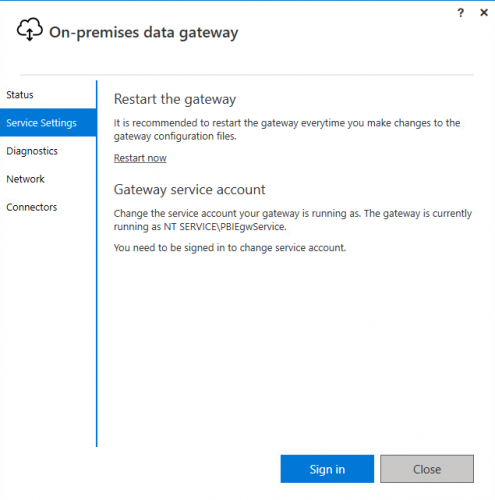
Refreshes have been successful. Hope this helps.
Jeff
2 -
I know this is an older post, but I am hoping someone might have some guidance for me:
I have set up the custom connector for Power BI for my organization following the steps here (https://docs.blackbaud.com/microsoft-connectors-docs/microsoft-power-platform/power-bi?_ga=2.37492963.2117777602.1631802218-765246487.1600365479) and it has been functioning perfectly, except that if I am not logged into my computer, my data will not refresh. I reached out to the IT department to see about setting up On-Premises Data Gateway (Enterprise mode) so that me/my computer is not needed for refreshes. I am attaching the document I think I sent my IT department in 2023 (yeah, the ticket has been open that long internally!).
Here is what my IT guy is saying to me: "I reviewed the document and still believe we need the assistance of Raiser's Edge support. I also wanted to ask them if this requires its own special domain service account. If so, this will most likely require an approved change request. Upon visiting their support portal, I'm prompted for a Black Baud login. Are you able to start a new ticket and request a Teams or Zoom call (we can also have a conference call)?"
Where do I go from here? I'm not even sure Blackbaud even offers support since it is not their product?0











Categories
- All Categories
- 6 Blackbaud Community Help
- 211 bbcon®
- 1.4K Blackbaud Altru®
- 403 Blackbaud Award Management™ and Blackbaud Stewardship Management™
- 1.2K Blackbaud CRM™ and Blackbaud Internet Solutions™
- 15 donorCentrics®
- 360 Blackbaud eTapestry®
- 2.6K Blackbaud Financial Edge NXT®
- 659 Blackbaud Grantmaking™
- 579 Blackbaud Education Management Solutions for Higher Education
- 3.2K Blackbaud Education Management Solutions for K-12 Schools
- 943 Blackbaud Luminate Online® and Blackbaud TeamRaiser®
- 84 JustGiving® from Blackbaud®
- 6.7K Blackbaud Raiser's Edge NXT®
- 3.8K SKY Developer
- 250 ResearchPoint™
- 120 Blackbaud Tuition Management™
- 165 Organizational Best Practices
- 241 Member Lounge (Just for Fun)
- 36 Blackbaud Community Challenges
- 37 PowerUp Challenges
- 3 (Open) PowerUp Challenge: Grid View Batch
- 3 (Closed) PowerUp Challenge: Chat for Blackbaud AI
- 3 (Closed) PowerUp Challenge: Data Health
- 3 (Closed) Raiser's Edge NXT PowerUp Challenge: Product Update Briefing
- 3 (Closed) Raiser's Edge NXT PowerUp Challenge: Standard Reports+
- 3 (Closed) Raiser's Edge NXT PowerUp Challenge: Email Marketing
- 3 (Closed) Raiser's Edge NXT PowerUp Challenge: Gift Management
- 4 (Closed) Raiser's Edge NXT PowerUp Challenge: Event Management
- 3 (Closed) Raiser's Edge NXT PowerUp Challenge: Home Page
- 4 (Closed) Raiser's Edge NXT PowerUp Challenge: Standard Reports
- 4 (Closed) Raiser's Edge NXT PowerUp Challenge: Query
- 798 Community News
- 3K Jobs Board
- 56 Blackbaud SKY® Reporting Announcements
- 47 Blackbaud CRM Higher Ed Product Advisory Group (HE PAG)
- 19 Blackbaud CRM Product Advisory Group (BBCRM PAG)