RE NXT Gift Management - Assigning Appeals




Hi everyone,
I have a question regarding the NXT gift batch processing. When I did all of our batches in the database view, every time I got to the end of a row in a gift batch, I'd be prompted to add the appeal/package to the constituent record (if they didn't already have that one on their record).
After processing several gift batches in NXT, I've realized I don't receive that same prompt and the appeals/packages that I put on the gifts don't get assigned to the appeal tab on the constituent's record. Is there a way to assign the appeals as I'm doing gift entry? In the meantime, I've been going back to database view to go through each web view batch and manually add the appeals, but I hope this isn't the only way to do it. Any thoughts/recommendations are appreciated!
Thank you!
I have a question regarding the NXT gift batch processing. When I did all of our batches in the database view, every time I got to the end of a row in a gift batch, I'd be prompted to add the appeal/package to the constituent record (if they didn't already have that one on their record).
After processing several gift batches in NXT, I've realized I don't receive that same prompt and the appeals/packages that I put on the gifts don't get assigned to the appeal tab on the constituent's record. Is there a way to assign the appeals as I'm doing gift entry? In the meantime, I've been going back to database view to go through each web view batch and manually add the appeals, but I hope this isn't the only way to do it. Any thoughts/recommendations are appreciated!
Thank you!
0
Comments
-
Hi James,
I honestly don't use the NXT batch feature at this time. It is just too limiting. I continue to use the DB batch until the NXT batch feature is more robust. Sorry I didn't have any more advice.1 -
We still batch in DB also.0
-
I'm not positive if this will work because I've never added appeals only when gifts are added. But there is a setting in database view for how to handle appeals.
Go to Configuration | Business Rules. Under Constituent options | General Options, in the middle of the screen on the right, you'll see "If the constituent gives to an appeal not listed on their Appeals tab..." and then a drop-down below it. You could change this to "Add the appeal to the constituent". There are a few other settings there as well that you can select from.
What I don't know is whether or not this is respected in webview. Hopefully it is and will take care of the issue. But if not, add this as an idea and rally supporters!
Karen
1 -
Hi James,
You are able to add appeals and packages to gifts in the NXT view. Click on the 3 dots from Gift Management and select Edit batch gifts, see pic below.
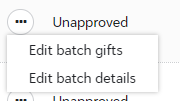
From here you select the donor you want to adjust and select the proper appeal, package, campaign and fun.
There are many other fields that you can change from this page. You can also find a good training in training central , named " Blackbaud Raiser's Edge NXT: Gift Batch and Automated Recurring Gifts".
Hope this helps!
Kristine1 -
Hi Kristine,
Thanks for the reply. I was aware of being able to edit batch gifts and add an appeal to the gift. However, when I add that appeal to the gift and approve the batch, it doesn't add it to the constituent's appeal tab on their record. That's the part I was trying to figure out.
Thank you!
James0











Categories
- All Categories
- 6 Blackbaud Community Help
- 211 bbcon®
- 1.4K Blackbaud Altru®
- 402 Blackbaud Award Management™ and Blackbaud Stewardship Management™
- 1.1K Blackbaud CRM™ and Blackbaud Internet Solutions™
- 15 donorCentrics®
- 360 Blackbaud eTapestry®
- 2.6K Blackbaud Financial Edge NXT®
- 656 Blackbaud Grantmaking™
- 577 Blackbaud Education Management Solutions for Higher Education
- 3.2K Blackbaud Education Management Solutions for K-12 Schools
- 941 Blackbaud Luminate Online® and Blackbaud TeamRaiser®
- 84 JustGiving® from Blackbaud®
- 6.7K Blackbaud Raiser's Edge NXT®
- 3.7K SKY Developer
- 248 ResearchPoint™
- 120 Blackbaud Tuition Management™
- 165 Organizational Best Practices
- 240 Member Lounge (Just for Fun)
- 34 Blackbaud Community Challenges
- 37 PowerUp Challenges
- 3 (Open) PowerUp Challenge: Grid View Batch
- 3 (Closed) PowerUp Challenge: Chat for Blackbaud AI
- 3 (Closed) PowerUp Challenge: Data Health
- 3 (Closed) Raiser's Edge NXT PowerUp Challenge: Product Update Briefing
- 3 (Closed) Raiser's Edge NXT PowerUp Challenge: Standard Reports+
- 3 (Closed) Raiser's Edge NXT PowerUp Challenge: Email Marketing
- 3 (Closed) Raiser's Edge NXT PowerUp Challenge: Gift Management
- 4 (Closed) Raiser's Edge NXT PowerUp Challenge: Event Management
- 3 (Closed) Raiser's Edge NXT PowerUp Challenge: Home Page
- 4 (Closed) Raiser's Edge NXT PowerUp Challenge: Standard Reports
- 4 (Closed) Raiser's Edge NXT PowerUp Challenge: Query
- 796 Community News
- 3K Jobs Board
- 54 Blackbaud SKY® Reporting Announcements
- 47 Blackbaud CRM Higher Ed Product Advisory Group (HE PAG)
- 19 Blackbaud CRM Product Advisory Group (BBCRM PAG)