Which Workflows do you use at your Org?


Comments
-
Here are the workflows we use at a small private college:
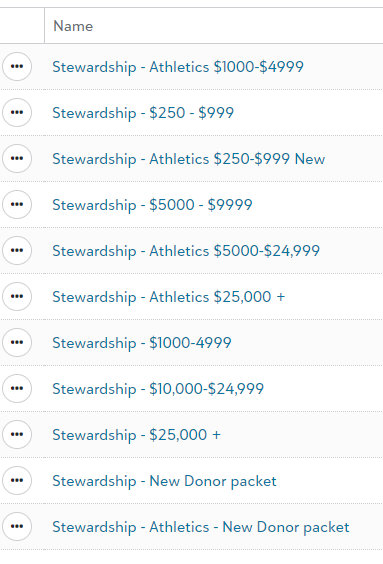 0
0 -
Most of ours are currently still structured in their original Action Tracks in database view, but same thing.
We have- a 12-month Welcome track for new donors. Actually, we have 12 of these, as we have customized the action track based on what time of the year they begin and what kind of new constituent they are.
- a monthly donor track for new recurring donors, as well as a renewal track for lapsing donors with bad credit cards
- a few different Planned Giving cultivation tracks, if a donor demonstrates interest in one of our planned giving informational pieces
- and we are working on implementing a major gift track - but this one is harder as it would need to be highly customized for each donor.
0 -
We just have 1 for Birthdays. We use the Tags function for our list, so we catch them within 2 weeks of their birthday just to let folks know we care.1
-
We have one to send a birthday email on a constituent's birthday. Trying to figure out how to build an email workflow for Anniversary Gifts and a Welcome Series. If anyone has an idea for how to accomplish either of the last two, send me a message.1
-
Hi,
Just to note you can go way beyond the current workflow features using the SKY API. You can use this via Microsoft's power automate or software like our SmartSYNC to create your own very customised workflows. Things like if this then that are totally possible. You can push data to other systems, send dynamic content emails, react to combinations of info like memberships, total given, constituent codes etc. Total freedom.
BB's built in RENXT workflows will allow for a lot but there are options if you need more.
Just as a complex example - We set up an automatic yearly giving statement/tax summary email for one client where it trawled through their donors on the 5 April and sent a tax summary based on the gifts that year in an HTML based email. Saved them tons of work and they can reuse it every year. It filtered gift types, manipulated the output data, performs mappings etc. All automated from an RENXT Constituent list of recipients.
Cheers
Warren5 -
Just last week, we started our new graduate welcome email series. This is a series of 4 emails that will go out over 2 months. Each email has a small call to action that will hopefully get new graduates to engage with us. We end the series with a small ask. Nervous and excited to see how this workflow will perform.
Love to see the ideas from you all on how you are using Workflow. I can see there is a lot of potential.
2 -
Hi Lynette.
Can you elaborate on your New Donor Packet workflow? I'm very curious what's included. Also, any information on what you include in your other workflows would be very helpful as well. Thank you for sharing!
Kim2 -
We actually had to kill the workflow. There were concerns over recognizing a constituent but not their spouse who doesn't have their own record.We couldn't find how to include the spouses.1
-
Hi Faith,
How are you building the list for these? I'm trying to start out simple but just recognizing when a new constituent has been added to RENXT. I've built a series of three emails separated by a week. My criteria is just constituents that have been added to the database that day yet it's not automating on it's own. It works if I resave the list after applying the same 'today' filter.1 -
I'd love to know more about your birthday workflow. We're looking at doing one for significant birthdays: 21, 30, 40, 50 etc.0
-
Aria Johnston - My org's birthday workflow draws constituents into a list if their birthday equals 'today', they then get an email and an action is added to their record; check out a thread I created for more tips on email workflows.
As others have mentioned, there are limitations to what you can do with the NXT workflow and they usually start with the capabilities of lists. Due to the complexity of what you are looking to do, you can get around the limitations by creating a static query that you then manually refresh in web view or you can utilize the Microsoft Integration with Power Automate. If you are interested in the latter, there is a great course called 'MSFT Accelerator Course' that I highly recommend, it teaches orgs about the integration and how to utilitze Power Automate/Apps with NXT. If you are interested in learning more, send me a message with your email and I can pass your information onto the course leader.Edit: Updating my post to add that the 101 MSFT Accelerator Course, mentioned above, is now available on-demand with videos and documentation. I would recommend you take a look at the Getting started and Training sections, and sign-up for monthly office hours.
4 -
Hi Aria
We are starting to figure out how to utilize the technology in a reliable way, but workaround the limitations, so we are actually using this more now.
1) We start with a workflow using Birthday tags so the action record is built a couple weeks ahead of time.
2) when the action record is made a review is done. The Subject line is modified after review so we can tell the difference between records needing timely action, or those being reviewed.
3) In the review process, we check for email addresses, (we have some constituents where we have birthday info but no email) We set the date of the modified record allowing for a paper mailing to get tho them close to their birthday.
4) We check spouse records, if a spouse exists and has no birthday, we may attempt to get the spouses birthday and build a separate record for the spouse under the constituent's name, but indicating a spouse record for initial review a couple weeks prior to their birthday. Spouse records never get erased, but get their date moved as appropriate and subject line modified. If we can't get a spouse birthday (which if they don't wish to share--we note) we delete the constituent's birthday action record.
5) If there is an email, we set it for the business day closest to (but prior in the case of weekends) to the Birthday.
6) On the next action date for the record, we go to Marketing emails and use a birthday template and modify it to wish the constituent a happy birthday. We put their email address in the test field and send it to them that way. Note that you can't use the merge fields as they will not extract the constituent data in a test, so write the constituents name in manually.
7) in cases where it is a full constituent record (and generated by a workflow) the action record can be completed and a new one gets made the net year.
It's a little manual, but it seems to cover our intents in caring for our constituents.1 -
I'd love to see some workflows implemented for our org. Trying to figure out workflows for new donors, new subscribers, anniversaries for recurring donations...1
-
Michelle,
I would love to chat about your birthday workflows. We would like to send a monthly email, recognizing those celebrating that month. I'm not sure how to get started. - Tami Z.
1 -
@Rose Meyer
First Time Donor Workflow
Thankyou email separate from the initial gift email/receipt.
Each new donor receives this only once.
List refreshes each time.
Gift Date = ‘last month’
AND Gift Fund one of A or B or C
AND Gift is First Gift
AND Solicit Code does-not-equal Do Not Contact or Do Not Email
Recurring Gift Donor Workflow
21 emails set up
Each new recurring-gift donor starts the journey with email #1, which ends with an Action added. Then email #2 is sent 7 days after the completed Action date.
We do need to run a Global Change to mark the Action as Complete.
Because Lists in NXT in Australia cant choose an Active recurring-gift and instead returns all recurring-gifts (including terminated ones) we have a Static Query in RE7 database-view based on Active recurring-gifts with a completed Action of a certain type. We then have a Queue to refresh the Static Query, which is then linked to a List which is refreshed from the Workflow.
New recurring-gift donors receive:
- email #1 #2 #3 #4 every 7 days for the first month
- email #5 #6 every 14 days for the second month
- email #7 through to #20 every 28 days.
Birthday Workflow
Being planned.
Failed recurring-gifts Workflow
Being planned.
Will be sent to anyone whose recurring-gift failed last week.2 -
@Nyree Henderson Would you be able to assist me with creating workflows for recurring donors. Please and TY.
0



















Categories
- All Categories
- 6 Blackbaud Community Help
- 211 bbcon®
- 1.4K Blackbaud Altru®
- 403 Blackbaud Award Management™ and Blackbaud Stewardship Management™
- 1.2K Blackbaud CRM™ and Blackbaud Internet Solutions™
- 15 donorCentrics®
- 360 Blackbaud eTapestry®
- 2.6K Blackbaud Financial Edge NXT®
- 658 Blackbaud Grantmaking™
- 579 Blackbaud Education Management Solutions for Higher Education
- 3.2K Blackbaud Education Management Solutions for K-12 Schools
- 943 Blackbaud Luminate Online® and Blackbaud TeamRaiser®
- 84 JustGiving® from Blackbaud®
- 6.7K Blackbaud Raiser's Edge NXT®
- 3.8K SKY Developer
- 250 ResearchPoint™
- 120 Blackbaud Tuition Management™
- 165 Organizational Best Practices
- 241 Member Lounge (Just for Fun)
- 34 Blackbaud Community Challenges
- 37 PowerUp Challenges
- 3 (Open) PowerUp Challenge: Grid View Batch
- 3 (Closed) PowerUp Challenge: Chat for Blackbaud AI
- 3 (Closed) PowerUp Challenge: Data Health
- 3 (Closed) Raiser's Edge NXT PowerUp Challenge: Product Update Briefing
- 3 (Closed) Raiser's Edge NXT PowerUp Challenge: Standard Reports+
- 3 (Closed) Raiser's Edge NXT PowerUp Challenge: Email Marketing
- 3 (Closed) Raiser's Edge NXT PowerUp Challenge: Gift Management
- 4 (Closed) Raiser's Edge NXT PowerUp Challenge: Event Management
- 3 (Closed) Raiser's Edge NXT PowerUp Challenge: Home Page
- 4 (Closed) Raiser's Edge NXT PowerUp Challenge: Standard Reports
- 4 (Closed) Raiser's Edge NXT PowerUp Challenge: Query
- 798 Community News
- 3K Jobs Board
- 56 Blackbaud SKY® Reporting Announcements
- 47 Blackbaud CRM Higher Ed Product Advisory Group (HE PAG)
- 19 Blackbaud CRM Product Advisory Group (BBCRM PAG)