ConnectRE Using Legacy ON API





We received the following notification regarding changes to the authentication settings for the Legacy ON API: https://community.blackbaud.com/blogs/17/7459
In following the instructions in the first bullet, I saw that I have two products that have an ON API connection to our datase. One vendor is in the process of changing to the SKY API soon. The other was ConnectRE which is Blackbaud's own product that keeps our RE database synchronized with our Core database.
Is there an option to change ConnectRE over from the Legacy ON API to SKY API as they are wanting? If not, I'm assuming that I should follow the instructions to create a new authentication token for the ConnectRE user to extend its life with ON API, correct? After I generate that token, is there anything that I need to do in the ConnectRE setup itself to add the new "key"?
I contacted support with these questions, but they said for any API related questions that I needed to post here in the Community instead for answers.
Thanks for any help you can provide.
In following the instructions in the first bullet, I saw that I have two products that have an ON API connection to our datase. One vendor is in the process of changing to the SKY API soon. The other was ConnectRE which is Blackbaud's own product that keeps our RE database synchronized with our Core database.
Is there an option to change ConnectRE over from the Legacy ON API to SKY API as they are wanting? If not, I'm assuming that I should follow the instructions to create a new authentication token for the ConnectRE user to extend its life with ON API, correct? After I generate that token, is there anything that I need to do in the ConnectRE setup itself to add the new "key"?
I contacted support with these questions, but they said for any API related questions that I needed to post here in the Community instead for answers.
Thanks for any help you can provide.
1
Comments
-
Hi Geoffrey Goodfellow - once you generate the secret and the key you need to add that to your Connect RE settings as the "username" and "password".
In Edit Setup (settings: gear icon) for the Connect RE plugin, replace the values for username and password with the values for key and secret.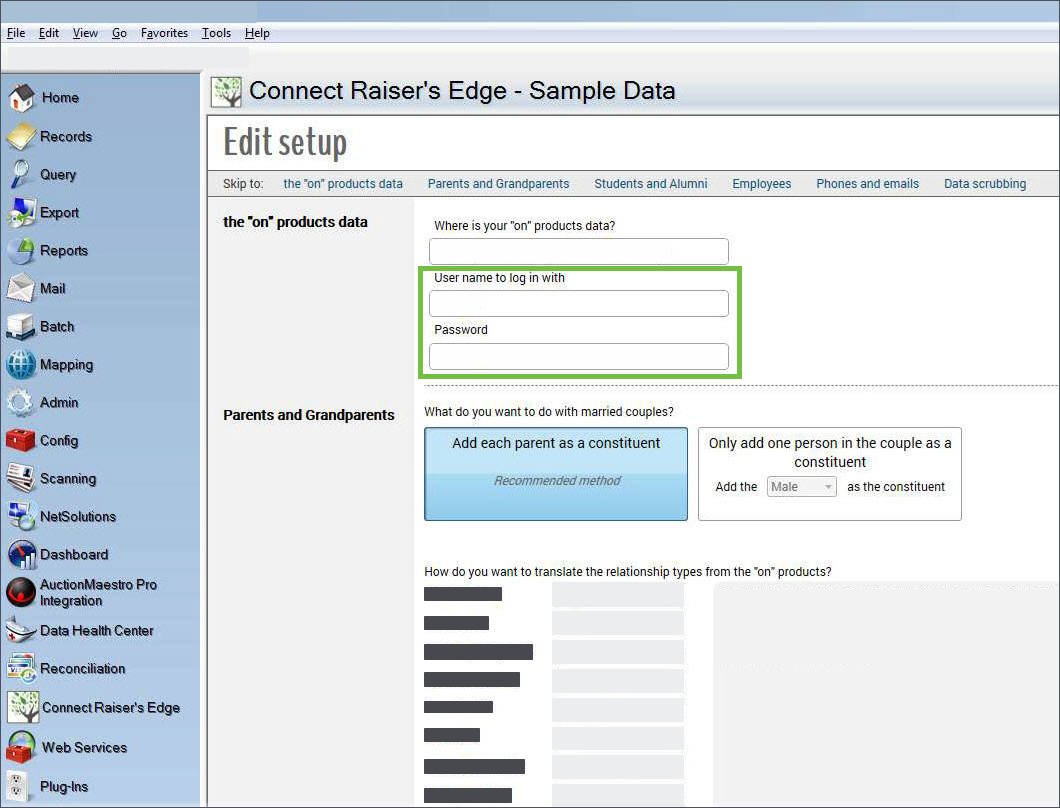 3
3 -
Thanks for providing that explanation! I did that, but it doesn't seem to connect. I just get an "oops, cannot connect to the 'on' Products" error message.0
-
Today, I went in without changing the key or secret, and Connect RE synced without any problems, so I think all is well! Thanks again for your help.2

Categories
- All Categories
- 6 Blackbaud Community Help
- 211 bbcon®
- 1.4K Blackbaud Altru®
- 402 Blackbaud Award Management™ and Blackbaud Stewardship Management™
- 1.1K Blackbaud CRM™ and Blackbaud Internet Solutions™
- 15 donorCentrics®
- 360 Blackbaud eTapestry®
- 2.6K Blackbaud Financial Edge NXT®
- 655 Blackbaud Grantmaking™
- 576 Blackbaud Education Management Solutions for Higher Education
- 3.2K Blackbaud Education Management Solutions for K-12 Schools
- 940 Blackbaud Luminate Online® and Blackbaud TeamRaiser®
- 84 JustGiving® from Blackbaud®
- 6.7K Blackbaud Raiser's Edge NXT®
- 3.7K SKY Developer
- 248 ResearchPoint™
- 120 Blackbaud Tuition Management™
- 165 Organizational Best Practices
- 240 Member Lounge (Just for Fun)
- 34 Blackbaud Community Challenges
- 37 PowerUp Challenges
- 3 (Open) PowerUp Challenge: Grid View Batch
- 3 (Closed) PowerUp Challenge: Chat for Blackbaud AI
- 3 (Closed) PowerUp Challenge: Data Health
- 3 (Closed) Raiser's Edge NXT PowerUp Challenge: Product Update Briefing
- 3 (Closed) Raiser's Edge NXT PowerUp Challenge: Standard Reports+
- 3 (Closed) Raiser's Edge NXT PowerUp Challenge: Email Marketing
- 3 (Closed) Raiser's Edge NXT PowerUp Challenge: Gift Management
- 4 (Closed) Raiser's Edge NXT PowerUp Challenge: Event Management
- 3 (Closed) Raiser's Edge NXT PowerUp Challenge: Home Page
- 4 (Closed) Raiser's Edge NXT PowerUp Challenge: Standard Reports
- 4 (Closed) Raiser's Edge NXT PowerUp Challenge: Query
- 796 Community News
- 3K Jobs Board
- 54 Blackbaud SKY® Reporting Announcements
- 47 Blackbaud CRM Higher Ed Product Advisory Group (HE PAG)
- 19 Blackbaud CRM Product Advisory Group (BBCRM PAG)