Letter file not in a merge file, but works for mail merge from gift record


Has anyone had the experience of a letter file not being listed in a mail merge file, but the letter is still able to be created using the "Acknowledge" button on the gift record.
I ask because I am trying to access a letter code to edit the document, but I cannot locate the letter code in any of our Mail Merge files.
Has anyone successfully located a mail merge letter code that is not listed on a merge letter file, but still works for creating a mail merge document?
I ask because I am trying to access a letter code to edit the document, but I cannot locate the letter code in any of our Mail Merge files.
Has anyone successfully located a mail merge letter code that is not listed on a merge letter file, but still works for creating a mail merge document?
Tagged:
0
Comments
-
Hi Dan,
The letters set up in Donor Acknowledgement Letters are completely different from the letters accessible directly on a gift record. You are definitely not the first person to be confused by this.
All letters are identified in Config | Letters, and you can specify letters for various record types - gift, constituent, action, etc. You can just enter a letter name at the New Letter screen and click "Save and Close".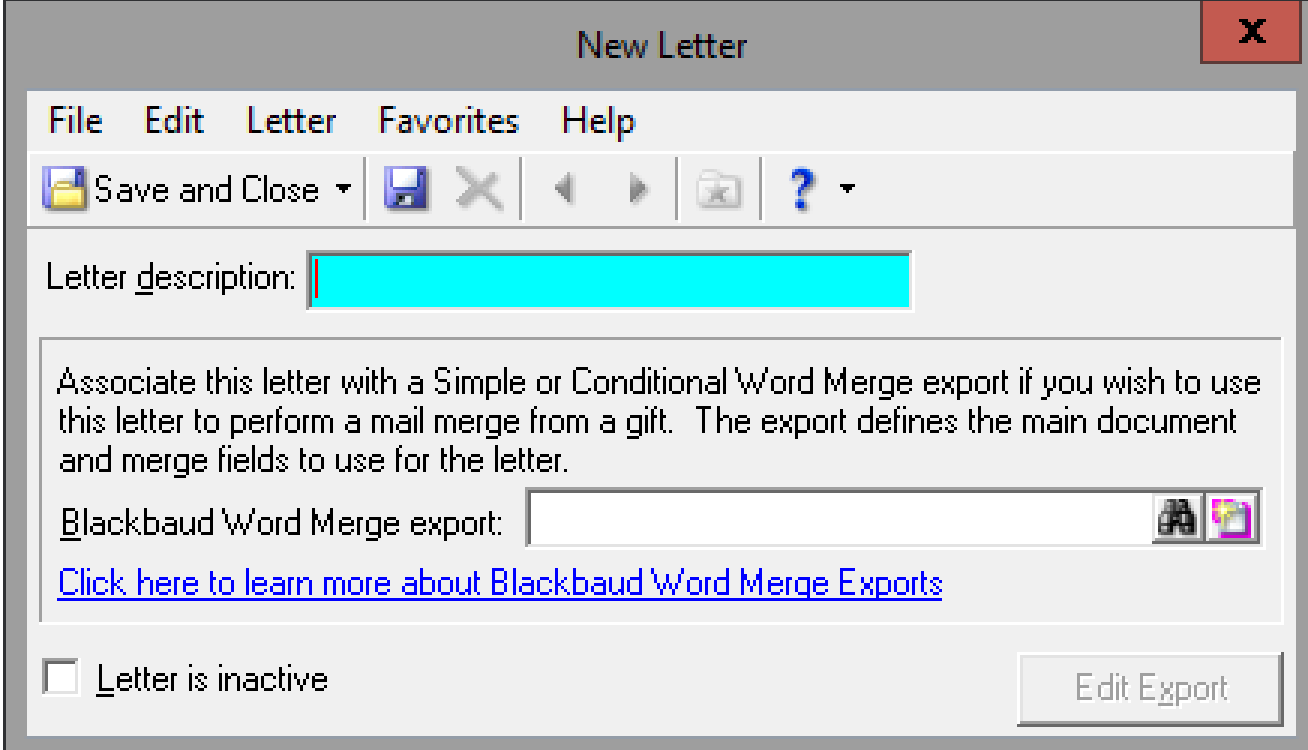
That letter type will then be available for you to select in Donor Acknowledgement Letters. Note that you will build the letter - all of the content and merge fields - within Donor Acknowledgement Letters.
You can also set up the letter to use a Word Merge Export. This will allow you to generate the letter directly from the gift record (or constituent record, action record etc.).
You cannot - to my knowledge - create one letter description and have them serve both purposes though. I haven't actually tested that that I can recall, but I am nearly certain that there is no correlation between the two letters.
Hope that helps!
Karen3 -
Karen Diener Do you happen to know where the letter templates are stored? I need to send them all to someone for updating of language? Anyone else know?0
-
They are only stored within RE. If you are using Donor Acknowledgement Letters, you have to progress through the process until you get to the point where you can edit the letters. Unfortunately you cannot just look them up anywhere in the system. That means you need to have a gift needing to be acknowledged that meets all of your criteria, but I usually just set up a test gift on my record and delete it as soon as I am done.
It is a little bit more straightforward if you use the Word Merge within Export. Then you just open the Export and go to "Edit Merge document" in the action bar: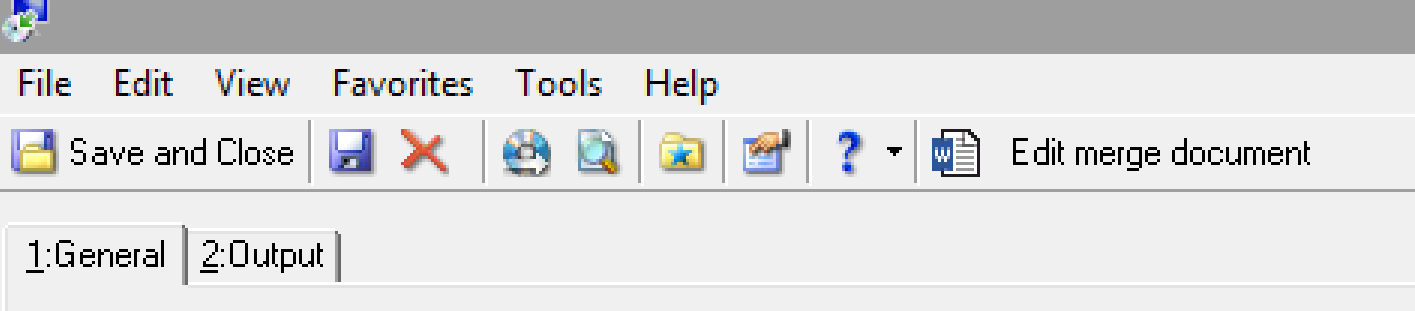
I wonder occasionally if we should pitch this for a BBCON or other webinar session. I feel like a lot of people still struggle with this!
Karen1 -
Since day one I have not found the letter experience user-friendly and developed my own work-around that worked for years. Now, I'm at different org and having to get back in the back end for editing.
The letters stored in RE can be found via Configuration > Letters.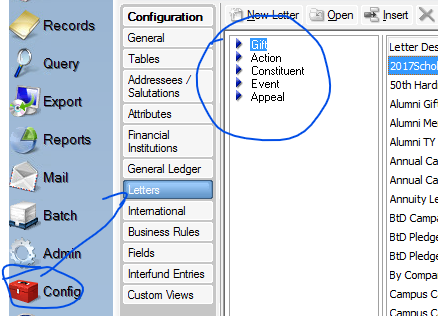
They can be edited from here. With some things I need to do now, will have to go this route.
My work-around for years when I needed new letters was just to do a Save As on existing letter and rename it for current use. 1
1












Categories
- All Categories
- 6 Blackbaud Community Help
- 211 bbcon®
- 1.4K Blackbaud Altru®
- 402 Blackbaud Award Management™ and Blackbaud Stewardship Management™
- 1.1K Blackbaud CRM™ and Blackbaud Internet Solutions™
- 15 donorCentrics®
- 360 Blackbaud eTapestry®
- 2.6K Blackbaud Financial Edge NXT®
- 655 Blackbaud Grantmaking™
- 576 Blackbaud Education Management Solutions for Higher Education
- 3.2K Blackbaud Education Management Solutions for K-12 Schools
- 941 Blackbaud Luminate Online® and Blackbaud TeamRaiser®
- 84 JustGiving® from Blackbaud®
- 6.7K Blackbaud Raiser's Edge NXT®
- 3.7K SKY Developer
- 248 ResearchPoint™
- 120 Blackbaud Tuition Management™
- 165 Organizational Best Practices
- 240 Member Lounge (Just for Fun)
- 34 Blackbaud Community Challenges
- 37 PowerUp Challenges
- 3 (Open) PowerUp Challenge: Grid View Batch
- 3 (Closed) PowerUp Challenge: Chat for Blackbaud AI
- 3 (Closed) PowerUp Challenge: Data Health
- 3 (Closed) Raiser's Edge NXT PowerUp Challenge: Product Update Briefing
- 3 (Closed) Raiser's Edge NXT PowerUp Challenge: Standard Reports+
- 3 (Closed) Raiser's Edge NXT PowerUp Challenge: Email Marketing
- 3 (Closed) Raiser's Edge NXT PowerUp Challenge: Gift Management
- 4 (Closed) Raiser's Edge NXT PowerUp Challenge: Event Management
- 3 (Closed) Raiser's Edge NXT PowerUp Challenge: Home Page
- 4 (Closed) Raiser's Edge NXT PowerUp Challenge: Standard Reports
- 4 (Closed) Raiser's Edge NXT PowerUp Challenge: Query
- 796 Community News
- 3K Jobs Board
- 54 Blackbaud SKY® Reporting Announcements
- 47 Blackbaud CRM Higher Ed Product Advisory Group (HE PAG)
- 19 Blackbaud CRM Product Advisory Group (BBCRM PAG)