Gift Detail & Summary Report (using a query and soft credit option)





I am trying to create a new report and I am struggling. I created a query - donors with a constituent code of Board Member. In Gift Detail and Summary Report I created the following columns:
Column 1 Donor Name
Column 2 Fund
Column 3 Cash/CK/CC/Stocks
Column 4 In-Kind
Column 5 Pledges
Column 6 Pledge Balance
The area I’m struggling with is Soft Credit. If the Board Member is being acknowledge with a soft credit, it should appear in columns 3 to 6(Depending on how the gift was originally donated). For example: If ABC Company donated $500 via check to our Annual Campaign Fund on behalf of John Smith our Board Member, How do I report for this? I am hoping it's an easy answer that I can just create one report and not have to manipulate in excel. "Fingers crossed" Thanks everyone Lisa
Column 1 Donor Name
Column 2 Fund
Column 3 Cash/CK/CC/Stocks
Column 4 In-Kind
Column 5 Pledges
Column 6 Pledge Balance
The area I’m struggling with is Soft Credit. If the Board Member is being acknowledge with a soft credit, it should appear in columns 3 to 6(Depending on how the gift was originally donated). For example: If ABC Company donated $500 via check to our Annual Campaign Fund on behalf of John Smith our Board Member, How do I report for this? I am hoping it's an easy answer that I can just create one report and not have to manipulate in excel. "Fingers crossed" Thanks everyone Lisa
0
Comments
-
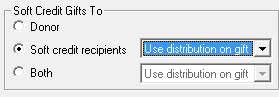
Lisa Hussain On the General tab for the report, what are your "Soft Credit Gifts To" setttings? To have SC appear you need to select an option other than "Donor".
Note, it will do this for all gifts. You can't pick and choose just orgs/individuals.1 -
I had it on both, I just changed it to Soft Credit Recipients. I'm going to try and run this and see how this works.
 0
0 -
? I'm a bit confused now. My defaults have name/fund as columns. I don't have to create them as column 1 & 2.
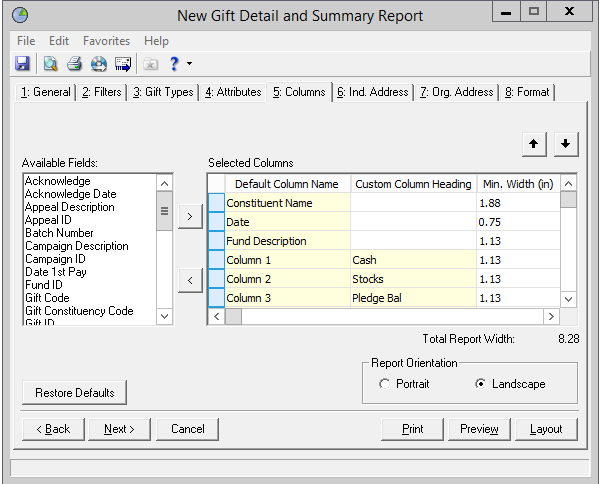
If you select SC both, you will get inflated $ amounts as HC and SC will be counted.
Are your SC $ pulling at all?0 -
JoAnn Strommen:
Lisa Hussain On the General tab for the report, what are your "Soft Credit Gifts To" setttings? To have SC appear you need to select an option other than "Donor".
Note, it will do this for all gifts. You can't pick and choose just orgs/individuals.I think you may also have to make this same selection in your query for it to work in the report.
0 -
What are you hoping to accomplish? Is it to have a report that ONLY shows gifts where board members are soft credited? If so, it seems like changing the settings to Soft Credit Recipients would have accomplished that, but I'd be curious if that did the trick.
Karen0 -
We were hoping to see all Board Members personal giving and any soft credit that is associated with them. The final result would be their "total" history per FY0
-
Yes, my default this this way as well. For purpose of writing I included them as a column0
-
OK. Your input query should be board members only, and then you'll need to select "both" for soft credits. That should take care of it.
Karen1 -
In order to make sure you don't exclude any Trustees you need to have SC to both for the query and the report, just make sure you select constituency type of Trustee for both the query and the report. This will ensure no org record they give through is pulled into the report, as well as any spouses that might be soft credited--unless the spouse is also a Trustee, then the $$ would be double counted. Since the chance of that is rare you should be fine doing it this way.0













Categories
- All Categories
- 6 Blackbaud Community Help
- 211 bbcon®
- 1.4K Blackbaud Altru®
- 402 Blackbaud Award Management™ and Blackbaud Stewardship Management™
- 1.1K Blackbaud CRM™ and Blackbaud Internet Solutions™
- 15 donorCentrics®
- 360 Blackbaud eTapestry®
- 2.6K Blackbaud Financial Edge NXT®
- 656 Blackbaud Grantmaking™
- 577 Blackbaud Education Management Solutions for Higher Education
- 3.2K Blackbaud Education Management Solutions for K-12 Schools
- 941 Blackbaud Luminate Online® and Blackbaud TeamRaiser®
- 84 JustGiving® from Blackbaud®
- 6.7K Blackbaud Raiser's Edge NXT®
- 3.7K SKY Developer
- 248 ResearchPoint™
- 120 Blackbaud Tuition Management™
- 165 Organizational Best Practices
- 240 Member Lounge (Just for Fun)
- 34 Blackbaud Community Challenges
- 37 PowerUp Challenges
- 3 (Open) PowerUp Challenge: Grid View Batch
- 3 (Closed) PowerUp Challenge: Chat for Blackbaud AI
- 3 (Closed) PowerUp Challenge: Data Health
- 3 (Closed) Raiser's Edge NXT PowerUp Challenge: Product Update Briefing
- 3 (Closed) Raiser's Edge NXT PowerUp Challenge: Standard Reports+
- 3 (Closed) Raiser's Edge NXT PowerUp Challenge: Email Marketing
- 3 (Closed) Raiser's Edge NXT PowerUp Challenge: Gift Management
- 4 (Closed) Raiser's Edge NXT PowerUp Challenge: Event Management
- 3 (Closed) Raiser's Edge NXT PowerUp Challenge: Home Page
- 4 (Closed) Raiser's Edge NXT PowerUp Challenge: Standard Reports
- 4 (Closed) Raiser's Edge NXT PowerUp Challenge: Query
- 796 Community News
- 3K Jobs Board
- 54 Blackbaud SKY® Reporting Announcements
- 47 Blackbaud CRM Higher Ed Product Advisory Group (HE PAG)
- 19 Blackbaud CRM Product Advisory Group (BBCRM PAG)