NXT: Remove a Solution Administrator



Hello Thinktank!
How do I remove a Solution Administrator from RENXT since he is no longer an employee. (He no longer appears in RE7) Thank you in advance for your input.
How do I remove a Solution Administrator from RENXT since he is no longer an employee. (He no longer appears in RE7) Thank you in advance for your input.
0
Comments
-
Denise Smith, the best practice for de-activating a user in RE or NXT is not to delete his account, but to remove all privileges from it, and possibly change his password or lock him out in database view. If you completely delete his account, then you lose all pending Actions and all transactional records of his activity in terms of who last changed records, etc., that may have been linked to his user account. This corrupts your audit trail and historical data integrity.
To de-activate a user in RE, simply remove his account from all active security groups. To de-activate a user in webview, go to your site Admin section (not in RE NXT, but your overall Account Admin area, where you manage billing invoices and Case Central issues). Go to the "Users and Admins" tab, and select "Make Inactive" for the user in question.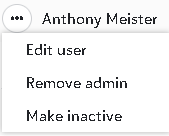
Hope this helps.1 -
Thank you Faith!! I appreciate you and your valuable input.0





Categories
- All Categories
- 6 Blackbaud Community Help
- 213 bbcon®
- 1.4K Blackbaud Altru®
- 403 Blackbaud Award Management™ and Blackbaud Stewardship Management™
- 1.1K Blackbaud CRM™ and Blackbaud Internet Solutions™
- 15 donorCentrics®
- 360 Blackbaud eTapestry®
- 2.6K Blackbaud Financial Edge NXT®
- 656 Blackbaud Grantmaking™
- 577 Blackbaud Education Management Solutions for Higher Education
- 3.2K Blackbaud Education Management Solutions for K-12 Schools
- 939 Blackbaud Luminate Online® and Blackbaud TeamRaiser®
- 84 JustGiving® from Blackbaud®
- 6.6K Blackbaud Raiser's Edge NXT®
- 3.7K SKY Developer
- 249 ResearchPoint™
- 119 Blackbaud Tuition Management™
- 165 Organizational Best Practices
- 241 Member Lounge (Just for Fun)
- 34 Blackbaud Community Challenges
- 37 PowerUp Challenges
- 3 (Open) PowerUp Challenge: Grid View Batch
- 3 (Closed) PowerUp Challenge: Chat for Blackbaud AI
- 3 (Closed) PowerUp Challenge: Data Health
- 3 (Closed) Raiser's Edge NXT PowerUp Challenge: Product Update Briefing
- 3 (Closed) Raiser's Edge NXT PowerUp Challenge: Standard Reports+
- 3 (Closed) Raiser's Edge NXT PowerUp Challenge: Email Marketing
- 3 (Closed) Raiser's Edge NXT PowerUp Challenge: Gift Management
- 4 (Closed) Raiser's Edge NXT PowerUp Challenge: Event Management
- 3 (Closed) Raiser's Edge NXT PowerUp Challenge: Home Page
- 4 (Closed) Raiser's Edge NXT PowerUp Challenge: Standard Reports
- 4 (Closed) Raiser's Edge NXT PowerUp Challenge: Query
- 794 Community News
- 3K Jobs Board
- 54 Blackbaud SKY® Reporting Announcements
- 47 Blackbaud CRM Higher Ed Product Advisory Group (HE PAG)
- 19 Blackbaud CRM Product Advisory Group (BBCRM PAG)