SP 26 Delete Multiple Queries




Has anyone had success in deleting multiple queries from the information library? I expected a delete button to appear next to the move button. 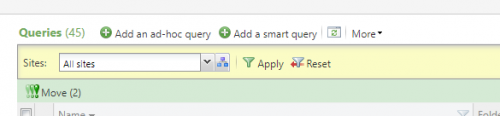
0
Comments
-
When a query is deleted, there are various integrity checks that the delete process does first for if the query is used anywhere. I think these checks might make the multiple delete option difficult to use, if not impossible.2
-
Agree 100%
We are pushing really hard on people to re-use queries for the last couple of years... basically our annual giving queries from FY13-FY17 have been flagged for re-using... anybody that wants to create a new query is supposed to find an old query and just edit it, rename it, change the definition, etc.
Basically, it's a nice idea, but because of the way the system works, it's very hard to delete queries.0 -
Where is this functionality? We don't have it either. I am planning on submitting a support case today.0
-
Jessie Rader and Allen Roth here is a screenshot - looks like Jessie does not have permissions on the Delete task in her screenshot.
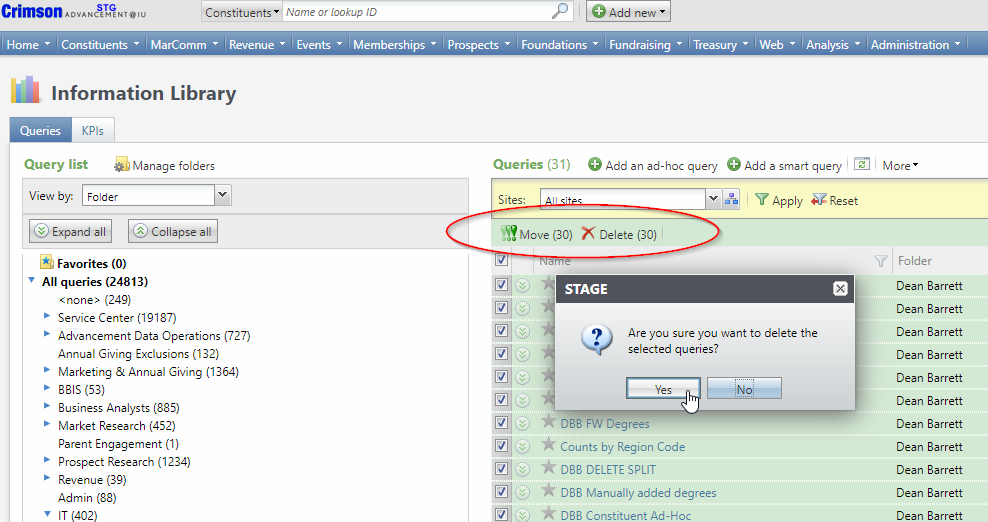
Let's play Query High Score! Who can beat 24,813 ?? 1
1 -
I am logged in as an admin and do not see that. I might have missed it but I also don't see the record operation for delete (turn on design mode, right click delete and view properties). It looks more like a sql process than a built in record operation (hope I phrased that correctly). Usually, I can find the exact record operation I want for when I create custom tabs but cannot in this instance. For example, I set up a custom tab for notes with a multi-select delete option on it. However, notes don't have dependencies like queries do.
What SP are you on and could this have been customized in your system?0 -
I am a system admin so I didn't think it could be a permissions issue but now I'm not sure. One of my staff just told me that she was able to do it when we first started testing service pack 26 and now it isn't there.0
-
We encountered this. We had installed SP26 HotFix 3 directly to a non production environment and we didnt see the Delete button. In our Production environment we saw the Delete button.
After testing, we found this problem only happens when an environment is on either SP26 HF1 or SP26 HF2, then upgrades to SP26 HF3. If we directly installed hotfix 3 without installing hotfix 1 or 2 we did not see the issue
Blackbaud provided a script for us which fixed the issue0










Categories
- All Categories
- 6 Blackbaud Community Help
- 211 bbcon®
- 1.4K Blackbaud Altru®
- 402 Blackbaud Award Management™ and Blackbaud Stewardship Management™
- 1.1K Blackbaud CRM™ and Blackbaud Internet Solutions™
- 15 donorCentrics®
- 360 Blackbaud eTapestry®
- 2.6K Blackbaud Financial Edge NXT®
- 655 Blackbaud Grantmaking™
- 576 Blackbaud Education Management Solutions for Higher Education
- 3.2K Blackbaud Education Management Solutions for K-12 Schools
- 941 Blackbaud Luminate Online® and Blackbaud TeamRaiser®
- 84 JustGiving® from Blackbaud®
- 6.7K Blackbaud Raiser's Edge NXT®
- 3.7K SKY Developer
- 248 ResearchPoint™
- 120 Blackbaud Tuition Management™
- 165 Organizational Best Practices
- 240 Member Lounge (Just for Fun)
- 34 Blackbaud Community Challenges
- 37 PowerUp Challenges
- 3 (Open) PowerUp Challenge: Grid View Batch
- 3 (Closed) PowerUp Challenge: Chat for Blackbaud AI
- 3 (Closed) PowerUp Challenge: Data Health
- 3 (Closed) Raiser's Edge NXT PowerUp Challenge: Product Update Briefing
- 3 (Closed) Raiser's Edge NXT PowerUp Challenge: Standard Reports+
- 3 (Closed) Raiser's Edge NXT PowerUp Challenge: Email Marketing
- 3 (Closed) Raiser's Edge NXT PowerUp Challenge: Gift Management
- 4 (Closed) Raiser's Edge NXT PowerUp Challenge: Event Management
- 3 (Closed) Raiser's Edge NXT PowerUp Challenge: Home Page
- 4 (Closed) Raiser's Edge NXT PowerUp Challenge: Standard Reports
- 4 (Closed) Raiser's Edge NXT PowerUp Challenge: Query
- 796 Community News
- 3K Jobs Board
- 54 Blackbaud SKY® Reporting Announcements
- 47 Blackbaud CRM Higher Ed Product Advisory Group (HE PAG)
- 19 Blackbaud CRM Product Advisory Group (BBCRM PAG)