Salutations for mail merging letters





Does anyone know how I am able to just have the salutation be the employee and not employee and spouse? I am not seeing that option when selecting the output in export. When I select "salutation" it gives me both employee and spouse. How do I select only the employee? I cannot choose head of household either because not all employees are head of household in the database. Thank you.
1
Comments
-
Hi Jolynn: Excellent question. If you are in web view then:
View an individual's name formatsOn the constituent record, you can view their name formats under Constituent summary. On the record of an individual who's related to a constituent, you can view name formats under Summary.
-
Under Primary name formats, you can view the individual's preferred addressee and salutation to use most of the time.
-
Under Other name formats, you can view any additional addressees and salutations, such as for the various types or tones of a communication:
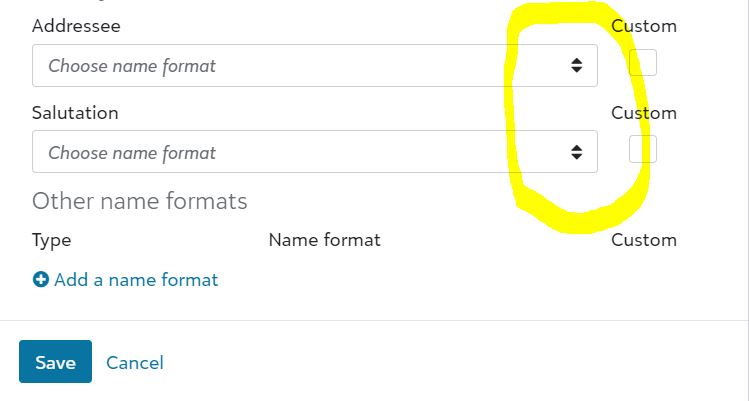
If you are in database view then:
Open a given record, click on the addressee salutations tab and the drop down should allow you to set the parameters you require. It will show a variety of options including First name middle initial, First name Spouse name, etc.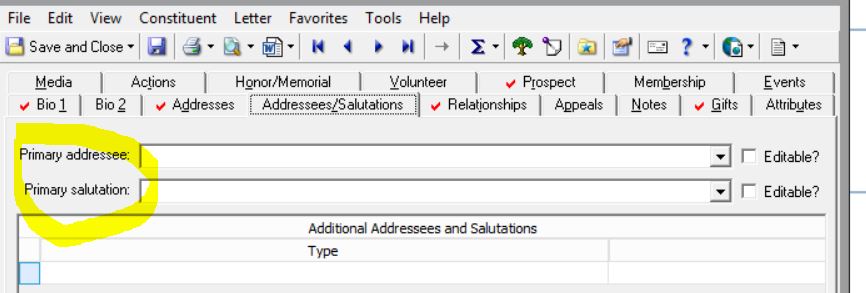
Does that help? If not please let us know if you have already done this step and if your question is solely in the mailing step.
Thank you for bringing this question up!
Ralph1 -
-
Are you exporting list in db view or web view?
Jolynn, first question is do you have an add/sal format that is just the name of the single person vs. one formatted to pull both names? It may be one you created or your primary add/sal depending on your org's procedures on entering add/sal data.
In db Export > Addressee/Salutation, if primary add/sal are the single name, choose sal to export - this selects primary. If it's a different sal entered by your org you will need to select >All Additional Add/Sal, click Add/Sal and you will get pop-up to select specific add/sal. Enter #, click Seleected Add/Sal and there select the type that contains your single name.
I don't do much export from web view so someone may have additional help. I know options are quite limited using web view.2 -
This sounds like a policy issue. Many organizations by default have the primary addressee info for married people to be something like Mr. & Mrs. John Smith, or John and Jane Smith, and the primary salutation to be something like Mr. and Mrs. Smith. If that is the case, then it sounds like you would have to create a secondary set of addressees and salutations.
Ralph Bane showed in his image the additional addressees and salutations. You would have to create the addressee there, along with the addressee/salutation type.
Otherwise, you would have to alter the primary addressee formats, which may not be ideal at all. This is a problem where you might want to consider how large of an export it would be, and if it is a common issue, as creating the additional formats can be somewhat time consuming.
In other words, what JoAnn Strommen said.1 -
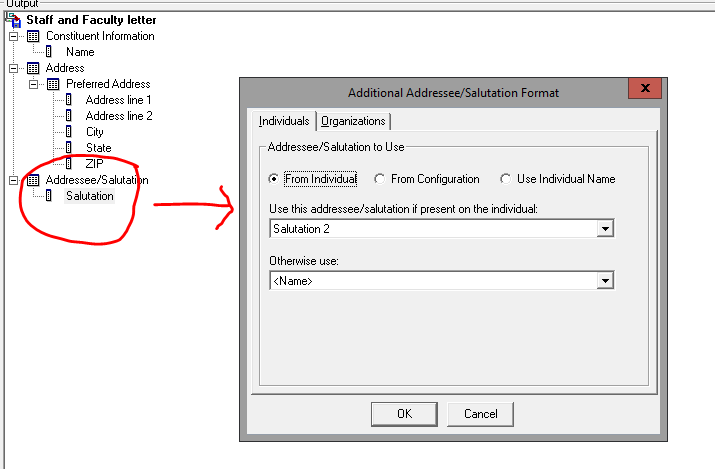
Thank you everyone for your suggestions. I really appreciate it. It's so helpful to hear what others are doing and what works and what doesn't. I was able to reach out to support and they helped me. For those that want to know, he said I could change the salutation selection by right clicking on salutation and then a box will pop up like in the screen shot below and that's where you can make your selection.
 0
0












Categories
- All Categories
- 6 Blackbaud Community Help
- 211 bbcon®
- 1.4K Blackbaud Altru®
- 402 Blackbaud Award Management™ and Blackbaud Stewardship Management™
- 1.1K Blackbaud CRM™ and Blackbaud Internet Solutions™
- 15 donorCentrics®
- 360 Blackbaud eTapestry®
- 2.6K Blackbaud Financial Edge NXT®
- 656 Blackbaud Grantmaking™
- 577 Blackbaud Education Management Solutions for Higher Education
- 3.2K Blackbaud Education Management Solutions for K-12 Schools
- 941 Blackbaud Luminate Online® and Blackbaud TeamRaiser®
- 84 JustGiving® from Blackbaud®
- 6.7K Blackbaud Raiser's Edge NXT®
- 3.7K SKY Developer
- 248 ResearchPoint™
- 120 Blackbaud Tuition Management™
- 165 Organizational Best Practices
- 240 Member Lounge (Just for Fun)
- 34 Blackbaud Community Challenges
- 37 PowerUp Challenges
- 3 (Open) PowerUp Challenge: Grid View Batch
- 3 (Closed) PowerUp Challenge: Chat for Blackbaud AI
- 3 (Closed) PowerUp Challenge: Data Health
- 3 (Closed) Raiser's Edge NXT PowerUp Challenge: Product Update Briefing
- 3 (Closed) Raiser's Edge NXT PowerUp Challenge: Standard Reports+
- 3 (Closed) Raiser's Edge NXT PowerUp Challenge: Email Marketing
- 3 (Closed) Raiser's Edge NXT PowerUp Challenge: Gift Management
- 4 (Closed) Raiser's Edge NXT PowerUp Challenge: Event Management
- 3 (Closed) Raiser's Edge NXT PowerUp Challenge: Home Page
- 4 (Closed) Raiser's Edge NXT PowerUp Challenge: Standard Reports
- 4 (Closed) Raiser's Edge NXT PowerUp Challenge: Query
- 796 Community News
- 3K Jobs Board
- 54 Blackbaud SKY® Reporting Announcements
- 47 Blackbaud CRM Higher Ed Product Advisory Group (HE PAG)
- 19 Blackbaud CRM Product Advisory Group (BBCRM PAG)