Crystal Reports




We are starting our new campaign and my Custom Reports, built on Crystal Reports are no longer working. We've had them since 2004. As Blackbaud no longer supports Crystal Reports, can anyone recommend someone who does? The canned reports don't give the information our director wants/needs. I've worked with Blackbaud support and they feel the issue is within Crystal. Thank you for any help.
0
Comments
-
What is the issue you are having?0
-
I've updated the export (and had it checked, double-checked, triple-checked, etc. for errors), but the custom report shows the previous year results in the current year column and nothing for the current year in any column.
The report is supposed to show current year to previous year gifts in/pledges. It also should show percentage of increased/decreased/new gifts and team results for current year.
Right now, all I'm getting are the results from last year in this year's column. I've attached a copy of what it should look like.
Any help would be appreciated. Thank you.
0 -
I wonder if the report is linked to the correct mdb file. Is it possible you moved or renamed the mdb files?0
-
Blackbaud associate and I redid the MDB file 5 times to be sure I had it linked properly. I linked it and so did the associate. They think it is a corruption of the Crystal Report.
0 -
I would check the settings in all of these locations:
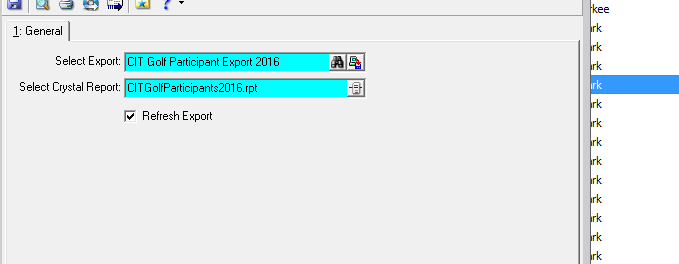
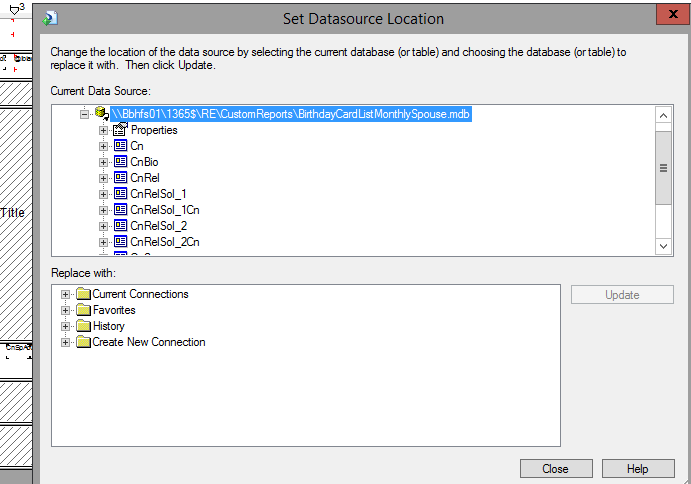 0
0 -
If the report is pointed to a correct mdb file, perhaps the issue is with report formula or group name that has a static name "Current Year" with last year Gift Date Range.2
-
Thank you. I'll give it a try. ; )0
-
I'll look at that, too. Thank you.0
-
Start at the very beginning with the query and export. Make sure they are grouping and exporting the correct sets of data. Especially check date settings in the export. I often export my Crystal data to Excel and take a look. That way I know if the export is wrong or the Crystal formulas / selects / etc. are wrong.
Karen0 -
We ended up hiring REPORT GURU's to update our Crystal Reports. They are great and pricing is reasonable!0












Categories
- All Categories
- 6 Blackbaud Community Help
- 213 bbcon®
- 1.4K Blackbaud Altru®
- 402 Blackbaud Award Management™ and Blackbaud Stewardship Management™
- 1.1K Blackbaud CRM™ and Blackbaud Internet Solutions™
- 15 donorCentrics®
- 360 Blackbaud eTapestry®
- 2.6K Blackbaud Financial Edge NXT®
- 655 Blackbaud Grantmaking™
- 576 Blackbaud Education Management Solutions for Higher Education
- 3.2K Blackbaud Education Management Solutions for K-12 Schools
- 939 Blackbaud Luminate Online® and Blackbaud TeamRaiser®
- 84 JustGiving® from Blackbaud®
- 6.6K Blackbaud Raiser's Edge NXT®
- 3.7K SKY Developer
- 248 ResearchPoint™
- 119 Blackbaud Tuition Management™
- 165 Organizational Best Practices
- 241 Member Lounge (Just for Fun)
- 34 Blackbaud Community Challenges
- 34 PowerUp Challenges
- 3 (Open) PowerUp Challenge: Chat for Blackbaud AI
- 3 (Closed) PowerUp Challenge: Data Health
- 3 (Closed) Raiser's Edge NXT PowerUp Challenge: Product Update Briefing
- 3 (Closed) Raiser's Edge NXT PowerUp Challenge: Standard Reports+
- 3 (Closed) Raiser's Edge NXT PowerUp Challenge: Email Marketing
- 3 (Closed) Raiser's Edge NXT PowerUp Challenge: Gift Management
- 4 (Closed) Raiser's Edge NXT PowerUp Challenge: Event Management
- 3 (Closed) Raiser's Edge NXT PowerUp Challenge: Home Page
- 4 (Closed) Raiser's Edge NXT PowerUp Challenge: Standard Reports
- 4 (Closed) Raiser's Edge NXT PowerUp Challenge: Query
- 792 Community News
- 2.9K Jobs Board
- 54 Blackbaud SKY® Reporting Announcements
- 47 Blackbaud CRM Higher Ed Product Advisory Group (HE PAG)
- 19 Blackbaud CRM Product Advisory Group (BBCRM PAG)