Rating Category



Question on adding a specific rating... I see how to add a value to the ratings.... but how do we also update the rating category??
Jarrell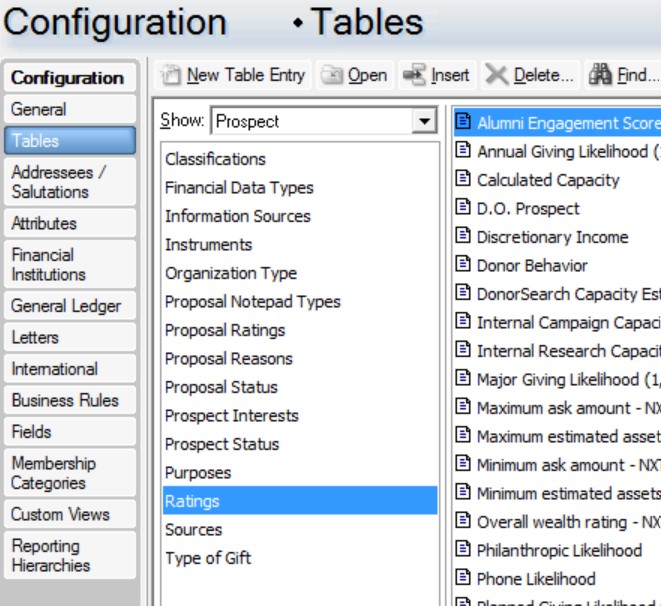
Jarrell
0
Comments
-
Do you mean changing the name of a category that's already in the code table, so that it's updated across all records which have that rating? You can edit the category name by double-clicking on it in the list in your screenshot, or by selecting it and clicking the Open button at the top.
Or do you mean updating a rating that's on a constituent record? That would be done via an import.0 -
Hey thanks, but this is what happens when I click "Alumni Engagement Score" (see pic1) - there is no imput for setting category. Pic2 shows the table fields... how do I set the Category ...so that it is updated across all records which have that rating... I want to add a new category: "Internal Alumni Engagement Score"
0 -
Here is the table structure... ratingsCat3.jpg0
-
0
-
The Description field in your screenshot 'RatingsCat2' is the rating category, I think. If you overwrite the words "Alumni Engagement Score" with something else, that will be the category that appears on constituent records.
If you wanted to add "Internal Alumni Engagement Score" as a brand new category instead, separate to "Alumni Engagement Score", you can click on either the New Table Entry or Insert buttons at the top of your code table in the Config area.2 -
Alan, thanks, but... not sure I understand...
In the database, there is a row with several columns
One column is for Description (I can add this)
There is no input for category
ratingsCat3.jpg0 -
Thanks all,
Jim Ballou at BB helped... I realized the entry is actually the category ...
Jarrell
1







Categories
- All Categories
- 6 Blackbaud Community Help
- 211 bbcon®
- 1.4K Blackbaud Altru®
- 402 Blackbaud Award Management™ and Blackbaud Stewardship Management™
- 1.1K Blackbaud CRM™ and Blackbaud Internet Solutions™
- 15 donorCentrics®
- 360 Blackbaud eTapestry®
- 2.6K Blackbaud Financial Edge NXT®
- 655 Blackbaud Grantmaking™
- 576 Blackbaud Education Management Solutions for Higher Education
- 3.2K Blackbaud Education Management Solutions for K-12 Schools
- 941 Blackbaud Luminate Online® and Blackbaud TeamRaiser®
- 84 JustGiving® from Blackbaud®
- 6.7K Blackbaud Raiser's Edge NXT®
- 3.7K SKY Developer
- 248 ResearchPoint™
- 120 Blackbaud Tuition Management™
- 165 Organizational Best Practices
- 240 Member Lounge (Just for Fun)
- 34 Blackbaud Community Challenges
- 37 PowerUp Challenges
- 3 (Open) PowerUp Challenge: Grid View Batch
- 3 (Closed) PowerUp Challenge: Chat for Blackbaud AI
- 3 (Closed) PowerUp Challenge: Data Health
- 3 (Closed) Raiser's Edge NXT PowerUp Challenge: Product Update Briefing
- 3 (Closed) Raiser's Edge NXT PowerUp Challenge: Standard Reports+
- 3 (Closed) Raiser's Edge NXT PowerUp Challenge: Email Marketing
- 3 (Closed) Raiser's Edge NXT PowerUp Challenge: Gift Management
- 4 (Closed) Raiser's Edge NXT PowerUp Challenge: Event Management
- 3 (Closed) Raiser's Edge NXT PowerUp Challenge: Home Page
- 4 (Closed) Raiser's Edge NXT PowerUp Challenge: Standard Reports
- 4 (Closed) Raiser's Edge NXT PowerUp Challenge: Query
- 796 Community News
- 3K Jobs Board
- 54 Blackbaud SKY® Reporting Announcements
- 47 Blackbaud CRM Higher Ed Product Advisory Group (HE PAG)
- 19 Blackbaud CRM Product Advisory Group (BBCRM PAG)