New Transcript builder setup





Comments
-
Hey Larry, I created a new template, but couldn't get it to do what I needed it to. It seemed to be more limited than the old version. I was also hoping to see some examples in case I was missing something!
 0
0 -
Following. Also still using the old transcript builder but sounds like we will be changing things up this year and I will probably need to build a new transcript. Ugh!2
-
Both old and new have their limitations. Our school has been showing all terms taken and a final grade on transcripts. See some have other details on the transcript and only show Final grades per course. What is the setups in grade plan for you? Using the new builder allows for grades based on 'Term' but when pull into builder shows same letter grades per each term. Whereas the old builder I have set to Term 1-3 which pulls each letter per term no problem.1
-
I have attached redacted examples of our official and unofficial transcripts from the "new" builder. This is our first year using the cloud SIS (after a long time in EE), so we have not yet published our first set of end-of-year transcripts.
- All course/grade info prior to this academic year is pulling transfer grades (imported from EE during migration).
- Honor Roll info from previous years are transcript notes.
- The unofficial transcript is available at any time to students and parents, and includes a notation that it was released directly to the student.
- The official transcript includes the registrar's signature and GPA information that do not appear on the unofficial version. Access is strictly limited to a handful of users at the school.
Example-Unofficial.pdf8 -
Larry Bucher - if you're seeing the same grade in three columns (instead of the correct letter grade for each term), check the settings for Grade plan grade and Grade plan in each column. My guess is that some of them are duplicates.
See attached screenshots for navigation.
Disclaimer: we print only the Final grade from the spring term grade plan, so I may be off base here.
t1.png
t2.png
t3.png
3 -
Hi,
Thanks very much for all your details. Very helpful and will have to see if our schools wants to use only Final grades going forward on the transcript. I think I have a problem though as I don't see what you see next to Grade Plan grade - Grade Plan.?2021-05-14_11-55-08.png
We have set to use only 'Term' and wonder if maybe an issue. But in old builder works by the way setup.Old transcript setup.png
grade plans created.png2 -
Larry -
I suspect that the reason you're not seeing the extra field (to select a grade plan) is because of differences in the way our academic years and our grade plans are set up.
I don't have enough experience with it to know for certain, or to offer additional advice.
Have you opened a case to ask about it?0 -
Not at present but will. Thanks for all your suggestions and I like the layout of the transcript you have designed.0
-
We are moving to the new transcript builder and I had to work with a person at Blackbaud to get things set up properly. It was not perfect but overall better than I thought.
Here was our end result if that helps at all.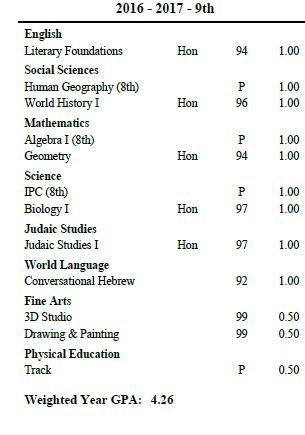 2
2 -
Hey. Would any of you who have shared templates be willing to upload them to the Resources area? I've seen a lot of questions come in asking for examples, so it would be great if we could create a library of report cards, transcripts, statements, and anything else that it would be helpful to share. Thanks.0
-
Bill Gray, your transcripts look great and are well executed! I especially like the fact that you have an unofficial transcript that parents and students are given access to that do not have GPA's. Great idea!
Our transcripts have extra spacing between course/grade rows, but Joshua Blice and Bill Grade seem to have single-spaced rows. Does anyone know how to get the single spacing on the new transcript? I cannot figure out how to fix this.1 -
Does anyone have any tips to share about how to get transfer grades to display? We've been using the old builder and have had no issues with it, but we're ready to begin transitioning to the new so that we don't get caught off-guard when BB suddenly decides to end support for the old one. Because our school only serves grades 10-12, all of our students come to us with transfer credit. I can get the transfer school information and course details to display, but not the grades. What am I missing? Do we need to create grade plans for transfer courses? And if yes, does anyone have a primer for how to do that?1
-
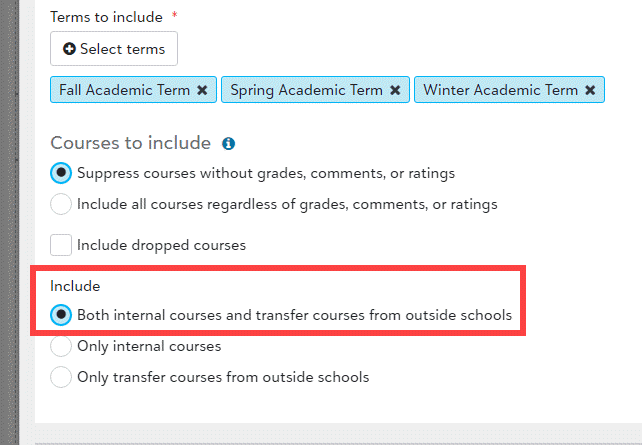
We had the same trouble and found that we had to select show "Letter Grades" rather than numeric under the Grade column (Final, Sem 1, Sem 2, etc) even though we use numeric. That might not be your issue if you don't have a grade translation like in the paragraph below. Also, you must select to Include All Grades rather than just internal as the attached.
Grade Column.pdf
As we want each numeric grade, 0 to 100, to show accurately on the transcript, rather than as a grade equivalent for a range... BB gave us a grade translation that looks like the attached.
Grade Translation.png0 -
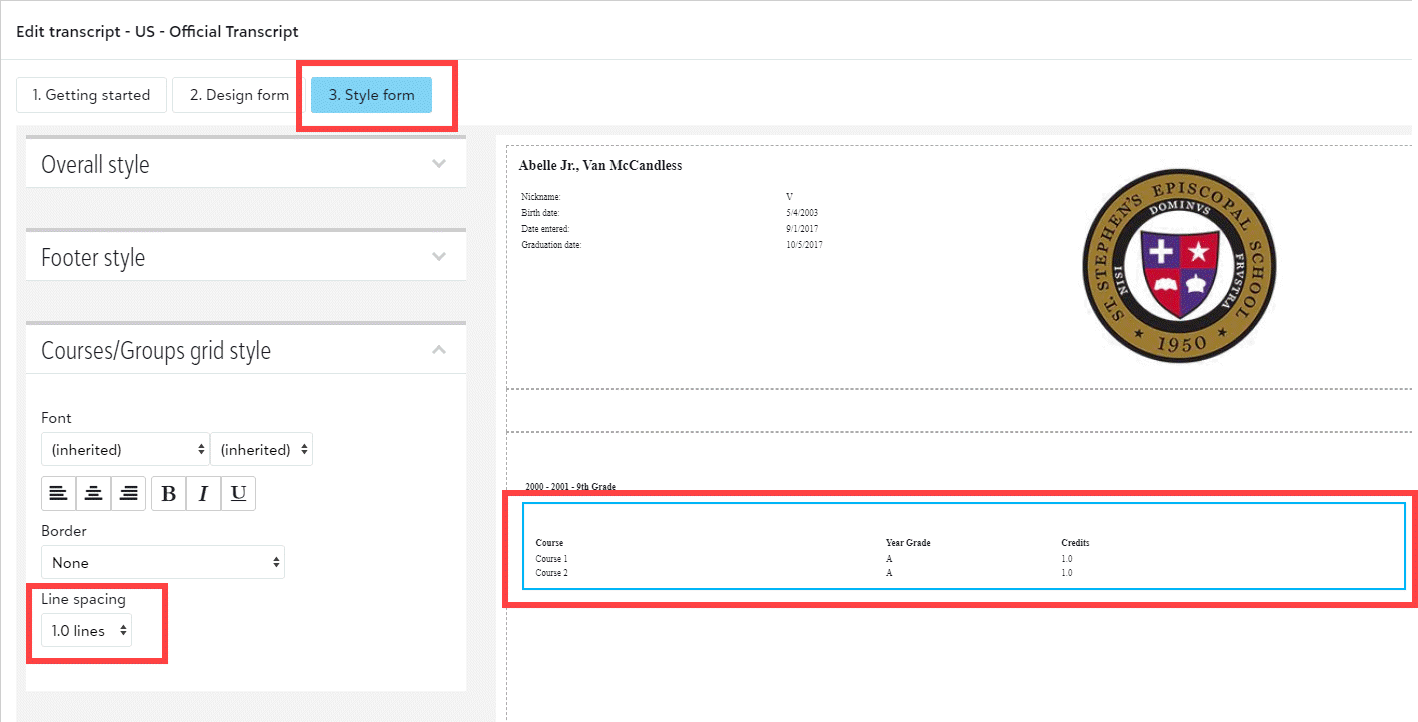
Angelia Johnson - line spacing is handled in the Style form tab of the transcript builder. (You'll also find all font, font size, and border options there.)
 2
2 -
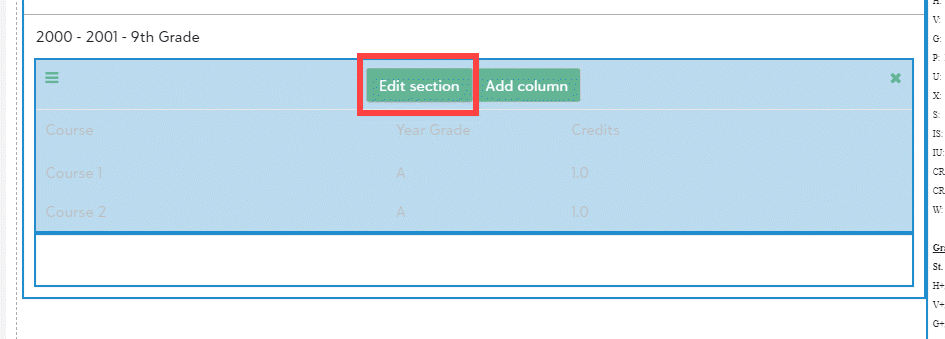
Angela - The option to include transfer grades are in the "Edit course" section. There may be other settings that I'm not remembering now. (We set up the transcript and transfer grades about 18 months ago. There was a good bit of effort related to getting the Equivalent Course values right in Academics > Grades > Grades Management > Enter grades by student > View grades - Transfer)
 3
3 -
Brian Gray, that was exactly what I needed to do! I've worked on this new transcript off and on for the past year and did not see the line spacing for the course grid for some reason. Your directions and picture were excellent help. Thank you very much!
0 -
Thanks Bryan. My settings match your screenshots. When you mention getting equivalent course values right, can you expound on that a bit?
BB support sent me to a link to add grade plans; it wasn't helpful. I'm not understanding how we would add transfer courses/grades to a grade plan. It wasn't necessary with the old transcript builder and seems to be our big roadblock with the new.0 -
The screenshot below may help. Academics > Grades > Grades management > Enter grades by student. Search for the student, then view Grades & Credits - Transfer.
Edit a grade to get to the screen shown below. We set the equivalent course field and the transcript category field when we imported grades from EE during our migration.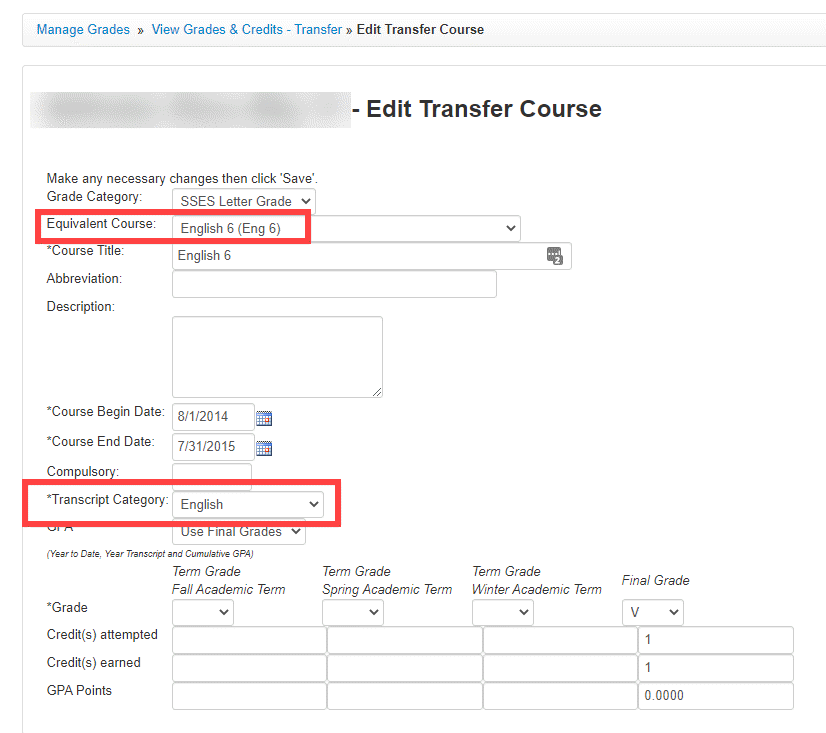
0 -
Angela Couvillion, here's another tip. You will need to go to Academic/Grades/ Grading Setup/School Year Setup to make sure that you have Grade Plans set up for past years that Blackbaud imported for you. Be sure to name the Grade Plans and Grade Descriptions the same as you currently use. I was told by support a year ago that usually the problem with grades not showing is naming differences. I just had to add another one this morning that wasn't showing up on the new transcript builder but was showing on the old one.
I had to go Core/Settings/School Information/Years and Terms when we first began using Blackbaud K-12 to make sure that there were already terms set up... but I think that you probably have already done that since your Old Transcript Builder transcripts are working.0 -
Thanks y'all. Your screenshots have helped me confirm that I'm on the right track, and I'm closing in on a solution. I've gotten far enough with testing to get summer grades from my test student to display, but not Fall and Spring. We use term grades only; never an average; always the letter grade. I'm guessing the fact that I can only get summer to appear is another setting somewhere about Term vs. Final, so I'll keep digging. Y'all have been more helpful than my chat with BB support, so thank you!
0 -
Have you figured out how to get the Transfer School grades to appear before our school grades in a given year? The transfer school grades are appearing after our school's grades which is chronologically out of order.
0 -
Susan -
Change the dates of attendance at the transfer school to be prior to the dates of that school year.
Core > go to student > Access > Personas box - click the pencil to the left of the student's name > edit transfer school enrollment
Hope that helps.
Scott1 -
@Brian Gray Hi Brian! Your transcripts look great. Question, how did split it into two columns? With the one on the left being the records, etc., and the right-hand column having other text included like your grade scale, etc. I feel like this is such a simple thing but can't figure out how to do that. Thank you in advance.
0 -
@Marybeth McKavic - The top is three sections (each 33% wide). Everything on the right column is 33% wide. The left side of the main section (courses & grades) take all of the rest of the width.
You can see annotated screenshots of what each section of the transcript is here.
1 -
@Brian Gray Thank you so much! Very helpful screenshot!
0























Categories
- All Categories
- 6 Blackbaud Community Help
- 213 bbcon®
- 1.4K Blackbaud Altru®
- 403 Blackbaud Award Management™ and Blackbaud Stewardship Management™
- 1.1K Blackbaud CRM™ and Blackbaud Internet Solutions™
- 15 donorCentrics®
- 360 Blackbaud eTapestry®
- 2.6K Blackbaud Financial Edge NXT®
- 656 Blackbaud Grantmaking™
- 577 Blackbaud Education Management Solutions for Higher Education
- 3.2K Blackbaud Education Management Solutions for K-12 Schools
- 939 Blackbaud Luminate Online® and Blackbaud TeamRaiser®
- 84 JustGiving® from Blackbaud®
- 6.6K Blackbaud Raiser's Edge NXT®
- 3.7K SKY Developer
- 248 ResearchPoint™
- 119 Blackbaud Tuition Management™
- 165 Organizational Best Practices
- 241 Member Lounge (Just for Fun)
- 34 Blackbaud Community Challenges
- 37 PowerUp Challenges
- 3 (Open) PowerUp Challenge: Grid View Batch
- 3 (Closed) PowerUp Challenge: Chat for Blackbaud AI
- 3 (Closed) PowerUp Challenge: Data Health
- 3 (Closed) Raiser's Edge NXT PowerUp Challenge: Product Update Briefing
- 3 (Closed) Raiser's Edge NXT PowerUp Challenge: Standard Reports+
- 3 (Closed) Raiser's Edge NXT PowerUp Challenge: Email Marketing
- 3 (Closed) Raiser's Edge NXT PowerUp Challenge: Gift Management
- 4 (Closed) Raiser's Edge NXT PowerUp Challenge: Event Management
- 3 (Closed) Raiser's Edge NXT PowerUp Challenge: Home Page
- 4 (Closed) Raiser's Edge NXT PowerUp Challenge: Standard Reports
- 4 (Closed) Raiser's Edge NXT PowerUp Challenge: Query
- 794 Community News
- 2.9K Jobs Board
- 54 Blackbaud SKY® Reporting Announcements
- 47 Blackbaud CRM Higher Ed Product Advisory Group (HE PAG)
- 19 Blackbaud CRM Product Advisory Group (BBCRM PAG)