Power Automate Flow: Condition on Solicit Code




Hi all,
I'm working on a multi-level volunteer sign up flow. It's going well until I get to adding solicit codes based on opt-ins that are part of my Microsoft Form. NXT won't allow my flow to add a solicit code if the existing constituent already has that solicit code. So I tried to build in a condition, essentially: List constituent's solicit codes → If solicit code “Do not mail” already exists, skip / If solicit code “Do not mail” does not exist, add the solicit code.
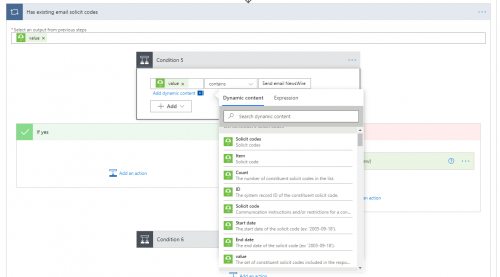
Whatever I try, it's not picking up when the code is present. From the List Constituent Solicit Codes item, I get the following fields that can be the basis of my condition. Solicit codes, Item, Count, ID, Solicit Code, Start Date, End Date, and Value. Then I can make my condition Contains, Equals, etc.
Does anyone know what combination of dynamic content and rule I should be using to solve this? TIA!
Comments
-
Hi Liz - Is your flow triggered from a Constituent List? Could you filter out constituents that already have the solicit code prior to bringing them into the flow? If this is not a possibility, you may want to think about using consent records, it will add a new record to RE and add/remove solicit codes based on what you have set up in your system. This might help you get around the current errors you are experiencing.
3 -
Austen,
Thank you for that great answer! The flow is triggered by a Microsoft Form so no filtering on the front end, but I like your idea about adding consent records. I already had set up the flow to do that but hadn't thought through the fact that consent mapping should add solicit codes without the flow needing to do so. I'll see how it goes with just consents in the flow.
Liz2 -
Hi Liz,
While you're evaluating creating consent records, I wanted to provide an answer for your original question. There are several ways to express this in Power Automate, but here is one way:
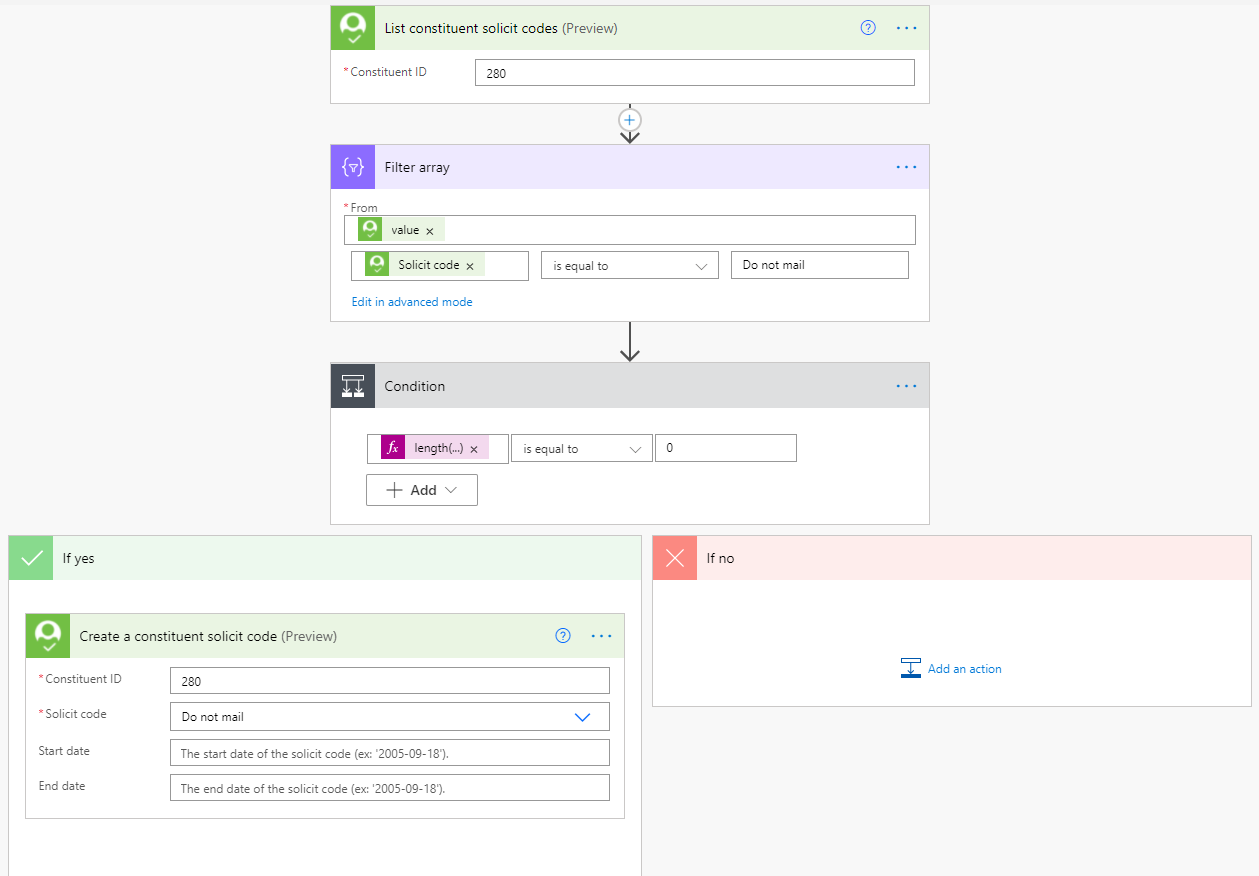
- List the solicit codes for a constituent (using the List constituent solicit codes action in the connector)
- Use a Filter Array action to filter the value in the response (which will be the array of solicit codes returned for the constituent) and use Solicit code is equal to Do not mail as your filter criteria.
- Use a Condition action to evaluate whether the filtered array contains any items. If so, you can skip the record. Otherwise, add the desired solicit code. The expression you can use in your Condition is length(body('Filter_array')) is equal to 0.
Here's a snippet of a flow that does the above logic:
 3
3 -
@Ben Lambert @Austen Brown @Liz Kelleher
Thanks so much for contributing to this post. I used the concept to build my first solicit code audit, which is working great! We add new donors to specific newsletters based on which program they support. I set up a flow based on a gift list that adds solicit codes to the constituent. The flow first looks to be sure they have not opted out of email communications. I would not have been able to do this on my own, and your post pointed me in the right direction.
Thanks!
3











Categories
- All Categories
- 6 Blackbaud Community Help
- 211 bbcon®
- 1.4K Blackbaud Altru®
- 402 Blackbaud Award Management™ and Blackbaud Stewardship Management™
- 1.1K Blackbaud CRM™ and Blackbaud Internet Solutions™
- 15 donorCentrics®
- 360 Blackbaud eTapestry®
- 2.6K Blackbaud Financial Edge NXT®
- 656 Blackbaud Grantmaking™
- 577 Blackbaud Education Management Solutions for Higher Education
- 3.2K Blackbaud Education Management Solutions for K-12 Schools
- 941 Blackbaud Luminate Online® and Blackbaud TeamRaiser®
- 84 JustGiving® from Blackbaud®
- 6.7K Blackbaud Raiser's Edge NXT®
- 3.7K SKY Developer
- 248 ResearchPoint™
- 120 Blackbaud Tuition Management™
- 165 Organizational Best Practices
- 240 Member Lounge (Just for Fun)
- 34 Blackbaud Community Challenges
- 37 PowerUp Challenges
- 3 (Open) PowerUp Challenge: Grid View Batch
- 3 (Closed) PowerUp Challenge: Chat for Blackbaud AI
- 3 (Closed) PowerUp Challenge: Data Health
- 3 (Closed) Raiser's Edge NXT PowerUp Challenge: Product Update Briefing
- 3 (Closed) Raiser's Edge NXT PowerUp Challenge: Standard Reports+
- 3 (Closed) Raiser's Edge NXT PowerUp Challenge: Email Marketing
- 3 (Closed) Raiser's Edge NXT PowerUp Challenge: Gift Management
- 4 (Closed) Raiser's Edge NXT PowerUp Challenge: Event Management
- 3 (Closed) Raiser's Edge NXT PowerUp Challenge: Home Page
- 4 (Closed) Raiser's Edge NXT PowerUp Challenge: Standard Reports
- 4 (Closed) Raiser's Edge NXT PowerUp Challenge: Query
- 796 Community News
- 3K Jobs Board
- 54 Blackbaud SKY® Reporting Announcements
- 47 Blackbaud CRM Higher Ed Product Advisory Group (HE PAG)
- 19 Blackbaud CRM Product Advisory Group (BBCRM PAG)