Email Notification to Fundraiser from Action List





I have a Workflow set up in NXT that creates a new Action for Fundraisers when someone from their portfolio gives. I also made an Action List of all these newly created Actions. I am being asked to find a way for the Fundraiser to get an email notification that they have an Open Action in this List that they need to complete. Yes, I know they can see Open Actions in their Work Center, but I am being asked to send them emails. So currently, I am manually emailing them but I'd love to automate this with Power Automate.
I was able to create a Flow that Gets the Action list, checks if it has any Items, and if so sends and email. However, I only want it to send an email to the Fundraiser assigned to the Action (the List has Actions for 4 Fundraisers.)
I tried setting this up a few ways and keep running into errors. I thought that the Switch function would work, but that keeps failing.
I am new to working with APIs and with Automate so I am hoping I am just missing something super basic.
Thanks!
Comments
-
Hi Michelle,
Can you provide some more details about the problem you're having with your flow? Sounds like you've already created a flow in Power Automate (either triggered manually, or on a schedule), and the flow gets the actions from your pre-defined list in NXT. So now you want to iterate over those actions, and email the fundraiser (the fundraiser on the action? or the fundraiser on the action's constituent record)?
Any details/screens you can provide will help troubleshoot!
1 -
Yes, I have a Flow that is triggered on a schedule that looks at an Action List in NXT and I want it to send an email to the Fundraiser on the Action. I tried using a Switch on the Fundraiser(s) field to tell it who to send an email to, but that doesn't seem to work
0 -
Hi Michelle, here's a flow that will notify the action's fundraiser(s):
First, I use the List actions connector action to fetch the set of actions in my NXT list:
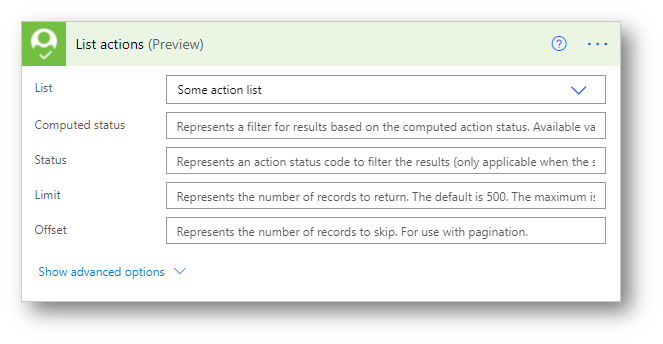
Then I use an Apply to Each loop to iterate over the set of actions returned (using the value property of the response), and then another Apply to Each loop to iterate over the set of fundraisers on the current action (using the Fundraiser(s) property. The action's fundraisers are returned as an array of strings, so to get the current fundraiser you can use Fundraiser(s) Item in the dynamic content window:
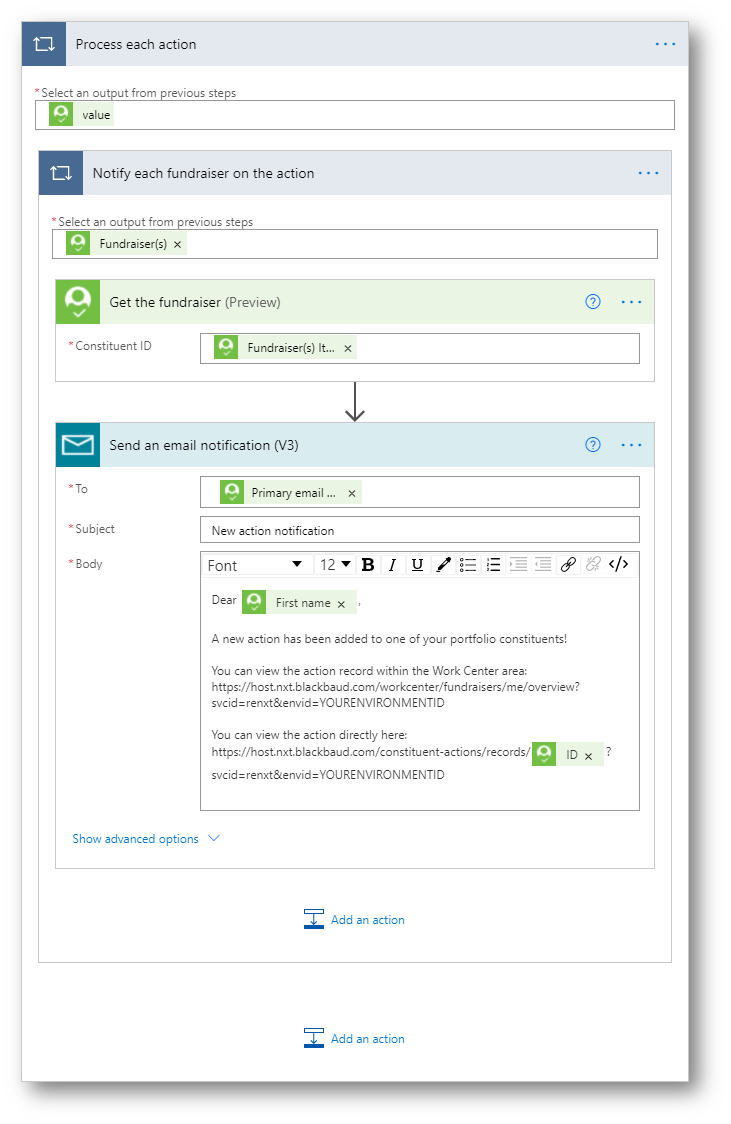
I hope this helps - let us know if you have any questions!
0 -
What happens if one Fundraiser has 5 Actions in this list? Will they get 5 emails? I wouldn't want that, I'd only want them to get 1 email.
0 -
As coded in my prev response, yes - a fundraiser with 5 actions in your NXT List would get 5 distinct email notifications (with 5 different links to the action record in NXT). If you wanted a consolidated, single notification, you'd need to build that logic into the flow (get the distinct set of fundraiser IDs from the list, then build the notification email for each fundraiser by aggregating the actions for that fundraiser). You could also consider factoring your NXT List into an list-per-fundraiser and then build a unique flow for each fundraiser). Just some thoughts off the top.
0 -
Thanks. I was hoping to avoid having to make separate lists for each Fundraiser and just have one list/one Flow. But that may be easier. I am new to using Flow so I don't know how to build the logic you mentioned into the flow. But I could follow your instructions to do one per Fundraiser.
Thanks
0 -
Yes, building a list per-fundraiser is really not an ideal solution. You could instead iterate over the list of actions and build a distinct array of fundraisers, and then use that to send an email notification. Let me compose that flow and I'll paste in some screens to illustrate later today.
1 -
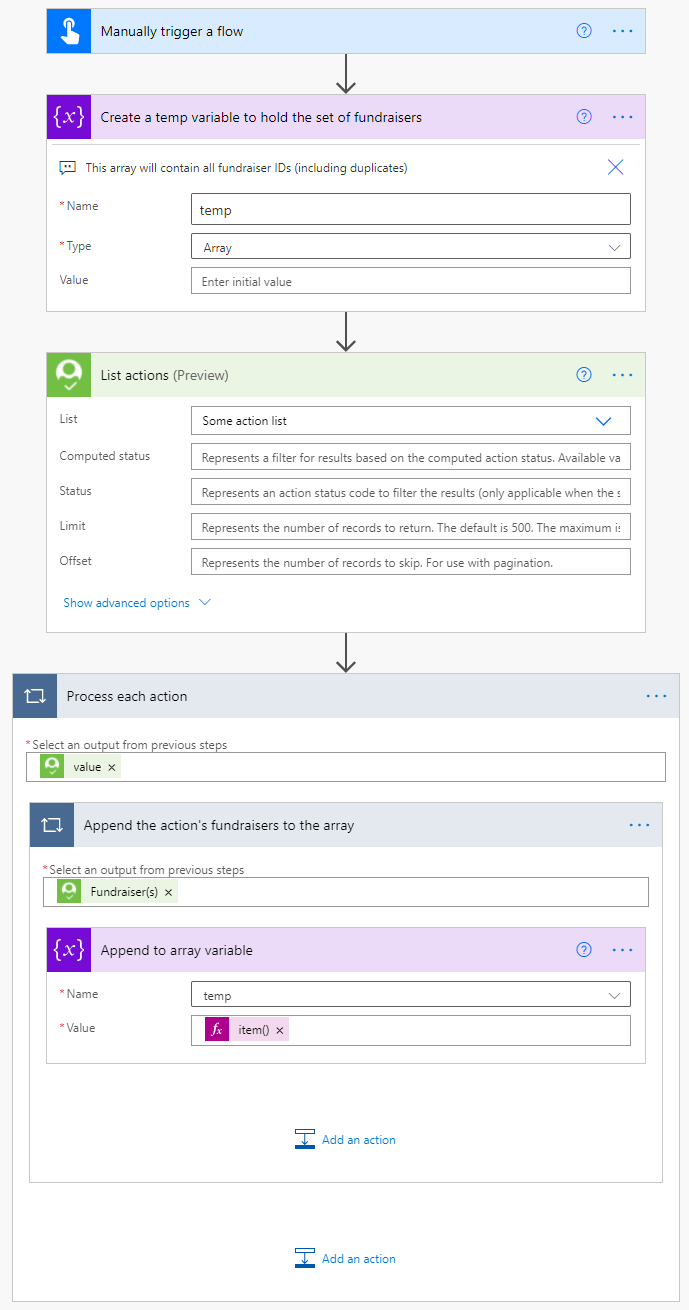
Here's one way to express the logic - in this example, the flow fetches the actions from the list, and then builds an array of fundraiser IDs from each action (this array may contain duplicate fundraiser IDs if multiple actions with the same fundraiser are returned by the list):
To remove any duplicate fundraiser IDs, the flow creates a new array using the union() function:
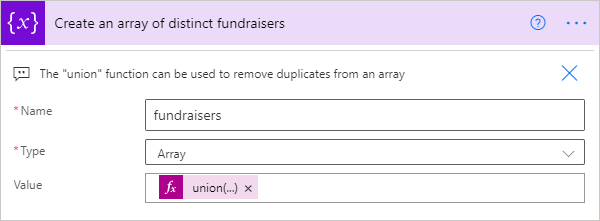
The above expression is:
union(variables('temp'),variables('temp'))
The flow then loops over the de-duplicated array of fundraiser IDs. It loads each fundraiser's constituent record to get the primary email address, and stores the email address in an array:
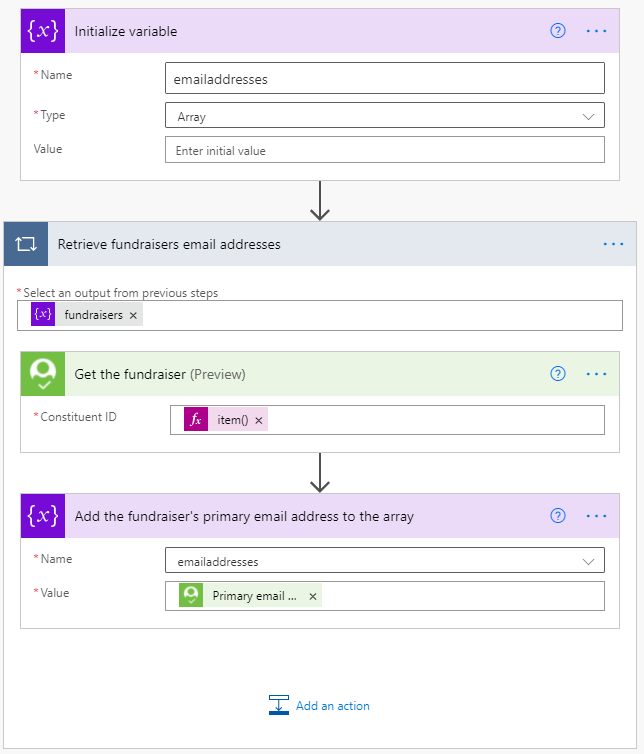
Finally, the flow uses a single “Send email” action to notify the fundraisers (and the join() function is used to join the array of email addresses into a single semicolon-delimited string for the To: property:
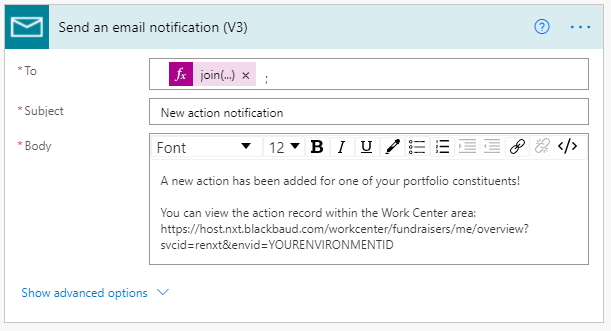 0
0 -
I cannot get the join function to work. what did you enter in the expression?
0 -
Hi Michelle,
The expression I used was:
join(variables('emailaddresses'), ';')
Interestingly, I just noticed that there is an out-of-box action you can use to perform the same join operation (combining the email addresses in the array into a single string separated by a semicolon). You can find this under Data Operations → Join:
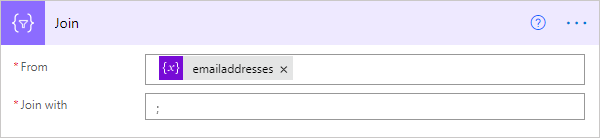
That should be equivalent to the expression I used, and if you use this approach you'd then update the To: property to use the Output from the Join action:
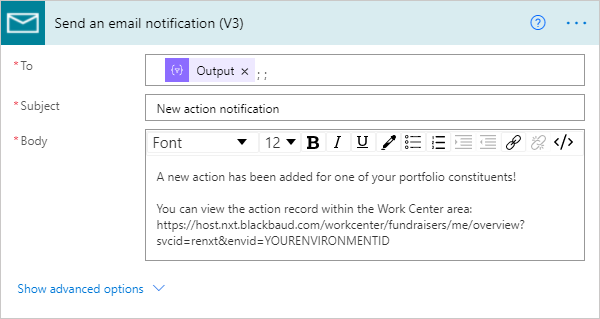 0
0 -
Thank you so much! Up and running now
 1
1 -
Hello,
Is there a way for this Flow to only email certain Fundraiser Types?
We have both our Staff and Board Members assigned as Fundraisers to constituents. Staff are the Primary Gift Officer Fundraiser Type and Board members are the Board Solicitor Fundraiser Type.
I do NOT want these emails to go to our Board Solicitors, only our Staff. Is this something I can set it up to do?
0 -
Hi Michelle,
Yes, it should be possible to modify the flow logic to account for the fundraiser types. It really depends on what logic you want and how your organization tracks fundraisers/types. There could be some complexity if a fundraiser serves multiple roles for different constituents (but that may not happen at your organization).
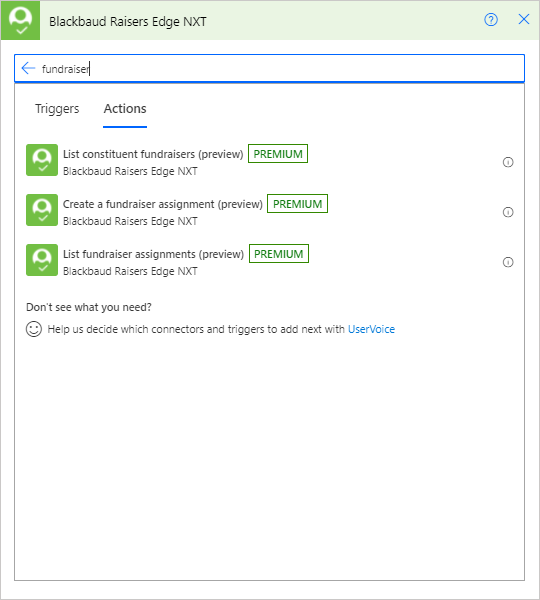
The connector has a few actions that might be useful (shown below). For a given action that is returned by the NXT list, you'll know the constituent ID as well as the fundraiser ID. You could use the List constituent fundraisers action to get the current constituent's fundraisers, locate the current fundraiser ID (the one from the action record) in order to evaluate the type property and only add the fundraiser ID to the array if the type = Staff.
Alternately, toward the end where you are iterating through the array of distinct fundraiser IDs, you could use the List fundraiser assignments action to see if the fundraiser is a Board Member) and only fetch the email address if the fundraiser is Staff.
 0
0 -
Thank you! I think the second option would work better, pulling the Fundraiser Type from the array and only fetch the email depending on the type.
Can you show me how/where I would add that into my flow? Here is what it looks like now:
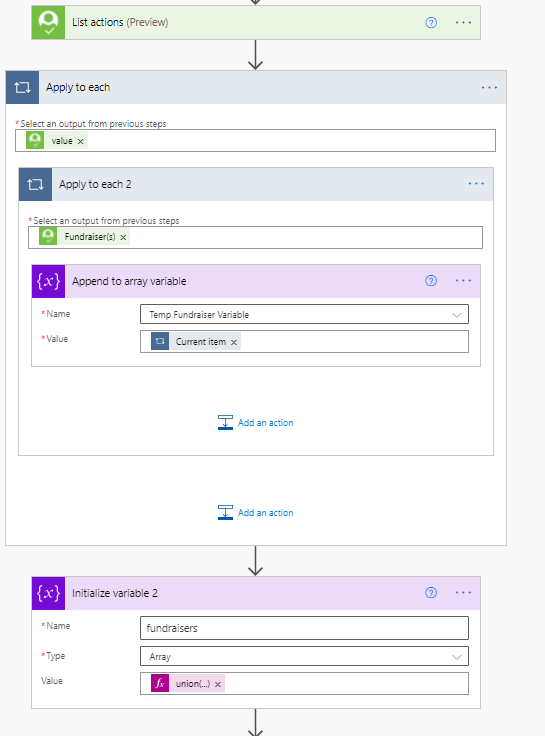
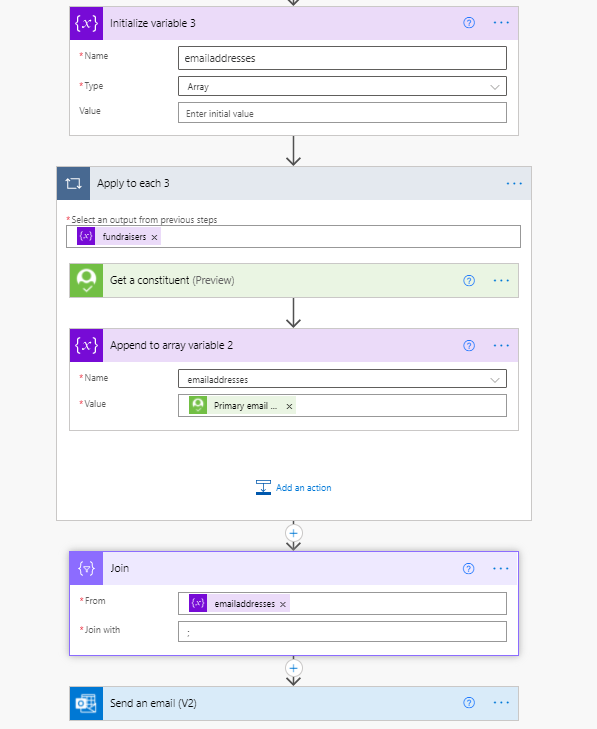 0
0




Categories
- All Categories
- 6 Blackbaud Community Help
- 213 bbcon®
- 1.4K Blackbaud Altru®
- 400 Blackbaud Award Management™ and Blackbaud Stewardship Management™
- 1.1K Blackbaud CRM™ and Blackbaud Internet Solutions™
- 15 donorCentrics®
- 360 Blackbaud eTapestry®
- 2.6K Blackbaud Financial Edge NXT®
- 655 Blackbaud Grantmaking™
- 576 Blackbaud Education Management Solutions for Higher Education
- 3.2K Blackbaud Education Management Solutions for K-12 Schools
- 939 Blackbaud Luminate Online® and Blackbaud TeamRaiser®
- 84 JustGiving® from Blackbaud®
- 6.6K Blackbaud Raiser's Edge NXT®
- 3.7K SKY Developer
- 248 ResearchPoint™
- 119 Blackbaud Tuition Management™
- 165 Organizational Best Practices
- 241 Member Lounge (Just for Fun)
- 34 Blackbaud Community Challenges
- 34 PowerUp Challenges
- 3 (Open) PowerUp Challenge: Chat for Blackbaud AI
- 3 (Closed) PowerUp Challenge: Data Health
- 3 (Closed) Raiser's Edge NXT PowerUp Challenge: Product Update Briefing
- 3 (Closed) Raiser's Edge NXT PowerUp Challenge: Standard Reports+
- 3 (Closed) Raiser's Edge NXT PowerUp Challenge: Email Marketing
- 3 (Closed) Raiser's Edge NXT PowerUp Challenge: Gift Management
- 4 (Closed) Raiser's Edge NXT PowerUp Challenge: Event Management
- 3 (Closed) Raiser's Edge NXT PowerUp Challenge: Home Page
- 4 (Closed) Raiser's Edge NXT PowerUp Challenge: Standard Reports
- 4 (Closed) Raiser's Edge NXT PowerUp Challenge: Query
- 790 Community News
- 2.9K Jobs Board
- 53 Blackbaud SKY® Reporting Announcements
- 47 Blackbaud CRM Higher Ed Product Advisory Group (HE PAG)
- 19 Blackbaud CRM Product Advisory Group (BBCRM PAG)