Exporting lists into Excel format, not just .csv




I understand that this option is supposed to exist but all I get is .csv files when I export. The problem is not just the Excel format (I know I can ‘save as’ as Excel) but the gift amounts sometimes appear as non-formattable numbers so I cannot do mathematical functions (even Sum!) on them. I read in a community post that the Excel option now exists but I can't find it. Help anyone?
Comments
-
Hi Jennifer
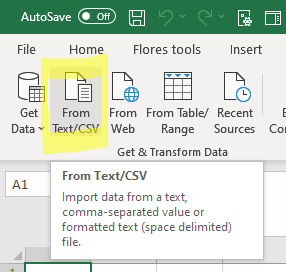
I can strongly suggest using PowerQuery to import your CSV files into Excel. In the Excel versions >2016 you can easily import data from various sources and CSV formats by clicking the ‘From Text/CSV’ button in the Data-tab. If you use this you will enter a new world of powerful importing, in which you can also handle different formatting of numbers and dates. Have a look! It is very powerful. And… if you refresh your CSV file you only have to click the Refresh All button and your Excel sheet is updated as well!
https://docs.microsoft.com/en-us/power-query/connectors/textcsv
4 -
If you rename the exported csv file to [name].txt (i.e. replace .csv with .txt) and then open it in Excel it will allow you to choose the data type to use for each column of data. Bit of a faff but you could select date/number etc. formats for the columns.
0 -
Thanks Warren for your suggestion, but I already tried this and I still couldn't convert the format for the numbers. For some reason actual commas are introduced as number separators during the download process and then the cells cannot be formatted as numbers. The only thing I could do was to do a find/replace and get rid of the commas - then the numbers were recognized as actual numbers.0
-
Thanks Martin, I will try this when I get a few minutes to work through it carefully!
0 -
Hi Jennifer. Are you saying that in the Export options the only choice you have is .csv? Or did I misunderstand your question?
0 -
Hi Karen:
Yes - in NXT lists I only have the "Export" button with no choices. When I hit that, I am quickly notified that the Export is ready in the download area. When I go there, all I can do is click on Download, no options - and it downloads as a .csv file. Is there another place I can configure the Export/Download options?
I know that there are some things I am not able to do because our operation is located in Europe, hopefully this is also not one of those things.
Let me know if you can tell me more, thanks,
Jenny0 -
If you're unable to change the file type, there is a quick way to change the gift amounts from text to numbers so that you can use the mathematical functions on them. Select the column and use the Text To Columns feature that's on the Data section of the ribbon menu. You just need to make sure you don't choose a delimiter that actually appears in the column - the default option of Tab should work fine.
3 -
Alan, thanks so much! I will check that out.
0 -
Jennifer, can you export from the database instead? You have more options there.
0 -
Just for completeness one more option is to use SKY API to push data to Excel Live or Google Sheets. We do that for lots of clients with the SmartSYNC solution but you could write code to do it… When doing this you can set formatting options, watch a constituent list in NXT for changes and add them in near real-time etc. so more like a live mirror of the constituent list rather than a one off export - works really well for reporting or sharing certain data with other groups.
0











Categories
- All Categories
- 6 Blackbaud Community Help
- 211 bbcon®
- 1.4K Blackbaud Altru®
- 402 Blackbaud Award Management™ and Blackbaud Stewardship Management™
- 1.1K Blackbaud CRM™ and Blackbaud Internet Solutions™
- 15 donorCentrics®
- 360 Blackbaud eTapestry®
- 2.6K Blackbaud Financial Edge NXT®
- 655 Blackbaud Grantmaking™
- 577 Blackbaud Education Management Solutions for Higher Education
- 3.2K Blackbaud Education Management Solutions for K-12 Schools
- 939 Blackbaud Luminate Online® and Blackbaud TeamRaiser®
- 84 JustGiving® from Blackbaud®
- 6.7K Blackbaud Raiser's Edge NXT®
- 3.7K SKY Developer
- 248 ResearchPoint™
- 120 Blackbaud Tuition Management™
- 165 Organizational Best Practices
- 240 Member Lounge (Just for Fun)
- 34 Blackbaud Community Challenges
- 37 PowerUp Challenges
- 3 (Open) PowerUp Challenge: Grid View Batch
- 3 (Closed) PowerUp Challenge: Chat for Blackbaud AI
- 3 (Closed) PowerUp Challenge: Data Health
- 3 (Closed) Raiser's Edge NXT PowerUp Challenge: Product Update Briefing
- 3 (Closed) Raiser's Edge NXT PowerUp Challenge: Standard Reports+
- 3 (Closed) Raiser's Edge NXT PowerUp Challenge: Email Marketing
- 3 (Closed) Raiser's Edge NXT PowerUp Challenge: Gift Management
- 4 (Closed) Raiser's Edge NXT PowerUp Challenge: Event Management
- 3 (Closed) Raiser's Edge NXT PowerUp Challenge: Home Page
- 4 (Closed) Raiser's Edge NXT PowerUp Challenge: Standard Reports
- 4 (Closed) Raiser's Edge NXT PowerUp Challenge: Query
- 796 Community News
- 3K Jobs Board
- 54 Blackbaud SKY® Reporting Announcements
- 47 Blackbaud CRM Higher Ed Product Advisory Group (HE PAG)
- 19 Blackbaud CRM Product Advisory Group (BBCRM PAG)