Stopping Requirements being marked as done - if a field is missing





Does anyone know if we can do the following?
We have set up a Payment Requirement for Bank Statements. When we receive the Bank statement, we also have fields set up in the Request record under a wire transfer section - 1 field for sort code, 1 for bank account and 1 for bank account name (3 fields)
We have an internal condition that when a bank statement is received, we use the details on the bank statement to fill in the fields on the request and save, then we can mark the requirement as done - which released payment from contigent to schedule. (we also have a seperate requirement and online form for the grantee to submit their bank details - and with the 2 lots of details in the system we have a part the cross references both for accuracy and payment authorising etc)
HOWEVER, we would ideally like to stop/have a warning when pressing done on the payment requirement - if we have missed completing the details in those fields for the wire transfer.
Is that possible somehow?
I have even been trying to work out some kind of warning dashboard part but I cant seem to get this to work either.
Comments
-
Hi Louisa,
We have setup a number of dashboard-driven workflows for BBGM clients that assist with applying these types of checks and balances.
We would typically setup a dashboard part to play that alerting role. This would display any bank details requirement that is missing required data. Sometimes these types of dashboard parts can require some tricky search criteria behind them.
Are you able to share what you have tried? There may be an easy fix.
Cheers
Justin
0 -
So I tried this one under the requirement type advanced search :CAST(Activities.Done_Date AS DATE) Between '04/01/2021' AND '03/31/2022' AND Activities.Type_ID = 6860 AND Requests.Wire_Transfer_Flag IS NULL
Which should be looking at our Bank details requirements marked us done in this fiscal year - but also where the wire transfer flag button hasnt been marked - but I get zero return on that even when I have done a test request with this requirement being marked as done but I havent ticked the wire transfer box….
My other problem was I was also trying to find the field name for Bank code and another one for account number - but these arent coming up in the advanced search listings (as i ideally wanted to have those in the search instead). I've tried going into the blueprint form to identify them but it does show me anything when I click on it.
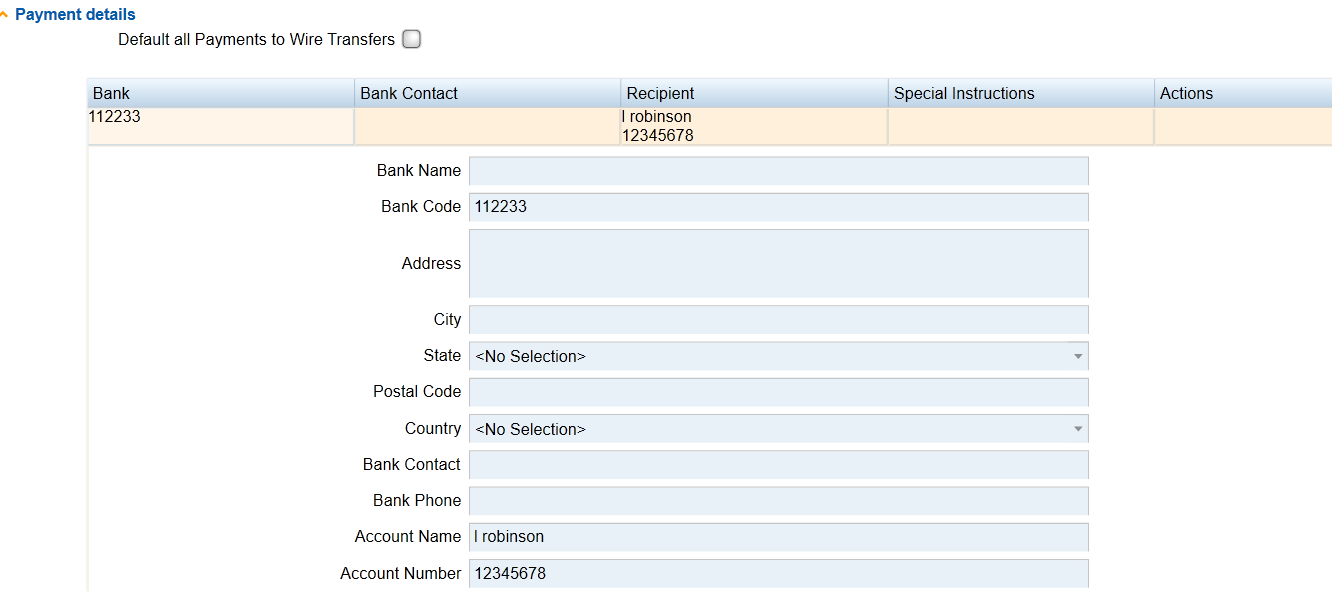 0
0 -
@Justin Finighan buzzacott gave us a solution of what we needed - (Activities.Type_ID = 6860 AND Activities.Done_Date BETWEEN N'01/04/2021' AND N'03/31/2022' AND Requests.Wire_Transfer_Flag = 0)
Thanks very much though
1 -
Another idea to consider -
Your administrator can also use Blueprint to display those bank detail fields on the Requirement record - so you can see if they have been completed.
You wouldn't be able to edit those Request fields whilst viewing the Requirement, those fields would be greyed out, but you could at least quickly do an easy visual check.
1 -
Thanks Kim - Thats an excellent idea, i could build a blueprint form that only the finance team can see.
0





Categories
- All Categories
- 6 Blackbaud Community Help
- 213 bbcon®
- 1.4K Blackbaud Altru®
- 401 Blackbaud Award Management™ and Blackbaud Stewardship Management™
- 1.1K Blackbaud CRM™ and Blackbaud Internet Solutions™
- 15 donorCentrics®
- 360 Blackbaud eTapestry®
- 2.6K Blackbaud Financial Edge NXT®
- 655 Blackbaud Grantmaking™
- 576 Blackbaud Education Management Solutions for Higher Education
- 3.2K Blackbaud Education Management Solutions for K-12 Schools
- 939 Blackbaud Luminate Online® and Blackbaud TeamRaiser®
- 84 JustGiving® from Blackbaud®
- 6.6K Blackbaud Raiser's Edge NXT®
- 3.7K SKY Developer
- 248 ResearchPoint™
- 119 Blackbaud Tuition Management™
- 165 Organizational Best Practices
- 241 Member Lounge (Just for Fun)
- 34 Blackbaud Community Challenges
- 34 PowerUp Challenges
- 3 (Open) PowerUp Challenge: Chat for Blackbaud AI
- 3 (Closed) PowerUp Challenge: Data Health
- 3 (Closed) Raiser's Edge NXT PowerUp Challenge: Product Update Briefing
- 3 (Closed) Raiser's Edge NXT PowerUp Challenge: Standard Reports+
- 3 (Closed) Raiser's Edge NXT PowerUp Challenge: Email Marketing
- 3 (Closed) Raiser's Edge NXT PowerUp Challenge: Gift Management
- 4 (Closed) Raiser's Edge NXT PowerUp Challenge: Event Management
- 3 (Closed) Raiser's Edge NXT PowerUp Challenge: Home Page
- 4 (Closed) Raiser's Edge NXT PowerUp Challenge: Standard Reports
- 4 (Closed) Raiser's Edge NXT PowerUp Challenge: Query
- 791 Community News
- 2.9K Jobs Board
- 53 Blackbaud SKY® Reporting Announcements
- 47 Blackbaud CRM Higher Ed Product Advisory Group (HE PAG)
- 19 Blackbaud CRM Product Advisory Group (BBCRM PAG)