Body of email saved in long notes of document record





When saving an email to SKY, the body of the email goes into the long notes field of the document record. This is very distracting and makes scrolling through the documents cumbersome, especially if it is a long email. Is there a way to turn that option off?
Comments
-
Hi Deena,
There is a setting under the control panel where you can set it to either export the content to the notes field, or attach as a .msg file.
1 - Preferences
2 - Link to Outlook
3 - Storage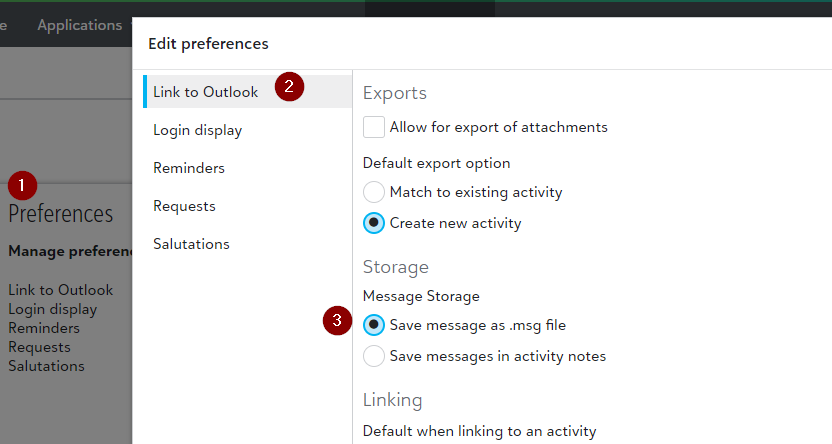 2
2 -
Marc, That's very helpful that this is an option, but I found that this was already my default setting and it has not been working. Has it been working for you?
0 -
I noticed the same thing with my account, Alison. The default is set as Marc describes yet it is not working as expected.
1 -
The way i have been using it is to create a new document and then I drag and drop the email from my Inbox and drop it onto the “choose file/replace file” button and it has been saving the email as a .msg file, for now at least it works.
0 -
I submitted this to case central. That seems like a good work around, Marc, but I don't believe the setting is working as it is meant to and I can't document all of these work arounds for broken settings and errors.
1 -
Marc - We do have the setting to save as a .msg file but it's also adding the body of the email to the long notes.
0 -
I also changed this setting yesterday and thought initially it had worked….. but I have just seen that it hasnt
 0
0










Categories
- All Categories
- 6 Blackbaud Community Help
- 213 bbcon®
- 1.4K Blackbaud Altru®
- 401 Blackbaud Award Management™ and Blackbaud Stewardship Management™
- 1.1K Blackbaud CRM™ and Blackbaud Internet Solutions™
- 15 donorCentrics®
- 360 Blackbaud eTapestry®
- 2.6K Blackbaud Financial Edge NXT®
- 655 Blackbaud Grantmaking™
- 576 Blackbaud Education Management Solutions for Higher Education
- 3.2K Blackbaud Education Management Solutions for K-12 Schools
- 939 Blackbaud Luminate Online® and Blackbaud TeamRaiser®
- 84 JustGiving® from Blackbaud®
- 6.6K Blackbaud Raiser's Edge NXT®
- 3.7K SKY Developer
- 248 ResearchPoint™
- 119 Blackbaud Tuition Management™
- 165 Organizational Best Practices
- 241 Member Lounge (Just for Fun)
- 34 Blackbaud Community Challenges
- 34 PowerUp Challenges
- 3 (Open) PowerUp Challenge: Chat for Blackbaud AI
- 3 (Closed) PowerUp Challenge: Data Health
- 3 (Closed) Raiser's Edge NXT PowerUp Challenge: Product Update Briefing
- 3 (Closed) Raiser's Edge NXT PowerUp Challenge: Standard Reports+
- 3 (Closed) Raiser's Edge NXT PowerUp Challenge: Email Marketing
- 3 (Closed) Raiser's Edge NXT PowerUp Challenge: Gift Management
- 4 (Closed) Raiser's Edge NXT PowerUp Challenge: Event Management
- 3 (Closed) Raiser's Edge NXT PowerUp Challenge: Home Page
- 4 (Closed) Raiser's Edge NXT PowerUp Challenge: Standard Reports
- 4 (Closed) Raiser's Edge NXT PowerUp Challenge: Query
- 791 Community News
- 2.9K Jobs Board
- 53 Blackbaud SKY® Reporting Announcements
- 47 Blackbaud CRM Higher Ed Product Advisory Group (HE PAG)
- 19 Blackbaud CRM Product Advisory Group (BBCRM PAG)