RE User Maintenance





Hi,
Searched forum and didn't see anything about this, so I want to see how everyone is handling:
Staff comes and goes, so my question is how is everyone handle staff leaving org? We only reset the password so they can't login anymore, but kept the user account. This means our list of user continue to accummulate. We don't currently do anything to get rid of user account.
Comments
-
Hi Alex, We have a security profile for inactive users which has no access to the system. In addition, BB suggests adding "zzz" in front of the inactive user's id which will put it at the end of the user list. This works well for us. It keeps the history intact of the inactive user (created query's, exports, and other changes in the system) as well as knowing which users are inactive. Hope this helps.
3 -
We do pretty much the same, although we use Windows Authentication rather than RE logins so we can't change their password in RE but when IT deactivate their Windows account, they won't be able to log in any more. I also move them to a security group called “Inactive Users” which has no rights, so they can't access anything even if IT don't deactivate their account immediately.
3 -
Ditto to @Alan French. Also, if you use NXT, you need to make sure you remove privileges from their NXT settings. And, for any cloud-hosted service, make sure to go into “Admin” (NOT in RE, but in your overall Blackbaud Admin account) under “Users and Admins” and make the user Inactive. This will prevent them from accessing any BB services (training, etc.) under your organization account.
3 -
At my org, we do all of what @Dina Rieman, @Alan French and @Faith Murray said. You can indeed end up with a long list over time, but having all the inactive ones at the bottom because of the ZZZ or XXX allows for ease of use still.
4 -
Just to add to my previous post, I'm glad we don't delete our users as one person left the team and then rejoined a couple of years later. If I'd deleted her RE account, because we use Windows Authentication I'd have had to ask our IT department to set her up with a brand new Windows login rather than just reactivating her old one, since as far as I'm aware it's not possible to reactivate deleted RE users.
3 -
I remove security group(s) from their database view profile. I then go to webview security and remove all roles, and break the link to the database profile. I make them inactive.
I haven't put the ZZZ in front of their id, nor put them into a special security group of Inactives, but I am going to look into those ideas.
2 -
Thank you everyone for your response.
The "zzz" suggestion does help as the list only gets longer.
Blackbaud needs to have ability to inactive RE user (not delete) and checkbox in Admin > Security for "show/hide" inactive.
The only thing I found in idea bank is this: https://community.blackbaud.com/products/raisersedge7/ideas I'm voting2 -
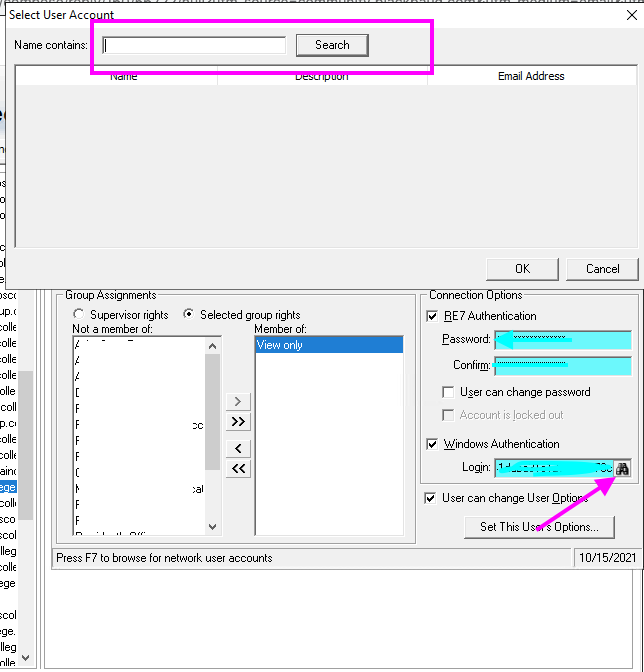
Alan French if a user is deleted and boomerangs back, simply re-invite them to Blackbaud. Create the user in db view, create the user in web view (link to db user). After the invitation is deployed from web view and the user is created in db view, open the user record in db view and click on the binoculars adjacent to the Windows login box. This will open the Select User Account window. If you click on search, the complete list of users populates. You can narrow the results by entering the specific user's email address in the search box. Once you locate the record, select and click OK. This is how you can connect the user to Windows authentication credentials without pestering IT. (This is how it works for RENXT.) ~~~sorry for hijacking the thread.
 1
1













Categories
- All Categories
- 6 Blackbaud Community Help
- 211 bbcon®
- 1.4K Blackbaud Altru®
- 402 Blackbaud Award Management™ and Blackbaud Stewardship Management™
- 1.1K Blackbaud CRM™ and Blackbaud Internet Solutions™
- 15 donorCentrics®
- 360 Blackbaud eTapestry®
- 2.6K Blackbaud Financial Edge NXT®
- 655 Blackbaud Grantmaking™
- 576 Blackbaud Education Management Solutions for Higher Education
- 3.2K Blackbaud Education Management Solutions for K-12 Schools
- 941 Blackbaud Luminate Online® and Blackbaud TeamRaiser®
- 84 JustGiving® from Blackbaud®
- 6.7K Blackbaud Raiser's Edge NXT®
- 3.7K SKY Developer
- 248 ResearchPoint™
- 120 Blackbaud Tuition Management™
- 165 Organizational Best Practices
- 240 Member Lounge (Just for Fun)
- 34 Blackbaud Community Challenges
- 37 PowerUp Challenges
- 3 (Open) PowerUp Challenge: Grid View Batch
- 3 (Closed) PowerUp Challenge: Chat for Blackbaud AI
- 3 (Closed) PowerUp Challenge: Data Health
- 3 (Closed) Raiser's Edge NXT PowerUp Challenge: Product Update Briefing
- 3 (Closed) Raiser's Edge NXT PowerUp Challenge: Standard Reports+
- 3 (Closed) Raiser's Edge NXT PowerUp Challenge: Email Marketing
- 3 (Closed) Raiser's Edge NXT PowerUp Challenge: Gift Management
- 4 (Closed) Raiser's Edge NXT PowerUp Challenge: Event Management
- 3 (Closed) Raiser's Edge NXT PowerUp Challenge: Home Page
- 4 (Closed) Raiser's Edge NXT PowerUp Challenge: Standard Reports
- 4 (Closed) Raiser's Edge NXT PowerUp Challenge: Query
- 796 Community News
- 3K Jobs Board
- 54 Blackbaud SKY® Reporting Announcements
- 47 Blackbaud CRM Higher Ed Product Advisory Group (HE PAG)
- 19 Blackbaud CRM Product Advisory Group (BBCRM PAG)