new seating charts for groups too along with classes





Hi,
We need seating charts in advisories but they are classified as groups in the LMS and only classes are showing the new seating chart capability.
Comments
-
Agreed. I'd also love to see a way for others to view the seating charts. Our Attendance Managers and Nurses are our contact tracers. They need access to the seating charts as well, either via a report or Group Page access. Thanks!
6 -
how do we use the new seating chart capability? I don't see it on my class page or roster.
0 -
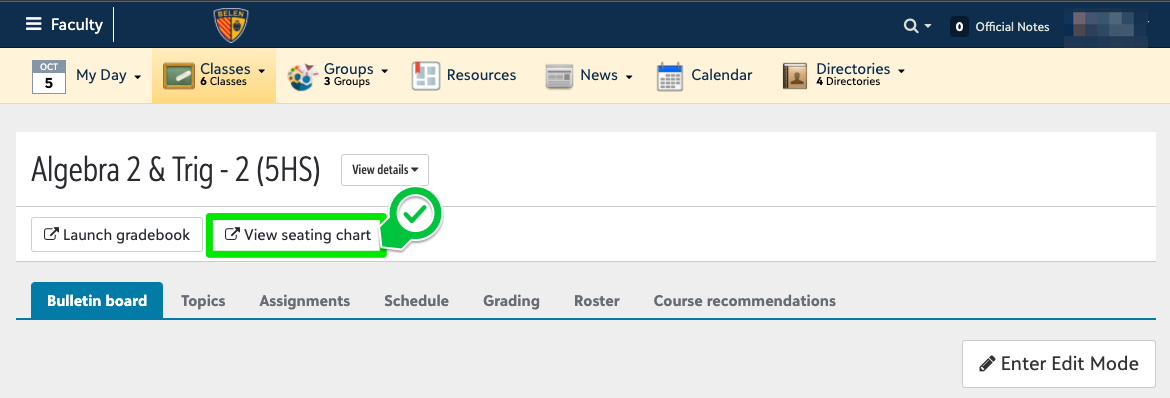
Near the top of the page, below the class name, you should see a new button labeled View seating chart.
 1
1 -
@Nancy Kierstead - a great idea for contact tracing!
2 -
So glad seating charts are now available and would love to see them available for advisories and viewable by others. My one issue is that they feel “backwards” to me. The “Front” is labeled at the top of the screen when I'd much rather have it at the bottom. Generally, a teacher is taking attendance from the front of the room and looking up/out at their class. I would expect the students in the front row of the class to be on the bottom or first row. When I was making a seating chart for my class today, I had to literally turn my head at one point for it to make sense. Am I alone in this? ?
I also noticed that you can get to the seating chart from all the class pages (Bulletin Board, Topics, Roster, etc.) EXCEPT the Assignments page, which is odd….
1 -
Our teachers like the Front being at the top - with our rooms most teachers are at the back or side of the room so they can see the students device screens.0
-
My teachers said the exact same thing! They all wanted the FRONT to be at the bottom of the screen instead of the top.
1 -
My teachers are also loving the new seating chart functionality. I also had four teachers indicate that they always construct their seating chart from the teacher's point of view. Wherever the teacher stands or sits is the “front” and may not necessarily be the front of the room itself. Because of this, the front row for the teacher is always closest to them, so having FRONT labeled in the LMS at the top of the document seems backwards to everyone. Perhaps no label is needed at all and it is assumed that all seating charts are always constructed from the teacher's point of view.
Also, we have a number of classrooms that don't really lend themselves to a grid layout. Some have round tables, others have tables not in a perfect row, so they would love more flexibility to arrange the blank gray squares into their room arrangement first before assigning students to each seat location.
3 -
@Geoffrey Goodfellow I agree that removing the “Front” label would be a good first step! I sent out my weekly email to our teachers right after posting here and immediately had three emails back from teachers commenting on this. Glad to hear I'm not the only one!
1 -
Hi @Megan Day,
It's Elizabeth, one of the Community Managers. I noticed you were having @mention issues,so I @mentioned Geoffrey for you. The platform “simplified” the @mention functionality, instead of writing the full name, you only put the most unusual name (first or last) after the @ and then choose from the list of peeps that pop up. Does that help?
In harmony and I love being a part of watching you all help each other!
Elizabeth
0 -
@Elizabeth Perron Yes, I know how the mention works. It wasn't working earlier this morning for me even after closing out the reply window and trying again. Seems to be fine now.
0 -
Megan Day:
@Elizabeth Perron Yes, I know how the mention works. It wasn't working earlier this morning for me even after closing out the reply window and trying again. Seems to be fine now.
Sorry to assume you didn't know. Glad it is working now!
1













Categories
- All Categories
- 6 Blackbaud Community Help
- 213 bbcon®
- 1.4K Blackbaud Altru®
- 403 Blackbaud Award Management™ and Blackbaud Stewardship Management™
- 1.2K Blackbaud CRM™ and Blackbaud Internet Solutions™
- 15 donorCentrics®
- 360 Blackbaud eTapestry®
- 2.6K Blackbaud Financial Edge NXT®
- 656 Blackbaud Grantmaking™
- 577 Blackbaud Education Management Solutions for Higher Education
- 3.2K Blackbaud Education Management Solutions for K-12 Schools
- 940 Blackbaud Luminate Online® and Blackbaud TeamRaiser®
- 84 JustGiving® from Blackbaud®
- 6.7K Blackbaud Raiser's Edge NXT®
- 3.7K SKY Developer
- 249 ResearchPoint™
- 119 Blackbaud Tuition Management™
- 165 Organizational Best Practices
- 241 Member Lounge (Just for Fun)
- 34 Blackbaud Community Challenges
- 37 PowerUp Challenges
- 3 (Open) PowerUp Challenge: Grid View Batch
- 3 (Closed) PowerUp Challenge: Chat for Blackbaud AI
- 3 (Closed) PowerUp Challenge: Data Health
- 3 (Closed) Raiser's Edge NXT PowerUp Challenge: Product Update Briefing
- 3 (Closed) Raiser's Edge NXT PowerUp Challenge: Standard Reports+
- 3 (Closed) Raiser's Edge NXT PowerUp Challenge: Email Marketing
- 3 (Closed) Raiser's Edge NXT PowerUp Challenge: Gift Management
- 4 (Closed) Raiser's Edge NXT PowerUp Challenge: Event Management
- 3 (Closed) Raiser's Edge NXT PowerUp Challenge: Home Page
- 4 (Closed) Raiser's Edge NXT PowerUp Challenge: Standard Reports
- 4 (Closed) Raiser's Edge NXT PowerUp Challenge: Query
- 796 Community News
- 3K Jobs Board
- 54 Blackbaud SKY® Reporting Announcements
- 47 Blackbaud CRM Higher Ed Product Advisory Group (HE PAG)
- 19 Blackbaud CRM Product Advisory Group (BBCRM PAG)