Queue not running scheduled jobs or not running them at scheduled date and time



We are having problems with queue. The function was working very well, minor hiccups over the last couple years. Beginning of September 2021 it began to fail. Scheduled queues did not run. or did not run at the designated time. We have had the case with support since September but are not getting any information. We have been over our install notes, checked our domain user, checked sql server permissions. The scheduled jobs are export some take upwards of 20 hours to complete. We do not mail any reports from the queue. Looking for someone with experience or can point us to some items to check.
Comments
-
Hi Tim, are you hosted?
1 -
Tim, we are having the same problem. Queue was working find before we merged our databases after our health systems merged. It stopped working after that. And we are hosted. BB hasn't been able to figure out what is wrong so I manually run mine.
0 -
We are not hosted. Our queue runs on a separate machine, with a dedicated user and can see the production database. We have confirmed our setup. This started as a long running export and now in addition to the long running export the queue does not seem to run the scheduled jobs.
0 -
Thanks, so it is not working in hosted either. Our queue runs on a separate machine, with a dedicated user and can see the production database. We have confirmed our setup. This started as a long running export and now in addition to the long running export the queue does not seem to run the scheduled jobs.
0 -
After we converted Database RE/FE to Webview RE NXT/FENXT several years ago we started having issues. I am able to send queue reports by:
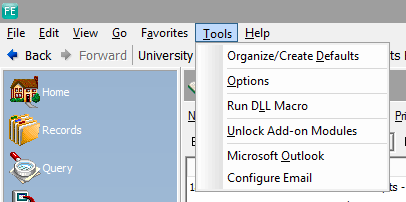
In database view go to Administration and click on Queue. Set up the reports and who you would like them sent to. When ready to send you click on the Queue and run. It may work different for you but for me I have to open FE Outlook by going to Tools Microsoft Outlook before the reports will send.
FE Outlook is the mail server in FE. I have my work Outlook email, but FE also offers an option. In the FE Database View if you click on Tools you should see Microsoft Outlook. There is an option to Configure Email that you may have to do first. This is what I needed to do to make the queue run for us but it may run for you with out this step. If you set up the Queue and run it by pressing the Green Exclamation point you should get the Citrix Receiver Icon (looks like a black circle with three circular lines). Click on that to allow access for (there are several time options). If you do not receive emails from the Queue within 5 minutes you may need to open the FE Microsoft Outlook and send from there.
 1
1 -
We are Azure hosted. Since that switch, some months the monthly queues have run successfully, other months they have not. They have run for some users, not for others. We have ongoing open case with BB support but have not been able to get issue resolved.
Interesting to hear we are not the only org with issues.
0 -
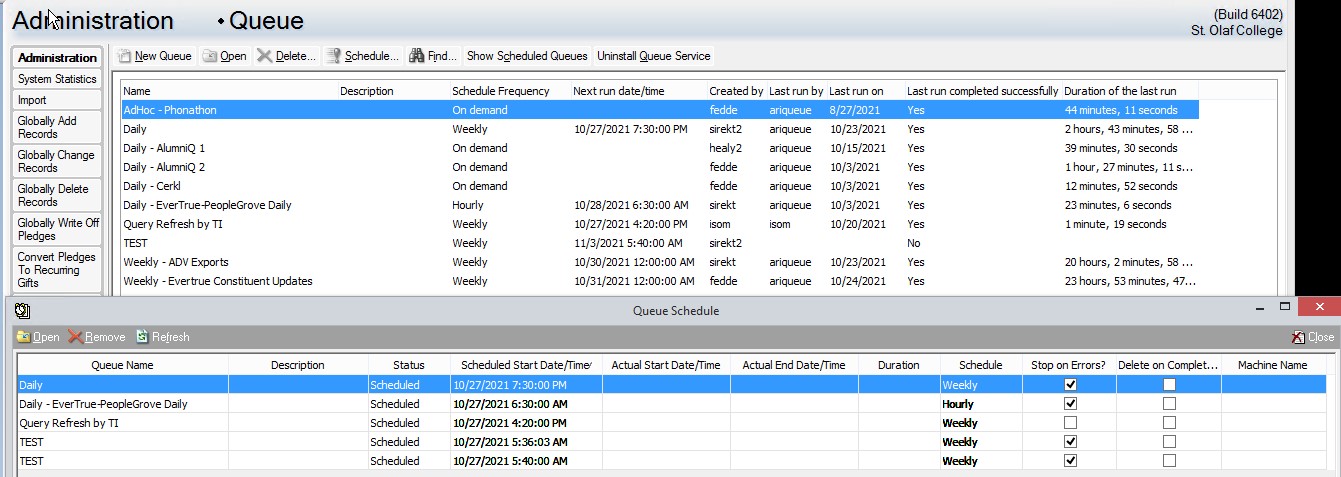
What is showing in the “Show Scheduled Queues” window?
0 -
Here is a current picture
 0
0 -
Thanks. Here are the steps I would take.
- Cancel the Queues that were supposed to run this morning and any others where the start time has already passed. (Not sure what time zone you are in so not sure which queues in the screenshot meet this criteria)
- On the machine (server?) that is running the Queue service, open the Task Manager. Close and end any winword.exe tasks. On the Processes tab close/end the REQueue.exe and ProcessQueue.exe processes.
- In RE, change one of your quick non-20 hour queues to run in ten minutes from ‘now’
- Wait 15 minutes and see if the queue runs.
1 -
Will see what is in the Queue tomorrow morning.
I just got a notice that a queue refresh job ran as scheduled.
We are central time zone.0 -
No we are not hosted. Queue has been working off and on. Having to check almost everyday. Sometimes in task manager we find process queue running, go back over to queue to see what is stuck, but nothing appears to be stuck Go back, end process queue, job will start, very frustrating. Have a log running but the log has so little detail.
0










Categories
- All Categories
- 6 Blackbaud Community Help
- 213 bbcon®
- 1.4K Blackbaud Altru®
- 400 Blackbaud Award Management™ and Blackbaud Stewardship Management™
- 1.1K Blackbaud CRM™ and Blackbaud Internet Solutions™
- 15 donorCentrics®
- 360 Blackbaud eTapestry®
- 2.6K Blackbaud Financial Edge NXT®
- 655 Blackbaud Grantmaking™
- 576 Blackbaud Education Management Solutions for Higher Education
- 3.2K Blackbaud Education Management Solutions for K-12 Schools
- 939 Blackbaud Luminate Online® and Blackbaud TeamRaiser®
- 84 JustGiving® from Blackbaud®
- 6.6K Blackbaud Raiser's Edge NXT®
- 3.7K SKY Developer
- 248 ResearchPoint™
- 119 Blackbaud Tuition Management™
- 165 Organizational Best Practices
- 241 Member Lounge (Just for Fun)
- 34 Blackbaud Community Challenges
- 34 PowerUp Challenges
- 3 (Open) PowerUp Challenge: Chat for Blackbaud AI
- 3 (Closed) PowerUp Challenge: Data Health
- 3 (Closed) Raiser's Edge NXT PowerUp Challenge: Product Update Briefing
- 3 (Closed) Raiser's Edge NXT PowerUp Challenge: Standard Reports+
- 3 (Closed) Raiser's Edge NXT PowerUp Challenge: Email Marketing
- 3 (Closed) Raiser's Edge NXT PowerUp Challenge: Gift Management
- 4 (Closed) Raiser's Edge NXT PowerUp Challenge: Event Management
- 3 (Closed) Raiser's Edge NXT PowerUp Challenge: Home Page
- 4 (Closed) Raiser's Edge NXT PowerUp Challenge: Standard Reports
- 4 (Closed) Raiser's Edge NXT PowerUp Challenge: Query
- 790 Community News
- 2.9K Jobs Board
- 53 Blackbaud SKY® Reporting Announcements
- 47 Blackbaud CRM Higher Ed Product Advisory Group (HE PAG)
- 19 Blackbaud CRM Product Advisory Group (BBCRM PAG)