Report of names and email addresses from web forms e-tickets sales?




How to create a Report of names and email addresses from web forms e-tickets sales?
Thanks
Shane
Comments
-
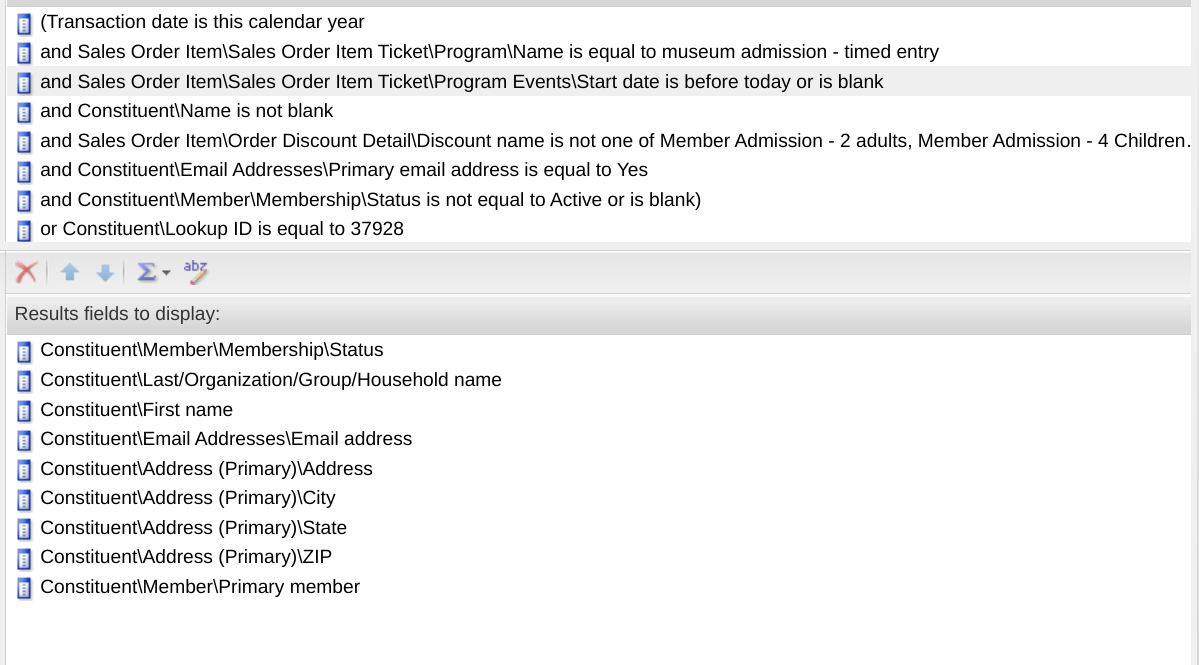
This query pulls data such as you want but you'll want to tweek it to your specific needs. It currently captures non member ticket buyers after their visit date.
 1
1 -
Thank You!
Shane0 -
It is in analysis. Create an ad hoc query using these parameters or knes specific to your needs ( for example, don't include the one omitting members from the output if you want them included.).0
-
oh, this is juicy! thank you!
0 -
Is this a Constituent or Sales Order query? Thanks again
0 -
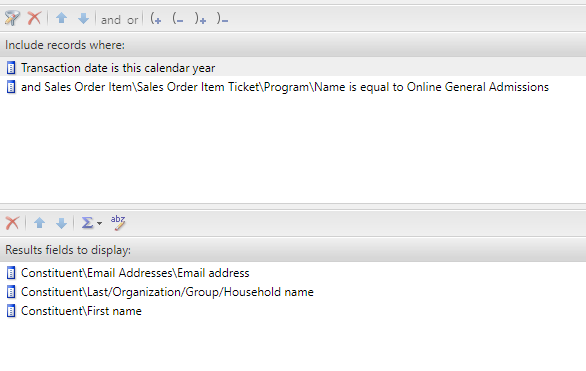
I got this query to give me what I need , but it seems to have duplicate records. I dont know if its because its pully from two different tables (Sales Orders, Constituents)
 0
0 -
It draws data from both, but the main source view is Sales Order
From Menu, choose Analysis, Information Library
Add an Ad-Hoc Query
Source View = Sales Orders
I believe it then has relationships with many other tables you can select from - e.g. Constituents
1 -
Use primary email address rather than just email address. Multiple email addresses may be causing your dupes.1
-
Thanks John, I used Primary Email Address and I get the same results
Shane
0 -
It is weird, you would think that choosing primary email address or the primary anything would then give you just one, but it never works out that way.
0 -
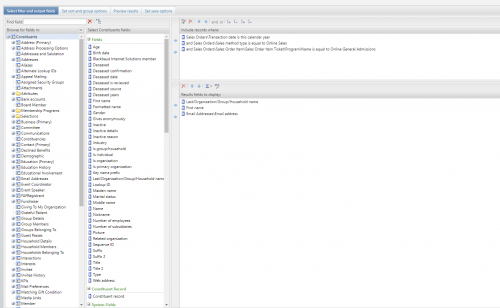
Here is what I ultimately ended up with for the query (see screenshot). Note the starting data source is Constituents and not Sales Orders.
 1
1










Categories
- All Categories
- 6 Blackbaud Community Help
- 213 bbcon®
- 1.4K Blackbaud Altru®
- 403 Blackbaud Award Management™ and Blackbaud Stewardship Management™
- 1.2K Blackbaud CRM™ and Blackbaud Internet Solutions™
- 15 donorCentrics®
- 360 Blackbaud eTapestry®
- 2.6K Blackbaud Financial Edge NXT®
- 656 Blackbaud Grantmaking™
- 577 Blackbaud Education Management Solutions for Higher Education
- 3.2K Blackbaud Education Management Solutions for K-12 Schools
- 940 Blackbaud Luminate Online® and Blackbaud TeamRaiser®
- 84 JustGiving® from Blackbaud®
- 6.7K Blackbaud Raiser's Edge NXT®
- 3.7K SKY Developer
- 249 ResearchPoint™
- 119 Blackbaud Tuition Management™
- 165 Organizational Best Practices
- 241 Member Lounge (Just for Fun)
- 34 Blackbaud Community Challenges
- 37 PowerUp Challenges
- 3 (Open) PowerUp Challenge: Grid View Batch
- 3 (Closed) PowerUp Challenge: Chat for Blackbaud AI
- 3 (Closed) PowerUp Challenge: Data Health
- 3 (Closed) Raiser's Edge NXT PowerUp Challenge: Product Update Briefing
- 3 (Closed) Raiser's Edge NXT PowerUp Challenge: Standard Reports+
- 3 (Closed) Raiser's Edge NXT PowerUp Challenge: Email Marketing
- 3 (Closed) Raiser's Edge NXT PowerUp Challenge: Gift Management
- 4 (Closed) Raiser's Edge NXT PowerUp Challenge: Event Management
- 3 (Closed) Raiser's Edge NXT PowerUp Challenge: Home Page
- 4 (Closed) Raiser's Edge NXT PowerUp Challenge: Standard Reports
- 4 (Closed) Raiser's Edge NXT PowerUp Challenge: Query
- 796 Community News
- 3K Jobs Board
- 54 Blackbaud SKY® Reporting Announcements
- 47 Blackbaud CRM Higher Ed Product Advisory Group (HE PAG)
- 19 Blackbaud CRM Product Advisory Group (BBCRM PAG)