Changes to Gradebook settings





After today's updates of the gradebook, I noticed 2 changes…
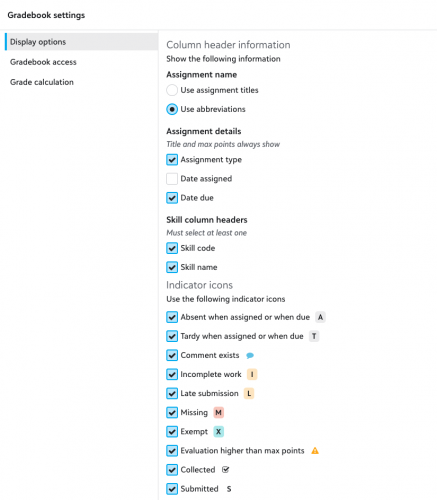
#1 - Under Display options, all the options are listed vertically…so users will have to scroll…scroll…scroll. Below is what I see today:
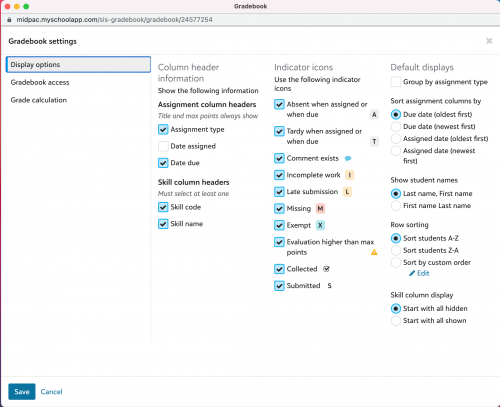
At the beginning of the school year, Display options could be seen all at once - in several columns.
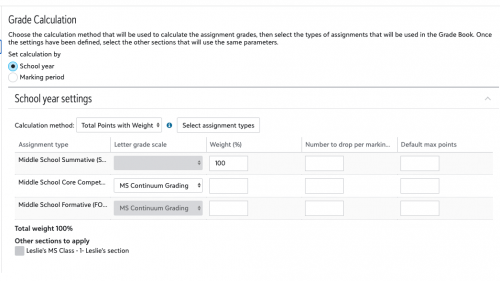
#2 - Grade calculations no longer have Default max points for assignments..? Below is what I now see…
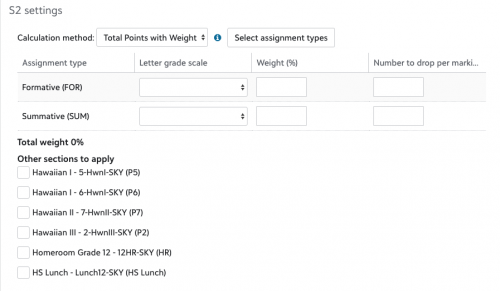
But back in late July, it looked like this:
Just want to make sure I didn't miss an update…
Comments
-
On my computer (Windows 10 with Chrome browser), the Display options are in a single column if the gradebook window is reduced in width. When I make the window wider, the options are shown in three columns. That's typical behavior for “responsive” web design - the layout adjusts based on screen (or browser window) width.
I can't reproduce the problem you're seeing with Default Max points. The field is visible even when I shrink the window to be very narrow.
0 -
Thanks for reaching out! The gradebook should be showing up with three columns as a default – we will work on getting that back in place ASAP.
Regarding max points, we did initially include a max points field in our release that we later rolled back. At this time, default max points are allowed when calculating for a whole school year, but not when calculating by marking period. We subsequently removed the field to reflect the existing functionality, though it is certainly something we can explore as an enhancement request.
0









Categories
- All Categories
- 6 Blackbaud Community Help
- 213 bbcon®
- 1.4K Blackbaud Altru®
- 403 Blackbaud Award Management™ and Blackbaud Stewardship Management™
- 1.1K Blackbaud CRM™ and Blackbaud Internet Solutions™
- 15 donorCentrics®
- 360 Blackbaud eTapestry®
- 2.6K Blackbaud Financial Edge NXT®
- 656 Blackbaud Grantmaking™
- 577 Blackbaud Education Management Solutions for Higher Education
- 3.2K Blackbaud Education Management Solutions for K-12 Schools
- 939 Blackbaud Luminate Online® and Blackbaud TeamRaiser®
- 84 JustGiving® from Blackbaud®
- 6.6K Blackbaud Raiser's Edge NXT®
- 3.7K SKY Developer
- 248 ResearchPoint™
- 119 Blackbaud Tuition Management™
- 165 Organizational Best Practices
- 241 Member Lounge (Just for Fun)
- 34 Blackbaud Community Challenges
- 37 PowerUp Challenges
- 3 (Open) PowerUp Challenge: Grid View Batch
- 3 (Closed) PowerUp Challenge: Chat for Blackbaud AI
- 3 (Closed) PowerUp Challenge: Data Health
- 3 (Closed) Raiser's Edge NXT PowerUp Challenge: Product Update Briefing
- 3 (Closed) Raiser's Edge NXT PowerUp Challenge: Standard Reports+
- 3 (Closed) Raiser's Edge NXT PowerUp Challenge: Email Marketing
- 3 (Closed) Raiser's Edge NXT PowerUp Challenge: Gift Management
- 4 (Closed) Raiser's Edge NXT PowerUp Challenge: Event Management
- 3 (Closed) Raiser's Edge NXT PowerUp Challenge: Home Page
- 4 (Closed) Raiser's Edge NXT PowerUp Challenge: Standard Reports
- 4 (Closed) Raiser's Edge NXT PowerUp Challenge: Query
- 794 Community News
- 2.9K Jobs Board
- 54 Blackbaud SKY® Reporting Announcements
- 47 Blackbaud CRM Higher Ed Product Advisory Group (HE PAG)
- 19 Blackbaud CRM Product Advisory Group (BBCRM PAG)