Sending Automatic Reports




Is there any way to send reports automatically to certain individuals? It seems like a basic function, but I'm having trouble seeing how to do so. Or do I actually have to manually run each report and send it manually?
Comments
-
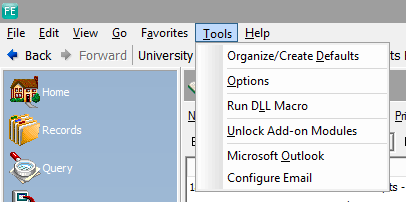
In database view go to Administration and click on Queue. Set up the reports and who you would like them sent to. When ready to send you click on the Queue and run. It may work different for you but for me I have to open FE Outlook by going to Tools Microsoft Outlook before the reports will send.
0 -
Hi Angela, I'm interested in figuring this out as well. What is “FE Outlook”?
0 -
Hi @Sylvia Cook
FE Outlook is the mail server in FE. I have my work Outlook email, but FE also offers an option. In the FE Database View if you click on Tools you should see Microsoft Outlook. There is an option to Configure Email that you may have to do first. This is what I needed to do to make the queue run for us but it may run for you with out this step. If you set up the Queue and run it by pressing the Green Exclamation point you should get the Citrix Receiver Icon (looks like a black circle with three circular lines). Click on that to allow access for (there are several time options). If you do not receive emails from the Queue within 5 minutes you may need to open the FE Microsoft Outlook and send from there.
 0
0 -
Angela!!! We were told that once we converted to NXT and our FE database was in their cloud, the Queue would no longer run. I just followed your steps and it worked! We have been trying to teach staff and volunteers how to log in to NXT as a read only user and run their own reports for almost 2 years without success. I still like that they can access their own reports on demand if they want but we can also start sending out monthly reports again!!
We could never get the Queue to run automatically with our email server back in our FE days so we were used to setting the time and accepting the Outlook prompts to send the reports. My accounting team's next project is to set the Queue back up again and start sending out reports, woohoo! ?
1 -
Hi Angela, Were you able to set these up to email automatically, or do you need to manually run each one?
0 -
Angela, Have you found a workaround for the Report Queue when BB removes Outlook from FE in February? We have been using the Report Queue for years and now (as I understand it) we will have to export each report and email separately in Outlook outside of FE. The Report Queue function will no longer work.
0 -
Has anyone shared a workaround for sending reports automatically when the report queue function ends?
0 -
Jill, we are still looking for a solution as well. I'm hoping someone will respond to your post. No one responded to mine a few weeks ago. We are planning to export reports and use an Excel add-on to assist with the email distribution process.
0















Categories
- All Categories
- 6 Blackbaud Community Help
- 211 bbcon®
- 1.4K Blackbaud Altru®
- 402 Blackbaud Award Management™ and Blackbaud Stewardship Management™
- 1.1K Blackbaud CRM™ and Blackbaud Internet Solutions™
- 15 donorCentrics®
- 360 Blackbaud eTapestry®
- 2.6K Blackbaud Financial Edge NXT®
- 656 Blackbaud Grantmaking™
- 577 Blackbaud Education Management Solutions for Higher Education
- 3.2K Blackbaud Education Management Solutions for K-12 Schools
- 941 Blackbaud Luminate Online® and Blackbaud TeamRaiser®
- 84 JustGiving® from Blackbaud®
- 6.7K Blackbaud Raiser's Edge NXT®
- 3.7K SKY Developer
- 248 ResearchPoint™
- 120 Blackbaud Tuition Management™
- 165 Organizational Best Practices
- 240 Member Lounge (Just for Fun)
- 34 Blackbaud Community Challenges
- 37 PowerUp Challenges
- 3 (Open) PowerUp Challenge: Grid View Batch
- 3 (Closed) PowerUp Challenge: Chat for Blackbaud AI
- 3 (Closed) PowerUp Challenge: Data Health
- 3 (Closed) Raiser's Edge NXT PowerUp Challenge: Product Update Briefing
- 3 (Closed) Raiser's Edge NXT PowerUp Challenge: Standard Reports+
- 3 (Closed) Raiser's Edge NXT PowerUp Challenge: Email Marketing
- 3 (Closed) Raiser's Edge NXT PowerUp Challenge: Gift Management
- 4 (Closed) Raiser's Edge NXT PowerUp Challenge: Event Management
- 3 (Closed) Raiser's Edge NXT PowerUp Challenge: Home Page
- 4 (Closed) Raiser's Edge NXT PowerUp Challenge: Standard Reports
- 4 (Closed) Raiser's Edge NXT PowerUp Challenge: Query
- 796 Community News
- 3K Jobs Board
- 54 Blackbaud SKY® Reporting Announcements
- 47 Blackbaud CRM Higher Ed Product Advisory Group (HE PAG)
- 19 Blackbaud CRM Product Advisory Group (BBCRM PAG)