Decision notifications




We are going paperless this year and want to make our acceptance notifications to families look better than in the past. For instance, we would love to have one email notification of acceptance go out that is on brand with our school's brand standards/marketing, but can't figure out how to get that to work through enrollment management. Is this something that needs to be set up through Core (a certain template) that we can then use in the EM side?
We considered push page but weren't sure how that would work. Any help or advice would be appreciated!
Comments
-
Hi Laura!
You have a number of options when it comes to communicating your decisions. Have you taken any of the Admissions Process classes through Blackbaud University? They're a fantastic resource and a great way to familiarize yourself with all of the options and tools at your disposal in Enrollment Management.
One thing I've seen many schools do is use the Mail Merge Letters as their official, branded notice of acceptance. You can create those letters (along with mailing labels) from Enrollment Management's Communication menu. You can build out your acceptance letter using logos and seals from your Core style settings as well as placeholder fields to personalize the letter. Once generated, the placeholders will populate with the appropriate candidate information.
You can generate these letters and they will be attached to the candidate record. You can then include them as a downloadable piece of the Decision page within Enrollment Management, or send them via snail mail with the generated mailing labels.
You absolutely could use a push page for this purpose, and it would be really up to you organization's preference at that point.
Good luck with your admissions season!
 3
3 -
Thank you Jess! I need to really get going on classes!
We actually have been using the mail merge for our official acceptance letters a few years and love that the logo/crest populates within the letters! In the past we printed and mailed those, along with paper packets full of paper contracts and forms. No more! We are ripping off the bandaid and going all digital (have been spending so many hours trying to figure out digital contracts! That is a whole other set of questions I have! Haha!
We do use our decision tab, which is set up with a welcome video, once their acceptance is published, and the family can print the letter there as well. We call all denied and do not publish.
My main concern right now is how to inject some “spirit hands” into our acceptance notification email (previously sent via our school gmail) out to the family that the student is accepted. For instance, we live in AL and Auburn University and U of A do a great job of sending a fun congratulations email, which also guides the parent/student to click on a link for the next steps. I want to go through onBoard to be able to use a template, so I may have to source code a fun graphic into an official note to jazz up our the way we notify them of their acceptance decision. Will look more into a push page to see if that is somewhere we can add a fun graphic too.
Thanks again!!
2 -
For the past few years, we have been using Pushpages to send out decision notifications. We have separate issues set up for each of the various decision types that are given and they are set to go out to the families within the particular decision groups.
There are definitely some pitfalls to using Pushpages in this manner. Since there isn't a specific student name placeholder and only user name, we have to do an export/import of parent emails and use that to add email contacts or overwrite any personal student emails so that we know the decisions are being received and that they are also personalized with the student name and not the parent.
Additionally, if you have siblings who both received the same decision and letter, only one of them is going to be sent. This obviously creates confusion for parents and students because they didn't receive notification about the other sibling.
I'm looking into the possibility of using Official Notes in place of Pushpages but it seems like there might be some of the same issues.
1 -
Hi @Troy Burki - with Official Notes you have some merge fields available. If you go to Communication > Official Notes & create a template you can add the custom candidate fields to the email.
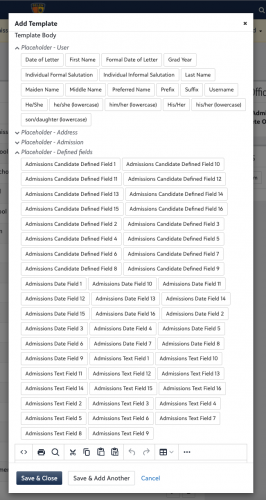 1
1 -
Thank you @Bryan Lorenzo, I was checking out those placeholders but I'm not sure that they would work in this specific case. From my understanding, those fields are pulled from Admissions Options → Custom Candidate Fields and therefore would need to be pre-populated for each candidate record if we were to create a custom text field called ‘student name’ or something like that. Is this the way that those custom fields are utilized within Official Notes or are they pulled from somewhere else?
0 -
Hi @Troy Burki - yes, they have to be added manually to the record at the moment.
I was just giving you a workaround for merge fields in Official Notes since there aren't any available for Push Pages.
0 -
Hi @Troy Burki as of today, January 6, 2022, you can now import custom candidate fields.
"We've added a new import type for Candidate Custom Fields. These are pulled directly from what is defined under Enrollment management, Admissions, Admissions Setup, and Admissions Options."
0










Categories
- All Categories
- 6 Blackbaud Community Help
- 211 bbcon®
- 1.4K Blackbaud Altru®
- 402 Blackbaud Award Management™ and Blackbaud Stewardship Management™
- 1.1K Blackbaud CRM™ and Blackbaud Internet Solutions™
- 15 donorCentrics®
- 360 Blackbaud eTapestry®
- 2.6K Blackbaud Financial Edge NXT®
- 656 Blackbaud Grantmaking™
- 577 Blackbaud Education Management Solutions for Higher Education
- 3.2K Blackbaud Education Management Solutions for K-12 Schools
- 941 Blackbaud Luminate Online® and Blackbaud TeamRaiser®
- 84 JustGiving® from Blackbaud®
- 6.7K Blackbaud Raiser's Edge NXT®
- 3.7K SKY Developer
- 248 ResearchPoint™
- 120 Blackbaud Tuition Management™
- 165 Organizational Best Practices
- 240 Member Lounge (Just for Fun)
- 34 Blackbaud Community Challenges
- 37 PowerUp Challenges
- 3 (Open) PowerUp Challenge: Grid View Batch
- 3 (Closed) PowerUp Challenge: Chat for Blackbaud AI
- 3 (Closed) PowerUp Challenge: Data Health
- 3 (Closed) Raiser's Edge NXT PowerUp Challenge: Product Update Briefing
- 3 (Closed) Raiser's Edge NXT PowerUp Challenge: Standard Reports+
- 3 (Closed) Raiser's Edge NXT PowerUp Challenge: Email Marketing
- 3 (Closed) Raiser's Edge NXT PowerUp Challenge: Gift Management
- 4 (Closed) Raiser's Edge NXT PowerUp Challenge: Event Management
- 3 (Closed) Raiser's Edge NXT PowerUp Challenge: Home Page
- 4 (Closed) Raiser's Edge NXT PowerUp Challenge: Standard Reports
- 4 (Closed) Raiser's Edge NXT PowerUp Challenge: Query
- 796 Community News
- 3K Jobs Board
- 54 Blackbaud SKY® Reporting Announcements
- 47 Blackbaud CRM Higher Ed Product Advisory Group (HE PAG)
- 19 Blackbaud CRM Product Advisory Group (BBCRM PAG)