Now we're losing letters?!
Comments
-
Does anyone know where in the contract this is offered as part of the functionality?
1 -
Not that it will probably make any difference, but I just called our account representative and told him this is ridiculous and they need to fix it. Huge step backwards. He kept blaming on security, but couldn't tell me what the security issue was.
5 -
When I asked my rep about it, he said that they didn't want to divulge what the security issue was in case someone took advantage of it which is understandable. What I'm struggling with is what are the best options to move forward with. If anyone has tips, please let me know
3 -
Patti Posey:
This is really bad. It not only affects all of our acknowledgement letters, but how do we export mailings lists, report and anything else you want to get out of RE. We just moved to NXT over the summer. Had we known this, we probably would have looked at other vendors. Seems blackbaud is going down hill fast!
Patti Posey - Stamford Hospital
Hi Patti. It may not be much reassurance if you have a database full of letters to change over - that still has to be done - but if you are concerned about the Export to Excel options, that does not appear to be going away. Only the options to right click on a grid and quickly open in Excel (which alot of people never used anyway) or do a cross tab report - the things where you are opening Excel within DB view. At first glance it looks like exporting to Excel is going away too, but when I read the documentation more closely it says we can still export to Excel.
3 -
Suzie MacMillan:
Beverly Porzelt:
It's not just the pain of change and set up and it's not just letters. This will double the functions every time we use them. And we use them for membership cards, interoffice communication, mailing lists, custom reports, and other uses besides letters and receipts. It really reduces the flexibility of this product and is very disappointing. Security seems like an excuse for budget.
My assumption is that the Microsoft products in the database are outdated and no longer supported by Microsoft which is a “security” issue - but instead of updating their program they are putting the onus on their customers - this is just an assumption though
I agree. They are focused on developing WebView, and they want DB managers to move their processes over to Power BI and Automate options as well as tapping into the sky API. Both Crystal Reports and MS Word and Excel require the database view. BB is slowly and painfully killing our dependence on database view. Since their goal is to someday kill DB view all together, all the cries of complaint in the world won't change anything.
5 -
I am wondering this same thing.
0 -
Do you have a network at work where you save things or a cloud network, like Google or Office 365? We are a mostly remote org and we use Office 365 SharePoint which is where we save templates like this.
1 -
We have so many restrictions and programs that we edit every single leadership letter by hand because right now, RE can't handle the amount of "variables' we have. If we can't edit the PDF, that is not a solution.
4 -
Hi Everyone. I realize that third-party solutions are not always the answer but ReceipterPro does everything being asked for in this thread! It automatically generates receipts, ack letters, soft credit letters and matching gift acknowledgments. It can print or email (based on donor preference), allows for previewing/editing, generates PDFs, supports unlimited templates (including multilingual), digital signatures, easy re-issues and more. Plus, it has no dependency on Microsoft Office!
Here is a link to the marketplace page for ReceipterPro: https://app.blackbaud.com/marketplace/applications/9dd428d7-342a-4bd7-9dad-529de9bccfa6
5 -
We just started with BB in June and it was a huge lift to move everything out of the clunky manual process we'd been using and into the receipts/acknowledgments process, so I'm really not looking forward to having to move it all back to the old way. Such a pain.
4 -
This video was very interesting and informative. Also interesting, was that once the letters were merged some of the formatting was lost. Bet that will be fun, reformatting each letter here and there…
2 -
Yeah, this is such a backwards step! We have a number of letters between 3 campuses depending on their donation amount.
Now I can't even ask a backup person do receipts easily.
This increases my workload and work-time to get processes done. It's bad enough I already export and reformat GL transmission reports because BB won't fix the double and triple-spacing issue (14 pages instead of 5!).
How about addressing/solving the issues versus increasing end-users' workloads or purchasing a 3rd party application. So annoyed right now.
10 -
I wouldn't care if they killed DB view so long as it was a FULLY re-skinned version of RE7. For instance, you can't add a Gift Subtype in NXT. It's like they made the web version and decided all the functionality of the DB view was going to make it clunky if it was all ported over. Frustrating and less useful.
7 -
Same. We also migrated to RE over the summer and now I'm having buyer's remorse.
0 -
If NXT did what DB view did there wouldn't be an issue, but alas it doesn't. For some reason they throttle the amount of information you can select as merge fields, etc. It's such a headache.
5 -
Salvatore Sciandra:
I wouldn't care if they killed DB view so long as it was a FULLY re-skinned version of RE7. For instance, you can't add a Gift Subtype in NXT. It's like they made the web version and decided all the functionality of the DB view was going to make it clunky if it was all ported over. Frustrating and less useful.
Indeed. This is a major pain point. They are slowly adding more and more, but still so far off from the functionality of DB view for those that need a tool for heavy lifting (database managers) over a pretty, mobile-friendly interface (development staff). Our development staff hardly ever gets into DB view anymore - they love WebView (NXT). It has everything THEY need. Since they often are not the most technical folks (though we sure love their ability to talk to donors) they really don't get why WebView is still mostly useless to DB managers.
8 -
Shawn Steele:
Hi Everyone. I realize that third-party solutions are not always the answer but ReceipterPro does everything being asked for in this thread! It automatically generates receipts, ack letters, soft credit letters and matching gift acknowledgments. It can print or email (based on donor preference), allows for previewing/editing, generates PDFs, supports unlimited templates (including multilingual), digital signatures, easy re-issues and more. Plus, it has no dependency on Microsoft Office!
Here is a link to the marketplace page for ReceipterPro: https://app.blackbaud.com/marketplace/applications/9dd428d7-342a-4bd7-9dad-529de9bccfa6
I just went and looked at their demo video. From the looks of it, there was no way to custom edit letters before they were put out as a pdf. Good pdf editors are an expense many organizations are not willing to take on when they already own MS Office products, and I have not found editing pdfs in Word to work well. So that is a huge negative. If it gave the option to output in Word, not just pdf, I would be more excited about this product.
3 -
While 3rd party apps are nice, it kind of belies the idea of Blackbaud being a one-stop shop for all your CRM needs. I think once Google starts making a suite of products for Constituent record management the writing will be on the wall.
6 -
Hi Sandra,
Its probably not in the quick demo on YouTube, but you can click the ‘Edit Mode’ button and make on screen edits to any document before processing.
Shawn
3 -
Agreed. Have you ever noticed how many of the Knowledgebase articles result in a 404 Error? It's a pain.
3 -
I had the same thought.
1 -
OMG - what a crock of beans!! We are a very small dept - and I am the only RE user. Do you have any idea how long it will take me to generate thank you/acknowledgement letters??? I have actually timed how long it normally takes me to generate a letter from opening the const. gift record to printing the envelope -it now takes almost 4 minutes a letter. Now how long will that take?? I don't have any minions to do this for me. For a small team, we have on average over 600 donors just for the Annual Fund, now in Tributes and Event thank you's!! Way to go RE - and the solution is to just buy another “marketplace” product? WTF
3 -
Security issue?? My behind!! Try being honest BB and just say you don't want to pay Microsoft anymore --what you feel like MS is gouging you - now you know how it feels BB!!!!!!!
3 -
Security? It's always about the $$ BB.
3 -
Sharon Yokelson:
OMG - what a crock of beans!! We are a very small dept - and I am the only RE user. Do you have any idea how long it will take me to generate thank you/acknowledgement letters??? I have actually timed how long it normally takes me to generate a letter from opening the const. gift record to printing the envelope -it now takes almost 4 minutes a letter. Now how long will that take?? I don't have any minions to do this for me. For a small team, we have on average over 600 donors just for the Annual Fund, now in Tributes and Event thank you's!! Way to go RE - and the solution is to just buy another “marketplace” product? WTF
Sharon, I can relate. There are three in my department… the director whose contact with NXT is REALLY minimal, the marketing/events person who has a little more contact with RE and me…. the database person….. and I am scheduled to have knee replacement surgery first week of February….. Right now I'm working on one batch that has holiday, pledge payments, memorials, regular donations and last of the Giving Tuesday letters…… In January add to that my in-kinds and volunteer acknowledgements. AND did I mention we have basic Excel and Word…which I've been able to tweek based on a few videos I've come across…... but there is no “shared drive”, only Google Docs which I've been trying to test for merges and about ready to scream because it just doesn't have the functionality. Whatever direction I go with will have to be one that I think #2 coworker can handle…..
3 -
Shawn Steele:
Hi Sandra,
Its probably not in the quick demo on YouTube, but you can click the ‘Edit Mode’ button and make on screen edits to any document before processing.
Shawn
Thanks Shawn. This is good to know. Makes it a much more viable solution.
Of course, what I fear Blackbaud may have lost site of, is that RE itself is a very expensive product. Most organizations have budgets they must adhere to, and Philanthropic organizations also have the additional responsibility to keep expense ratios low so donors know their money is not all spent on administrative costs, and some is actually making it to the cause they wanted to support.
This means that add-ons, after paying for RE, may just not be viable option no matter how great they are. If an organization has to do outside mail merges anyway, they may just look to any one of a number of products that cost far less that export data for mail merges. RE's “everything in one place for one price” toolbox is one of the reasons folks are willing to pay premium. Take away that, and there are any number of competitors that can manage data and spit it out. I'm not sure they will be able to keep their edge when they eliminate the extra tools in DB view completely without replacing them in Webview/NXT, and just rely on being another pretty cloud based database product with limited functionality. Time will tell I guess!
5 -
Sandra Moore:
Thanks Shawn. This is good to know. Makes it a much more viable solution.
Of course, what I fear Blackbaud may have lost site of, is that RE itself is a very expensive product. Most organizations have budgets they must adhere to, and Philanthropic organizations also have the additional responsibility to keep expense ratios low so donors know their money is not all spent on administrative costs, and some is actually making it to the cause they wanted to support.
This means that add-ons, after paying for RE, may just not be viable option no matter how great they are. If an organization has to do outside mail merges anyway, they may just look to any one of a number of products that cost far less that export data for mail merges. RE's “everything in one place for one price” toolbox is one of the reasons folks are willing to pay premium. Take away that, and there are any number of competitors that can manage data and spit it out. I'm not sure they will be able to keep their edge when they eliminate the extra tools in DB view completely without replacing them in Webview/NXT, and just rely on being another pretty cloud based database product with limited functionality. Time will tell I guess!
THIS. All this.
NXT is next to useless for me and taking away functionality hamstrings me, a data management and gift recording position.
1 -
Does anyone know how to get around the address block issue? We use foreign addresses mixed with US. I cannot imagine formatting all the foreign addresses ourselves, especially in a merge document. Plus “fixing” every address. I hope I'm missing something!
1 -
Beverly Porzelt:
Does anyone know how to get around the address block issue?As long as you export enough of the merge fields, you shouldn't have a problem … though I would still give a scan of the address blocks before printing as general principle.
For example, our current address block uses the following merge fields:
«Addressee»
«Soft_credit_recipient_1»
«Organization_Name»
«Address_line_1»
«Address_line_2»
«City», «State» «ZIP_Code»
«Country»If you include the additional Address_line fields (3,4,5) from the “Fields to Export” selection (then edit your template/s), that will export those lines but will not print them or leave blank lines once merged for the final product.
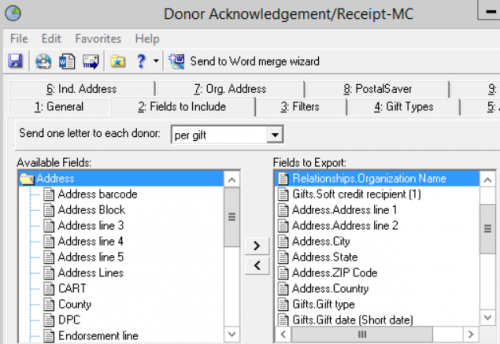
Alternately, you could use Address_block or Address_lines, but I believe it would put the entire address in one Excel cell vs. a line per cell.
Hope that helps.
1 -
Thank you, but my problem is with foreign addresses. They have different formats, rather than city state zip. It would be a lot of variations to account for in every mail merge. Blackbaud handled that pretty well, but now?
1



















Categories
- All Categories
- 6 Blackbaud Community Help
- 211 bbcon®
- 1.4K Blackbaud Altru®
- 403 Blackbaud Award Management™ and Blackbaud Stewardship Management™
- 1.2K Blackbaud CRM™ and Blackbaud Internet Solutions™
- 15 donorCentrics®
- 360 Blackbaud eTapestry®
- 2.6K Blackbaud Financial Edge NXT®
- 659 Blackbaud Grantmaking™
- 579 Blackbaud Education Management Solutions for Higher Education
- 3.2K Blackbaud Education Management Solutions for K-12 Schools
- 943 Blackbaud Luminate Online® and Blackbaud TeamRaiser®
- 84 JustGiving® from Blackbaud®
- 6.7K Blackbaud Raiser's Edge NXT®
- 3.8K SKY Developer
- 250 ResearchPoint™
- 120 Blackbaud Tuition Management™
- 165 Organizational Best Practices
- 241 Member Lounge (Just for Fun)
- 36 Blackbaud Community Challenges
- 37 PowerUp Challenges
- 3 (Open) PowerUp Challenge: Grid View Batch
- 3 (Closed) PowerUp Challenge: Chat for Blackbaud AI
- 3 (Closed) PowerUp Challenge: Data Health
- 3 (Closed) Raiser's Edge NXT PowerUp Challenge: Product Update Briefing
- 3 (Closed) Raiser's Edge NXT PowerUp Challenge: Standard Reports+
- 3 (Closed) Raiser's Edge NXT PowerUp Challenge: Email Marketing
- 3 (Closed) Raiser's Edge NXT PowerUp Challenge: Gift Management
- 4 (Closed) Raiser's Edge NXT PowerUp Challenge: Event Management
- 3 (Closed) Raiser's Edge NXT PowerUp Challenge: Home Page
- 4 (Closed) Raiser's Edge NXT PowerUp Challenge: Standard Reports
- 4 (Closed) Raiser's Edge NXT PowerUp Challenge: Query
- 798 Community News
- 3K Jobs Board
- 56 Blackbaud SKY® Reporting Announcements
- 47 Blackbaud CRM Higher Ed Product Advisory Group (HE PAG)
- 19 Blackbaud CRM Product Advisory Group (BBCRM PAG)