Adding BBID to new parents





We process admissions information in an external program (Ravenna) and new families are pulled in to Enrollment Management at the point of offer of admission. What is the best way to get these new families on BBID? I REALLY want to start them out with it instead of having them do it one way and then have to switch in July. I appreciate any advice or insight you can provide!
Comments
-
Hi - once you have your families in Blackbaud you can invite them to get a BBID. When they come over from Ravanna what role do they have? Are they already incoming students?
1 -
Once you import your candidate families into enrollment management, you can go to Core under the Security menu and select “BBID Authentication." Then go to the “unregistered” tab, select all of your new families, and click “connect” at the bottom of the screen. This will allow you to connect everyone in bulk!
4 -
Thank you Jess! That seems just about as simple and painless a process within the system as I could ask for! Messaging around it and dealing with those who don't have an email that works with BBID is another matter…
1 -
I believe they are candidates and parents of candidates, but I will need to confirm with Admissions.
0 -
@Lauren Henderson - if they come over are parents of candidates you will have the setting in Enrollment Management > Admissions > Blackbaud ID authentication. This will automatically filter to candidates, parents of candidates, incoming students, and parents of incoming students.(you also have the option in Core > Security > BBID Authentication depending on your permissions but this is all users in the system you do have the option to filter by role here a well.)
I would suggest exporting the parents from Ravanna before adding them to BB just to check for duplicate emails and removing that email from 1 parent. Every parent needs a unique email for BBID.
2 -
@Bryan Lorenzo That is even cleaner!
I will need to do it for existing parents as well, but that's a separate issue.
0 -
If we bulk connect the new/ existing parents, will they receive the BBID invitation email? I know for one-off connection, we have the choice to send the email or not.
0 -
A box will pop up to ask if you want to send an invite. Select yes and send. super easy!
2 -
Does anyone know how the appearance of the Create an Account page changes after the “BBID Opt-in” toggle is selected? I'm afraid to turn it on, not knowing if I'll be able to turn it back off!
0 -
Hi @Laura Forshay - if you have BBID enabled under Enrollment management > Admissions set up > Application forms > BBID Opt-In. The only difference on the account creation page is that instead of “Your Username or Email” they see “Your Login Email”.
When you have BBID enabled after the parents create an account they will get an email to finish setting up the BBID account. You can adjust the email notification verbiage by going to Enrollment management > Communication > Notifications >EMS User Invited to BBID.
You can read more on BBID for EMS here https://community.blackbaud.com/forums/viewtopic/296/56661
NON BBID
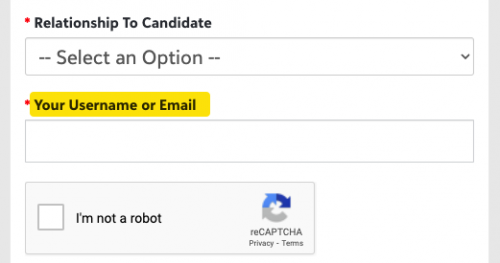
BBID
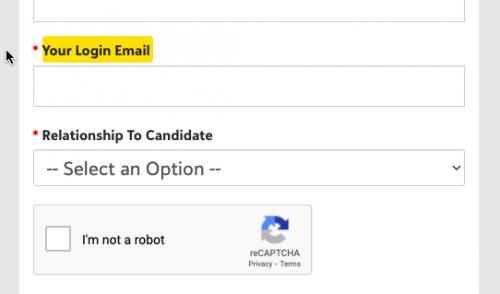 1
1 -
Ah, got it. Thanks so much, Bryan!
0











Categories
- All Categories
- 6 Blackbaud Community Help
- 213 bbcon®
- 1.4K Blackbaud Altru®
- 403 Blackbaud Award Management™ and Blackbaud Stewardship Management™
- 1.2K Blackbaud CRM™ and Blackbaud Internet Solutions™
- 15 donorCentrics®
- 360 Blackbaud eTapestry®
- 2.6K Blackbaud Financial Edge NXT®
- 656 Blackbaud Grantmaking™
- 577 Blackbaud Education Management Solutions for Higher Education
- 3.2K Blackbaud Education Management Solutions for K-12 Schools
- 940 Blackbaud Luminate Online® and Blackbaud TeamRaiser®
- 84 JustGiving® from Blackbaud®
- 6.7K Blackbaud Raiser's Edge NXT®
- 3.7K SKY Developer
- 249 ResearchPoint™
- 119 Blackbaud Tuition Management™
- 165 Organizational Best Practices
- 241 Member Lounge (Just for Fun)
- 34 Blackbaud Community Challenges
- 37 PowerUp Challenges
- 3 (Open) PowerUp Challenge: Grid View Batch
- 3 (Closed) PowerUp Challenge: Chat for Blackbaud AI
- 3 (Closed) PowerUp Challenge: Data Health
- 3 (Closed) Raiser's Edge NXT PowerUp Challenge: Product Update Briefing
- 3 (Closed) Raiser's Edge NXT PowerUp Challenge: Standard Reports+
- 3 (Closed) Raiser's Edge NXT PowerUp Challenge: Email Marketing
- 3 (Closed) Raiser's Edge NXT PowerUp Challenge: Gift Management
- 4 (Closed) Raiser's Edge NXT PowerUp Challenge: Event Management
- 3 (Closed) Raiser's Edge NXT PowerUp Challenge: Home Page
- 4 (Closed) Raiser's Edge NXT PowerUp Challenge: Standard Reports
- 4 (Closed) Raiser's Edge NXT PowerUp Challenge: Query
- 796 Community News
- 3K Jobs Board
- 54 Blackbaud SKY® Reporting Announcements
- 47 Blackbaud CRM Higher Ed Product Advisory Group (HE PAG)
- 19 Blackbaud CRM Product Advisory Group (BBCRM PAG)