Now we're losing letters?!
Comments
-
Yes, that is my understanding. If you have Office 365, though, you can create an NXT workaround using Power Automate. Haven't tried it yet but am planning to set this up at our org:
0 -
Aw, man--I do the right click > Export grid to Excel all the time! ?
0 -
They've told me export is not going away, only mailmerge to word
0 -
This is true. Anything that launches the Microsoft application is going away. The MAIL application is not going away. You can use Export within the MAIL application of RE.
0 -
I have not had a chance to try an actual foreign address. The first time I tried the address block, by inserting what you said before, it looked good, it separated the lines of address properly. This is a crazy time of year, and still working on other stuff right now.
0 -
I thought labels will still be available, export to pdf or csv
0 -
If we are loosing all real & practical functionality of the Mail Module, 3rd party vendors should be paid for by BB, not us. We have asked our sales rep this and they are getting us the “numbers” of what each option would cost and I will share that here. They said there is no “plan” for anything to replace the Mail Module nor provide this functionality in NXT. I was frankly shocked. I brought up that our previous CRM LGL (which largely was awful) had a fully integrated letters module that worked remarkably well. Why couldn't BB acquire this technology, or buy one of these third part vendors?
I don't know how on earth we will budget for this, but BB must consider offsetting the third party vendor cost, or acquiring one of these apps for its customers as they are not seemingly developing anything. It's only fair since the are cutting off our legs to at least give us crutches to hobble forward on…!
2 -
You do not need a third party vendor. You can still use MAIL and Export. Create a conditional merge within Word and then merge. It will most likely process faster then from RE. MAIL will still mark as Acknowledged. The only thing going away is the Microsoft application. Anything that launches in Microsoft is going away, not the application of MAIL. Please view this https://youtu.be/ro86FSjcQYU
4 -
You can also look at Bill Connors' whitepaper http://billconnors.com/msinhosting/?fbclid=IwAR0Vd4OZoGNzm1ee8uMaqgkJcP1gddwmMc_5fk8S5_EpxYcaVY0QME9YIvE or the Blackbaud resource page https://www.blackbaud.com/hosting-integration-update-resources?utm_source=community.blackbaud.com&utm_medium=email&utm_campaign=website
4 -
I utilized Bill's post and the youtube video mentioned in the next post, both valuable resources. A bit time consuming to save letters and set up the main template with the letter paths - yet done and easy merge. Super glad I took time to set this up prior to the Feb 28 deadline.
0 -
I literally timed a recent export and it took 3x longer with the manual conditional mail merge (which I am very adept at, and did before BB). We have 12 separate letters, including Memberships. This is not a good "solution" for us, it is a huge problem.
2 -
Depending on the merge you can do things via PowerAutomate and APIs etc. to alleviate timing issues. You can for instance queue up receipt letters as gifts are added - adding the receipt merge to a waiting document that you can then process once a week/month etc.
Annual Statements are a bit more of an issue as they can't be trickle fed and have to run at once but again the APIs can be quite quick there if you are not too complex on the merge requirements.
Anyway, happy to discuss if you wish to do so further (just PM me). The trickle feed into a doc to speed things up works very well basically.
0 -
For anyone that hasn't seen it yet, the tool to mass export all of your letters from RE is ready:
4 -
Wow, when did this get done? Better late than never I guess. Thank you Suzie for posting the link!!!
0 -
Beverly Porzelt:
Wow, when did this get done? Better late than never I guess
I didn't even get a notification from BB, an RE consultant that I'm subscribed to their newsletters sent out the info…thanks BB….
It worked really well, I have all of our letters out of RE now and a ton less anxiety
 1
1 -
Thank you for posting this Suzie. All my letters have now been exported in one simple step. Now to figure out the next steps.
1 -
Do we know if they will develop one for the parameter files too?
0 -
Yes, a lot less anxiety! But we still need to hook them all up…
0 -
Formatting? Thanks to Suzie's recent post, I was able to export all 24 ack letters in from RE. I created the conditional merge document in Word and successfully completed the merge outside of RE. BUT…..the formatting is totally “wonky”. Does anyone know how to fix this?
0 -
Peggy Gibbs:
Formatting? Thanks to Suzie's recent post, I was able to export all 24 ack letters in from RE. I created the conditional merge document in Word and successfully completed the merge outside of RE. BUT…..the formatting is totally “wonky”. Does anyone know how to fix this?
The word docs out of RE are usually an older version of word, one, I made sure autosave was off, and then when I saved one of the exported word docs, I either saved it as the same older version of word or if I saved it as a newer version I made sure to select “maintain compatibility with previous versions of word” and I found that kept the formatting the same (when I saved as a newer version of word without doing that it totally wrecked my formatting)
2 -
Suzie MacMillan: Thank you! I will try this tomorrow. I appreciate your help! Thank you.
Peggy Gibbs:
Formatting? Thanks to Suzie's recent post, I was able to export all 24 ack letters in from RE. I created the conditional merge document in Word and successfully completed the merge outside of RE. BUT…..the formatting is totally “wonky”. Does anyone know how to fix this?
The word docs out of RE are usually an older version of word, one, I made sure autosave was off, and then when I saved one of the exported word docs, I either saved it as the same older version of word or if I saved it as a newer version I made sure to select “maintain compatibility with previous versions of word” and I found that kept the formatting the same (when I saved as a newer version of word without doing that it totally wrecked my formatting)
0 -
Suzie MacMillan: I have been at this since 6 am this morning and chatted with support. Nothing seems to work for me. Can you possibly go step by step as to what you did to achieve success? I am so very frustrated at the moment. I am a 23-year Raiser's Edge user and I have never experienced so much trouble!
Peggy Gibbs:
Formatting? Thanks to Suzie's recent post, I was able to export all 24 ack letters in from RE. I created the conditional merge document in Word and successfully completed the merge outside of RE. BUT…..the formatting is totally “wonky”. Does anyone know how to fix this?
The word docs out of RE are usually an older version of word, one, I made sure autosave was off, and then when I saved one of the exported word docs, I either saved it as the same older version of word or if I saved it as a newer version I made sure to select “maintain compatibility with previous versions of word” and I found that kept the formatting the same (when I saved as a newer version of word without doing that it totally wrecked my formatting)
0 -
Be aware everyone. BB has started making changes already. Patch 27 changed membership cards, renewals, and receipts, that I am aware of. Reference https://kb.blackbaud.com/knowledgebase/articles/Article/198472. You need to perform the mass export if you haven't already to use these mail functions. I was told "From now on, to process mail merges, you'll need to use the "Word Merge Document Exporter" https://kb.blackbaud.com/knowledgebase/articles/Article/198463 (in the article you'll find a video that will guide you on how to use this solution."
2 -
I know this has been really stressful for folks so I'm sharing the Export template, Word Merge template with nested IF statments, and instructions that I've developed for our organization. This is customized to our organization (especially the car donation stuff) but I think it's universal enough to give folks a starting point to work from. Basically it is ONE single Export and Word Merge for a variety of different gifts (designated to a specific Campaign, Tribute, Benefits, Gift In-Kind, Individual, Org with or without Contacts) using the same “anchor” copy. My hope is that you can use ALT + F9 to flip between View Field Codes and text in the Merge Template and update the codes/copy in a way that will work for you if you're struggling. Hang in there pals, and please feel free to repost to other places in Community if more appropriate!
Multiconditional Merge Export Template.xlsx
14 -
Rachel, you deserve a Community Award of some kind! Thank you!
2 -
Aldera Chisholm:
Rachel, you deserve a Community Award of some kind! Thank you!Honestly, I was surprised I hadn't seen anything posted sooner! So glad it's helpful.
2 -
Thanks so much Rachel
0 -
Hi Rachel,
Thank you so much for creating these instructions! I just have one question (so far). I clicked on “Export” in Raiser's Edge and I didn't see “Multiconditional Merge Export” as an option. Could you let me know what I could be missing? Thanks.
Michael
0 -
Michael Catrino:
Hi Rachel,
Thank you so much for creating these instructions! I just have one question (so far). I clicked on “Export” in Raiser's Edge and I didn't see “Multiconditional Merge Export” as an option. Could you let me know what I could be missing? Thanks.
Michael
Hi Michael - if you haven't found the answer to your question yet, hope I can be of help.
I'm not exactly certain if you are looking to work with your letter data, or with letters themselves that have already been built in RE that need to be moved out.
If just data, the Export option for this is the in the lower right corner of the first tab of a mail object, print screen here:
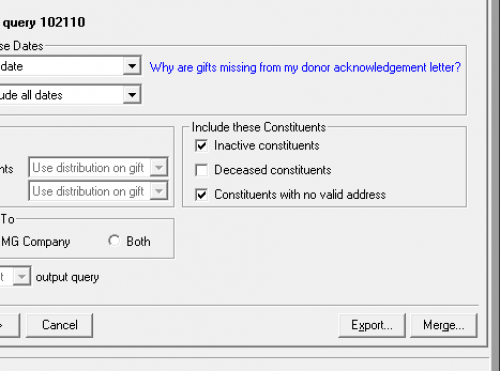
If you are looking to export your actual letters in one fell swoop, that tool is at the bottom of your tools list as shown here: (See bottom option - Word Merge Document Exporter)

If you have not yet done so, be sure to reference the documentation you access using the “click here” link in the notification bar at the top of your Citrix Access screen. Hope it goes well for you!
0 -
Hi @Michael Catrino, you will have to create a new Gift Export in your RE Database and add the specific outputs that I've included in the “Multiconditional Mail Merge” sample Excel file to create an export that will work with the sample Word file I shared. Unlike with Reports where there are a lot of “canned” ones that come with RE, Exports generally need to be created from scratch. Good news is that you only have to set it up once!
0





























Categories
- All Categories
- 6 Blackbaud Community Help
- 211 bbcon®
- 1.4K Blackbaud Altru®
- 403 Blackbaud Award Management™ and Blackbaud Stewardship Management™
- 1.2K Blackbaud CRM™ and Blackbaud Internet Solutions™
- 15 donorCentrics®
- 360 Blackbaud eTapestry®
- 2.6K Blackbaud Financial Edge NXT®
- 659 Blackbaud Grantmaking™
- 579 Blackbaud Education Management Solutions for Higher Education
- 3.2K Blackbaud Education Management Solutions for K-12 Schools
- 943 Blackbaud Luminate Online® and Blackbaud TeamRaiser®
- 84 JustGiving® from Blackbaud®
- 6.7K Blackbaud Raiser's Edge NXT®
- 3.8K SKY Developer
- 250 ResearchPoint™
- 120 Blackbaud Tuition Management™
- 165 Organizational Best Practices
- 241 Member Lounge (Just for Fun)
- 36 Blackbaud Community Challenges
- 37 PowerUp Challenges
- 3 (Open) PowerUp Challenge: Grid View Batch
- 3 (Closed) PowerUp Challenge: Chat for Blackbaud AI
- 3 (Closed) PowerUp Challenge: Data Health
- 3 (Closed) Raiser's Edge NXT PowerUp Challenge: Product Update Briefing
- 3 (Closed) Raiser's Edge NXT PowerUp Challenge: Standard Reports+
- 3 (Closed) Raiser's Edge NXT PowerUp Challenge: Email Marketing
- 3 (Closed) Raiser's Edge NXT PowerUp Challenge: Gift Management
- 4 (Closed) Raiser's Edge NXT PowerUp Challenge: Event Management
- 3 (Closed) Raiser's Edge NXT PowerUp Challenge: Home Page
- 4 (Closed) Raiser's Edge NXT PowerUp Challenge: Standard Reports
- 4 (Closed) Raiser's Edge NXT PowerUp Challenge: Query
- 798 Community News
- 3K Jobs Board
- 56 Blackbaud SKY® Reporting Announcements
- 47 Blackbaud CRM Higher Ed Product Advisory Group (HE PAG)
- 19 Blackbaud CRM Product Advisory Group (BBCRM PAG)