Adding new letters after 2/28





Does any know how conditional merge receipting will handle the addition of new letters? If it was discussed, I missed it. Has anyone tested this?
Letter field used on gift record is not a standard table. I seem to be able to add a new letter name without an actual doc in Config > Letters and have it populate as an option. But don't I need a document to specify the fields/data I want merged?
So, will we still be creating a merge doc as we have but just not be able to use it within RE and have to save it externally and add to conditional merge formatting?
This was my 2 a.m. issue last night. LOL
Comments
-
This is the working conditional master merge file we have. We have two main letters that change each month, along with several others that are needed on a regular basis. I do not know yet how NOT to print a page that does not receive a letter (as we have those too-the printer ejects a blank page for those.) The master copy (one of them!) is saved on a drive that multiple people have access to. That way when a letter is written, it can be saved. When another needs to tweak the spacing, they have access, along with the person who generates the letters. Hope this helps!
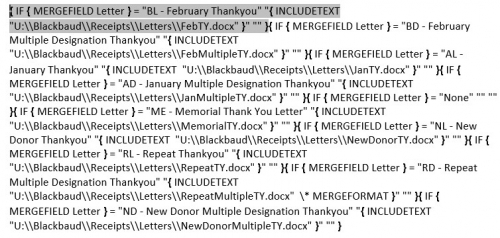
You can see in the path, parts that have the RE format, then you have the path on the shared drive of where the letters are saved. 3 -
JoAnn Strommen:
Does any know how conditional merge receipting will handle the addition of new letters? If it was discussed, I missed it. Has anyone tested this?
Letter field used on gift record is not a standard table. I seem to be able to add a new letter name without an actual doc in Config > Letters and have it populate as an option. But don't I need a document to specify the fields/data I want merged?
So, will we still be creating a merge doc as we have but just not be able to use it within RE and have to save it externally and add to conditional merge formatting?
This was my 2 a.m. issue last night. LOL
@JoAnn Strommen I don't think the data fields matter in the letter anymore, as we will be merging them externally. I think the only time you need to set the fields is in the letter export, which should have all of the fields you need. So basically, you are just adding the name in RE so that your export has the name (ie. “New Letter” in the Letter field), and the actual data in the template. Hopefully, you are just pulling fields that already exist in your regular letter data file.
EDIT: So here's the way the process should work, in essence. Granted, I haven't had the time to test this, but in theory.
- Create new letter type in RE
- Add new letter type to letter export or create a new letter export
- Create letter template externally of RE with the appropriate merge fields.
- Add new letter type to your master merge document.
- Wash, rinse, and repeat until you get it working and formatted correctly.
5 -
@Dariel Dixon is correct - that is exactly how it works. I have probably done this at least 100 times during February, helping clients through the process.
I worry about the long-term maintenance of this just because of the Microsoft Word quirkiness. I encourage people to save the knowledgebase solution and video links, and add their own findings to their internal documentation. It should be very easy to add a letter, specific documentation about how to avoid the random formatting changes should not be ignored.
Most client instances work best when you uncheck the “preserve formatting during updates” box, but I've had a couple work best when it IS checked. Most are working just fine with XLSX formats as well as CSV. Some have spaces in letter names and some don't. Again - includes links to the Blackbaud-created documentation but be very specific in your internal notes about what was DIFFERENT from that documentation and WHY. If you know! :-)
Karen
2 -
Thank you @Dariel Dixon and @Karen Diener. I will just have to see what happens with our capital campaign I know we will be creating new letters and it may mean pulling new fields/info from attributes etc.
Unfortunately, the whole shared drive posts/preserve formatting has not resolved issue for us completely. We're functioning but not in desired manner.
0 -
I'm trying to add a new letter code right now, and the database keeps crashing every time I want to save and close. It wants me to edit the Word document before closing, then it crashes. (Why is this still an option after 2/28?) I've been waiting to get ahold of Support for about 20 minutes now.
What I want to do: I already have a “general” letter code configured. I want to add an “increased gift” letter code to the table so I can build that conditional into the Word template instead of manually adding that language into letters.
This is moderately critical for me because I rely on these letter codes when running the conditional mail merges.
Anyone else have better luck? Am I missing something?
0 -
Cassidy Nogueira:
I'm trying to add a new letter code right now, and the database keeps crashing every time I want to save and close. It wants me to edit the Word document before closing, then it crashes. (Why is this still an option after 2/28?) I've been waiting to get ahold of Support for about 20 minutes now.
What I want to do: I already have a “general” letter code configured. I want to add an “increased gift” letter code to the table so I can build that conditional into the Word template instead of manually adding that language into letters.
This is moderately critical for me because I rely on these letter codes when running the conditional mail merges.
Anyone else have better luck? Am I missing something?
@Cassidy Nogueira You only need to add the letter in config. That's all that's needed to pull the letter code in the export. You don't need to go through the wizard at all.
1 -
This issue happened to me in config.
0 -
That is so odd. I just did it an hour ago, and added a letter code. I just typed in the name and hit save. Is it making you select an export? I don't think it should be a mandatory field.
0 -
It’s making me create an export, and it won’t let me save unless I “edit the Word merge document.” I’m going to try again tomorrow morning. For whatever reason, Raiser‘s Edge has more issues in the afternoon. It’s slower, more glitchy, and I end up force restarting database view (and my computer) multiple times. It seems to be an issue only with my computer in our department…
This tech issue was my final straw today!
1 -
Just confirming that the process worked fine for me just now.
- Go to Config | Letters. I always use “insert” so I can put the letter in the list exactly where I want it. If you click “New” it will end up at the bottom of the table.
- Type the name of the letter and then hit “save and close”.
Karen
1 -
Thank you Dana for the reply and the share.
1













Categories
- All Categories
- 6 Blackbaud Community Help
- 213 bbcon®
- 1.4K Blackbaud Altru®
- 403 Blackbaud Award Management™ and Blackbaud Stewardship Management™
- 1.1K Blackbaud CRM™ and Blackbaud Internet Solutions™
- 15 donorCentrics®
- 360 Blackbaud eTapestry®
- 2.6K Blackbaud Financial Edge NXT®
- 656 Blackbaud Grantmaking™
- 577 Blackbaud Education Management Solutions for Higher Education
- 3.2K Blackbaud Education Management Solutions for K-12 Schools
- 940 Blackbaud Luminate Online® and Blackbaud TeamRaiser®
- 84 JustGiving® from Blackbaud®
- 6.7K Blackbaud Raiser's Edge NXT®
- 3.7K SKY Developer
- 249 ResearchPoint™
- 119 Blackbaud Tuition Management™
- 165 Organizational Best Practices
- 241 Member Lounge (Just for Fun)
- 34 Blackbaud Community Challenges
- 37 PowerUp Challenges
- 3 (Open) PowerUp Challenge: Grid View Batch
- 3 (Closed) PowerUp Challenge: Chat for Blackbaud AI
- 3 (Closed) PowerUp Challenge: Data Health
- 3 (Closed) Raiser's Edge NXT PowerUp Challenge: Product Update Briefing
- 3 (Closed) Raiser's Edge NXT PowerUp Challenge: Standard Reports+
- 3 (Closed) Raiser's Edge NXT PowerUp Challenge: Email Marketing
- 3 (Closed) Raiser's Edge NXT PowerUp Challenge: Gift Management
- 4 (Closed) Raiser's Edge NXT PowerUp Challenge: Event Management
- 3 (Closed) Raiser's Edge NXT PowerUp Challenge: Home Page
- 4 (Closed) Raiser's Edge NXT PowerUp Challenge: Standard Reports
- 4 (Closed) Raiser's Edge NXT PowerUp Challenge: Query
- 796 Community News
- 3K Jobs Board
- 54 Blackbaud SKY® Reporting Announcements
- 47 Blackbaud CRM Higher Ed Product Advisory Group (HE PAG)
- 19 Blackbaud CRM Product Advisory Group (BBCRM PAG)