New Update in the GL Posting Module


Since the new update (updated for me last night) when you click on a JE number to edit it or look at it, previously it would just bring you to the details. Now a separate pop up window slides to the right and then you have to click on “Open Entire Record” to then after that edit it. Seems like a pointless and extra click update. The box that pops up isn't big enough to see the details even if the JE is posted. IMO - not the best update
Comments
-
Hi Liz - Thank you for your feedback!
You can resize the flyout window by dragging the vertical line to cover as much or as little of the screen as you want and that setting is sticky so it will be the same size until you resize it again.
As far as the extra click to view the entire record, I would like to offer a little context here. We removed fly-out as part of a January update and quickly learned that many of our users use the flyout to move thru batches as part of the approval workflow. Removing the fly-out greatly increased the amount of time it took to for users to complete those tasks. In response to feedback, we made the decision to re-release the fly-out while we evaluate options to satisfy those users who need/want the flyout vs those who do not.2 -
Thank you so much for adding this back! I'm sorry it adds an additional click for some users that might not be approvers….but it so reduces the time for the approval process. Dramatically. THANK YOU!!! Thank you for listening to our feedback!
4 -
I don't understand how anyone can approve JE entries on the ‘flyout' I can't even get all the information to show on screen without scrolling back and forth. I expand the flyout all the way left and the credit column is still cut off. I could change my chrome zoom to less then 100% and get more to show but prefer the normal 100%. The column sizing is not sticky on the flyout. Line, Encumbrance, Journal and way too long and don't stay small when I resize. It would be nice to change column ordering also. That would help with having the important data close together for that flyout review. And while I'm making a wish list, how about not limiting the lines shown to 10 at a time. List all the lines so we don't have to click page by page to review, even if it's just on the full record. Thank you for trying to revert some old features back though
 4
4 -
I am so glad the preview window is back! Thank you Blackbaud!
3 -
Hi Melissa,
I know I use the fly out a lot. Not for approving, but when attaching documents, looking for distributions, and other misc. tasks. I was one of the ones who was upset it left. You don't realize how often you use something until it is gone.
Another suggestion, add copy batch to the circle with 3 dots where edit resides. For those who do data entry, that would be a huge time saver.
0 -
Hi Dawn,
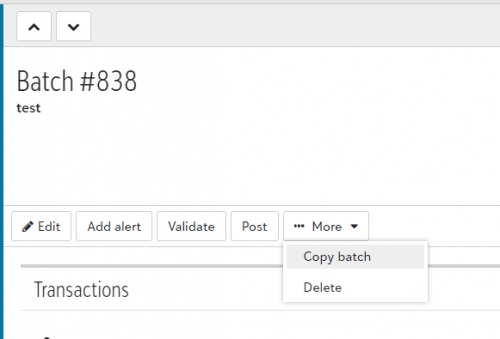
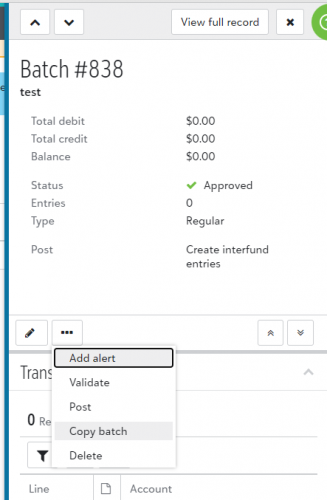
The Copy batch option should be available for you in the flyout. Depending on how far open the fly out is, its either under the three dots or its under the More dropdown. If the option is not displayed for you and you have permissions to Copy batches then something else might be going on that we need to look into.Let me know!
 0
0 -
Hi Melissa,
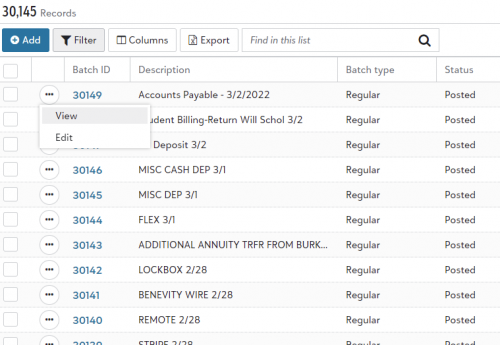
I do know that it is available in the flyout, and have that capability. But since copying a batch is something that I know happens multiple times a day, I don't need the fly out to open to be able to accomplish that. I am asking if on the Journal Entry Screen with all of the journal entries listed, can the option to copy the batch be in that first screen, saving all of us who are entering data a good chunk of time.
I feel like the developers sometimes forget to talk to those who enter all the pretty data others want to look at to see how that should flow.
 0
0 -
My apologies, Dawn - I misunderstood your comment before. Thank you for clarifying! I will take your suggestion of adding the Copy option to the context menu to the team.
1 -
Thanks Melissa!
0













Categories
- All Categories
- 6 Blackbaud Community Help
- 213 bbcon®
- 1.4K Blackbaud Altru®
- 400 Blackbaud Award Management™ and Blackbaud Stewardship Management™
- 1.1K Blackbaud CRM™ and Blackbaud Internet Solutions™
- 15 donorCentrics®
- 360 Blackbaud eTapestry®
- 2.6K Blackbaud Financial Edge NXT®
- 655 Blackbaud Grantmaking™
- 576 Blackbaud Education Management Solutions for Higher Education
- 3.2K Blackbaud Education Management Solutions for K-12 Schools
- 939 Blackbaud Luminate Online® and Blackbaud TeamRaiser®
- 84 JustGiving® from Blackbaud®
- 6.6K Blackbaud Raiser's Edge NXT®
- 3.7K SKY Developer
- 248 ResearchPoint™
- 119 Blackbaud Tuition Management™
- 165 Organizational Best Practices
- 241 Member Lounge (Just for Fun)
- 34 Blackbaud Community Challenges
- 34 PowerUp Challenges
- 3 (Open) PowerUp Challenge: Chat for Blackbaud AI
- 3 (Closed) PowerUp Challenge: Data Health
- 3 (Closed) Raiser's Edge NXT PowerUp Challenge: Product Update Briefing
- 3 (Closed) Raiser's Edge NXT PowerUp Challenge: Standard Reports+
- 3 (Closed) Raiser's Edge NXT PowerUp Challenge: Email Marketing
- 3 (Closed) Raiser's Edge NXT PowerUp Challenge: Gift Management
- 4 (Closed) Raiser's Edge NXT PowerUp Challenge: Event Management
- 3 (Closed) Raiser's Edge NXT PowerUp Challenge: Home Page
- 4 (Closed) Raiser's Edge NXT PowerUp Challenge: Standard Reports
- 4 (Closed) Raiser's Edge NXT PowerUp Challenge: Query
- 790 Community News
- 2.9K Jobs Board
- 53 Blackbaud SKY® Reporting Announcements
- 47 Blackbaud CRM Higher Ed Product Advisory Group (HE PAG)
- 19 Blackbaud CRM Product Advisory Group (BBCRM PAG)