The Great Word Master Merge Swap post





As we all are working toward (hopefully) finishing up your master merge documents for your acknowledgements, we have peers that are still struggling with this. I was hoping maybe we can post up some of the master documents you have that are working, so we can help some of our peers.
Some of us are masters with this, and have extra formatting and switches that do cool stuff. Let's see how this goes…
Comments
-
I am able to duplicate the conditional merge for acknowledgment letters in a Word environment but only if the master document, the one with the “includetext”, is on my local drive. When the master document is saved to our Microsoft One Drive network the merge will not work. In need of some help and assistance.
Steve Walsh
0 -
We have this issue as well, at this point we are just saving the master documents on the person's computer that will be doing the mail merges and are hoping the person doesn't go away for an extended period of time!
0 -
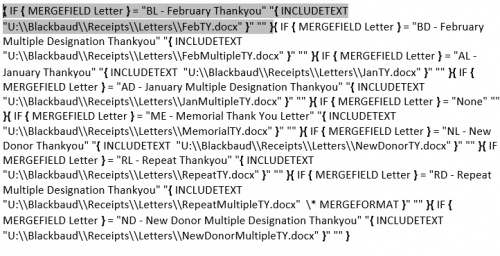
This is the working conditional master merge file we have. We have two main letters that change each month, along with several others that are needed on a regular basis. I do not know yet how NOT to print a page that does not receive a letter. The master copy (one of them!) is saved on a drive that multiple people have access to. That way when a letter is written, it can be saved. When another needs to tweak the spacing, they have access, along with the person who generates the letters. Hope this helps!
 4
4 -
Here are the Export template, Word Merge template with nested IF statments, and instructions that I've developed for our organization. This is customized to our organization (especially the car donation stuff) but I think it's universal enough to give folks a starting point to work from. Basically they are templates to do ONE single Export and Word Merge for a variety of different gifts (designated to a specific Campaign, Tribute, Benefits, Gift In-Kind, Individual, Org with or without Contacts) using the same “anchor” copy. My hope is that you can use ALT + F9 to flip between View Field Codes and text in the Merge Template and update the codes/copy in a way that will work for you if you're struggling. Hang in there pals, and please feel free to repost to other places in Community if more appropriate!
Multiconditional Merge Export Template.xlsx
7 -
I wanted to follow up with this post. Here is a sample of one of the letters I have. It's straightforward for the most part.
If you have any questions, send me a shout.
BTW @Rachel Bailey, how does that CC information for the relationship work in practice? I'm curious if there is a lot of editing afterward with those fields.
1 -
Great question @Dariel Dixon. If more than one Contact (you can prescribe the Types you want to include when you set up your Export) is found for an organization, the Word Merge will generate one single letter for the gift with the first Contact found as the addressee and all subsequent Contacts listed in the Cc: line. The only editing you have to do to make sure each Contact gets a carbon copy is as follows (per the Instructions document I shared):
Multiple Recipients: If an organization gave a gift and has more than one letter recipient, a “Cc:” line will appear underneath the signature on the letter. Copy the letter and paste once for each name that appears after “Cc:”
- Example: ABC Corporation gave a gift of $500 and has two letter recipients: John Smith and Jane Doe. You see one letter with John in the To: line and Jane in the Cc: line. Copy the whole letter and paste ONCE immediately after the original letter. When printing you will have two identical letters addressed to John; one will go in John’s envelope, the other in Jane’s.
- HINT: Type CTRL + H and open Find & Replace to search for instances of the text “Cc:”
Hope this answers your question!
0 -
We have been struggling with how the soft credits work in the new system. Currently, we are doing a lot of manual editing with them, but I'm looking for a better way. I definitely want to look into what fields work best, but it's tough. Because these are relationships and not soft credits, those fields wouldn't work, but it does give me some ideas as to how they need to be handled.
0 -
We are struggling with Soft Credits as well. Anyone come up with a solution besides manually fixing the letters? I prefer to make the computer do as much of the work as possible.
0 -
Would you be open to doing a separate letter run for gifts with soft credits?
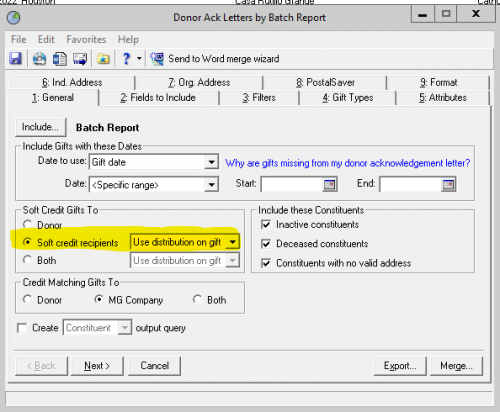
If you are using the mail module to get your data file for the merge, you'd get a separate spreadsheet of soft credit recipients using the below setting.
 0
0 -
MaryKathryn Odean:
Would you be open to doing a separate letter run for gifts with soft credits?
If you are using the mail module to get your data file for the merge, you'd get a separate spreadsheet of soft credit recipients using the below setting.
Let's talk about it @MaryKathryn Odean. I have used this option, however I think the issue is not in the merge itself, but how my organization has decided to use soft credits. We have a lot of organizations with multiple SCs per gift, and with varied amounts on each distribution (Person A gave $15, Person B gave $25 for a $40 gift). The problem is that I haven't found an automated solution to having both of these letters print with the correct SC amount without editing them afterwards, which in all honesty isn't the worst issue, but something to try to work out.
With a simple 1:1 gift to SC ratio, then either of the latter two option will work.
0 -
Hi @Dariel Dixon - When I export a list from a gift acknowledgement using the Soft Credit settings “use distribution on gift," all of the soft credit donors are included with their correct soft credit amount. See below screenshot for an $11 gift where I added two separate soft credits.

There's probably a better way to handle soft credits, but my preference has been to export two separate lists: one for the hard credit letters and one for the soft credit letters. The soft credit letters have a different merge template without receipt language since these are typically donor advised fund gifts. To exclude spousal soft credits, you could use a letter code like “DAF - TY without tax language" and filter on those gifts only for the soft credit run (using tab # 3 in the gift acknowledgement module).
0 -
My question to you @MaryKathryn Odean is that if you run a separate list for soft credits, is the soft credit list just merged with a simple merge, or is it a complex merge? Right now, we have our soft credit letter in our big letter merge. The most ideal situation would be to have it fit within one merge, but I'm definitely taking it under consideration.
Right now, we have 3 different letter signers based on gift amount, and each one of those levels has a SC letter. I would hate to have to take those letters out and run another list for just those gifts. I could, however, take all of the SC letters and run them as their own conditional merge, but we would have to make sure to separate the letters so that the proper people will be signing them.
0 -
I have been working on a conditional master merge file and it looks similar to yours @Dana Burton although I am having issues with the letter formatting. After the merge is complete and the various letters are created some of the letters have their formatting change (that is something happens when it pulls the letter template into the merge various changes occur such as line spacing, bolding wrong text and missing bullets). I have tried reformatting the template but after the merge it still has formatting issues. How can I get the final product to look like my template?
0 -
@Loree Morehouse That's a common issue. I solved it by going through a checklist of things.
- Did I remove the MERGEFORMAT/CHARFORMAT comments?
- Did I check the line spacing in each of the individual letters?
- Did I verify all the letters are in the same style?
There's a couple of other steps somewhere in-between, but I can't remember. But it takes a lot of research and trial and error.
0 -
Wow - this is great stuff, takes me back to my DBA days.
Just wanted to bring attention, on behalf of the Blackbaud partners out there, that there are a few mail merge options just coming to market. SmartTHING (ourselves), RedArc and DonorTek (and maybe more) have a few tools to allow you and indeed anyone in your teams to do your more regular simple letters through a click and go approach. May take the pressure off the day to day receipting tasks. Some of these solutions also have conditional merge support so you can do complex targeted content easily with your templates.
Costs are from FREE (limited usage) upwards so worth a check. We recently did a webinar for BB on SmartLETTERS (linked below), others likewise. BBs past webinars listing is here:
https://hello.blackbaud.com/NP-Blackbaud-Raisers-Edge-NXT-Connected-Office.htmlSmartTHING: SmartSYNC Acknowledgements, Letters and More for Blackbaud Raiser's Edge NXT https://event.on24.com/wcc/r/3681983/A2CAA522C9A39FD95E55756469634F33
RedArc: https://redarc.systems/letterbox
DonorTek: Acknowledge your gifts without mail merge! https://event.on24.com/wcc/r/3595177/74B2D5A819FB48C0623F82BBFFE7C344Hope it helps to know what is now out there, apologies if you are already aware. I am sure the mail merge processes will continue but for those not so technical or less willing to go the complex route the above solutions should help.
Cheers
Warren
0



















Categories
- All Categories
- 6 Blackbaud Community Help
- 213 bbcon®
- 1.4K Blackbaud Altru®
- 401 Blackbaud Award Management™ and Blackbaud Stewardship Management™
- 1.1K Blackbaud CRM™ and Blackbaud Internet Solutions™
- 15 donorCentrics®
- 360 Blackbaud eTapestry®
- 2.6K Blackbaud Financial Edge NXT®
- 655 Blackbaud Grantmaking™
- 576 Blackbaud Education Management Solutions for Higher Education
- 3.2K Blackbaud Education Management Solutions for K-12 Schools
- 939 Blackbaud Luminate Online® and Blackbaud TeamRaiser®
- 84 JustGiving® from Blackbaud®
- 6.6K Blackbaud Raiser's Edge NXT®
- 3.7K SKY Developer
- 248 ResearchPoint™
- 119 Blackbaud Tuition Management™
- 165 Organizational Best Practices
- 241 Member Lounge (Just for Fun)
- 34 Blackbaud Community Challenges
- 34 PowerUp Challenges
- 3 (Open) PowerUp Challenge: Chat for Blackbaud AI
- 3 (Closed) PowerUp Challenge: Data Health
- 3 (Closed) Raiser's Edge NXT PowerUp Challenge: Product Update Briefing
- 3 (Closed) Raiser's Edge NXT PowerUp Challenge: Standard Reports+
- 3 (Closed) Raiser's Edge NXT PowerUp Challenge: Email Marketing
- 3 (Closed) Raiser's Edge NXT PowerUp Challenge: Gift Management
- 4 (Closed) Raiser's Edge NXT PowerUp Challenge: Event Management
- 3 (Closed) Raiser's Edge NXT PowerUp Challenge: Home Page
- 4 (Closed) Raiser's Edge NXT PowerUp Challenge: Standard Reports
- 4 (Closed) Raiser's Edge NXT PowerUp Challenge: Query
- 791 Community News
- 2.9K Jobs Board
- 53 Blackbaud SKY® Reporting Announcements
- 47 Blackbaud CRM Higher Ed Product Advisory Group (HE PAG)
- 19 Blackbaud CRM Product Advisory Group (BBCRM PAG)