Deposit Import


We are new to Financial Edge and have a number of deposits and payments to bring over. I am starting with the Deposit Import. The import is failing on the Deposit ID. Looking at the deposit record, it looks like you create the Deposit ID with a limit of 12 characters. When I do that for the import, it fails. I cannot find the definition of the Deposit ID anywhere. Any ideas?
Comments
-
Not sure if this will help, but you can try changing the column formatting from “general” to “Text”
I've had to do this when I import JE's.
1 -
Hi Robin,
The deposit id is an optional field you can use separate from the Deposit Number which is auto-generated by FE. It is a 12 character alphanumeric field. See the screenshot below. To import a payment into the deposit ( as the import function is for payments, not deposits, so you'd have to create/save the deposit first with no payments). You'd need the deposit ID as one of the fields in the import file. So let's say I wanted to import 3 payments to the deposit below, I'd use the deposit ID field in the import file to tell the import which specific deposit to save the payments on. So in theory, if you had multiple open deposits saved, you could have 1 file and do 1 import to add many payments to multiple deposits, using the Deposit ID field to point where each payment should go.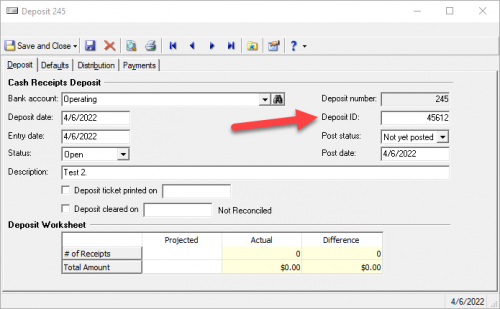 0
0








Categories
- All Categories
- 6 Blackbaud Community Help
- 211 bbcon®
- 1.4K Blackbaud Altru®
- 402 Blackbaud Award Management™ and Blackbaud Stewardship Management™
- 1.1K Blackbaud CRM™ and Blackbaud Internet Solutions™
- 15 donorCentrics®
- 360 Blackbaud eTapestry®
- 2.6K Blackbaud Financial Edge NXT®
- 657 Blackbaud Grantmaking™
- 577 Blackbaud Education Management Solutions for Higher Education
- 3.2K Blackbaud Education Management Solutions for K-12 Schools
- 941 Blackbaud Luminate Online® and Blackbaud TeamRaiser®
- 84 JustGiving® from Blackbaud®
- 6.7K Blackbaud Raiser's Edge NXT®
- 3.7K SKY Developer
- 248 ResearchPoint™
- 120 Blackbaud Tuition Management™
- 165 Organizational Best Practices
- 240 Member Lounge (Just for Fun)
- 34 Blackbaud Community Challenges
- 37 PowerUp Challenges
- 3 (Open) PowerUp Challenge: Grid View Batch
- 3 (Closed) PowerUp Challenge: Chat for Blackbaud AI
- 3 (Closed) PowerUp Challenge: Data Health
- 3 (Closed) Raiser's Edge NXT PowerUp Challenge: Product Update Briefing
- 3 (Closed) Raiser's Edge NXT PowerUp Challenge: Standard Reports+
- 3 (Closed) Raiser's Edge NXT PowerUp Challenge: Email Marketing
- 3 (Closed) Raiser's Edge NXT PowerUp Challenge: Gift Management
- 4 (Closed) Raiser's Edge NXT PowerUp Challenge: Event Management
- 3 (Closed) Raiser's Edge NXT PowerUp Challenge: Home Page
- 4 (Closed) Raiser's Edge NXT PowerUp Challenge: Standard Reports
- 4 (Closed) Raiser's Edge NXT PowerUp Challenge: Query
- 796 Community News
- 3K Jobs Board
- 54 Blackbaud SKY® Reporting Announcements
- 47 Blackbaud CRM Higher Ed Product Advisory Group (HE PAG)
- 19 Blackbaud CRM Product Advisory Group (BBCRM PAG)