Exporting Queries


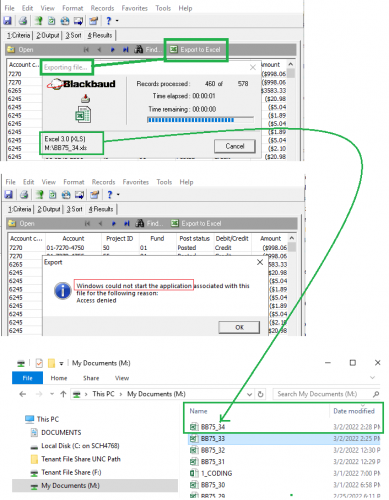
BB made a workaround (for security reasons) for exporting queries in database view. Now we must save the query to the BB local drive before we can export to our own files. This creates additional steps in the process and I would consider this to be complicated for the average computer user. The filepath is quite long and not in the clients local drive
Comments
-
You can try defining your file location so that it points only to My Documents in your hosted files folder for a shorter file path.
Then, drag the file to your local folder. I prefer Downloads so it's easier to locate.
 4
4 -
I am able to export the file to my company's local server drive. Agree it is a pain to create the path, but at least it puts it on my network vs. the BB network. Only complaint is that I need to reformat dates and amounts.
3 -
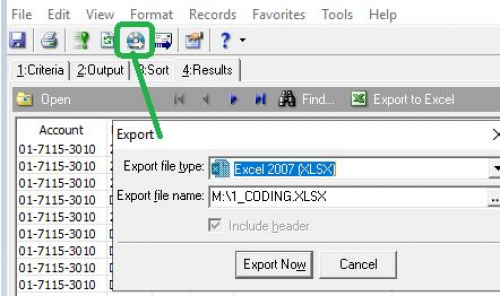
Here is how you save to a local or network drive, can be used for queries but works for technically anything you're saving locally :
4 -
Did you mean reformatting as a result of using the more generic export button?
“Export to Excel” eliminates most formatting issues.
 3
3 -
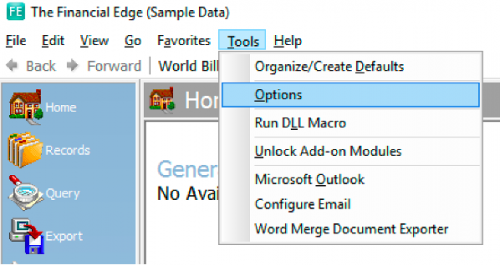
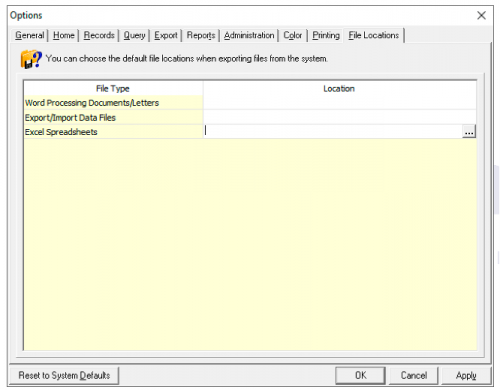
Hi @Emily Tompkins, these are all great suggestions! Another helpful option is to set your file locations in Tools-Option (located on the toolbar) of database view. Once these are set and you attempt to export the file, it will default to the location that you set. I've attached a few pictures to help you get to the settings.
FE - Tools - Options - File Locations
Click the (…) and set the file path for each file type.
 1
1 -
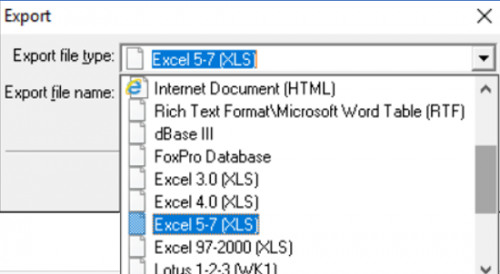
Thank you for the great suggestion. Unfortunately the Export file type “Excel 2007(XLSX)” disappeared as I tried to export a query from FE Database view.
Does anyone have the same issue? Any suggestion for me how to find that option?
Thank you so much for any advice!
 0
0 -
Hi,
I would suggest (if it is a query report) to save it as .CSV file and it is faster and easier, so you don't have to deal with excel options…
 0
0














Categories
- All Categories
- 6 Blackbaud Community Help
- 211 bbcon®
- 1.4K Blackbaud Altru®
- 402 Blackbaud Award Management™ and Blackbaud Stewardship Management™
- 1.1K Blackbaud CRM™ and Blackbaud Internet Solutions™
- 15 donorCentrics®
- 360 Blackbaud eTapestry®
- 2.6K Blackbaud Financial Edge NXT®
- 655 Blackbaud Grantmaking™
- 576 Blackbaud Education Management Solutions for Higher Education
- 3.2K Blackbaud Education Management Solutions for K-12 Schools
- 941 Blackbaud Luminate Online® and Blackbaud TeamRaiser®
- 84 JustGiving® from Blackbaud®
- 6.7K Blackbaud Raiser's Edge NXT®
- 3.7K SKY Developer
- 248 ResearchPoint™
- 120 Blackbaud Tuition Management™
- 165 Organizational Best Practices
- 240 Member Lounge (Just for Fun)
- 34 Blackbaud Community Challenges
- 37 PowerUp Challenges
- 3 (Open) PowerUp Challenge: Grid View Batch
- 3 (Closed) PowerUp Challenge: Chat for Blackbaud AI
- 3 (Closed) PowerUp Challenge: Data Health
- 3 (Closed) Raiser's Edge NXT PowerUp Challenge: Product Update Briefing
- 3 (Closed) Raiser's Edge NXT PowerUp Challenge: Standard Reports+
- 3 (Closed) Raiser's Edge NXT PowerUp Challenge: Email Marketing
- 3 (Closed) Raiser's Edge NXT PowerUp Challenge: Gift Management
- 4 (Closed) Raiser's Edge NXT PowerUp Challenge: Event Management
- 3 (Closed) Raiser's Edge NXT PowerUp Challenge: Home Page
- 4 (Closed) Raiser's Edge NXT PowerUp Challenge: Standard Reports
- 4 (Closed) Raiser's Edge NXT PowerUp Challenge: Query
- 796 Community News
- 3K Jobs Board
- 54 Blackbaud SKY® Reporting Announcements
- 47 Blackbaud CRM Higher Ed Product Advisory Group (HE PAG)
- 19 Blackbaud CRM Product Advisory Group (BBCRM PAG)