How does one enter Job Title and Organisation info directly into NXT?





I can add Job Title and Organisation information to a constituent record in Database View (via Bio1 Tab>Business Button) and can view where this appears on a constituent record in NXT (constituent summary window) .
Are we able to enter Job Title and Organisation information directly into NXT or does it still have to be done in Database View?
Comments
-
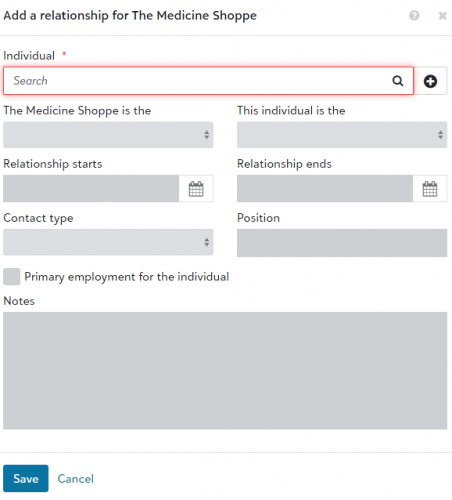
It is in the relationship tile. You can add that information by connecting it as an organizational relationship.
3 -
I think @Dariel Dixon's answer is the best, but we also use Custom Fields to enter info that we want to be able to see on the constituent's record in webview (e.g., what kind of donor they are, whether they receive a year-end letter).
We don't usually track employer or job title unless it's related to their giving or their company offers matching gifts.
0 -
@Russell Joyce , @Dariel Dixon is correct. This information can be entered directly into NXT webview under relationship.
 3
3 -
Dear All, thanks ever so much for your feedback - yes, Dariel was correct - goes in the relationships window. I got the same answer back from Blackbaud Support too. All best, Russell
0 -
PS @BarbaraKunkel shout out for the screen grab!
0










Categories
- All Categories
- 6 Blackbaud Community Help
- 211 bbcon®
- 1.4K Blackbaud Altru®
- 403 Blackbaud Award Management™ and Blackbaud Stewardship Management™
- 1.2K Blackbaud CRM™ and Blackbaud Internet Solutions™
- 15 donorCentrics®
- 360 Blackbaud eTapestry®
- 2.6K Blackbaud Financial Edge NXT®
- 658 Blackbaud Grantmaking™
- 579 Blackbaud Education Management Solutions for Higher Education
- 3.2K Blackbaud Education Management Solutions for K-12 Schools
- 943 Blackbaud Luminate Online® and Blackbaud TeamRaiser®
- 84 JustGiving® from Blackbaud®
- 6.7K Blackbaud Raiser's Edge NXT®
- 3.8K SKY Developer
- 250 ResearchPoint™
- 120 Blackbaud Tuition Management™
- 165 Organizational Best Practices
- 241 Member Lounge (Just for Fun)
- 36 Blackbaud Community Challenges
- 37 PowerUp Challenges
- 3 (Open) PowerUp Challenge: Grid View Batch
- 3 (Closed) PowerUp Challenge: Chat for Blackbaud AI
- 3 (Closed) PowerUp Challenge: Data Health
- 3 (Closed) Raiser's Edge NXT PowerUp Challenge: Product Update Briefing
- 3 (Closed) Raiser's Edge NXT PowerUp Challenge: Standard Reports+
- 3 (Closed) Raiser's Edge NXT PowerUp Challenge: Email Marketing
- 3 (Closed) Raiser's Edge NXT PowerUp Challenge: Gift Management
- 4 (Closed) Raiser's Edge NXT PowerUp Challenge: Event Management
- 3 (Closed) Raiser's Edge NXT PowerUp Challenge: Home Page
- 4 (Closed) Raiser's Edge NXT PowerUp Challenge: Standard Reports
- 4 (Closed) Raiser's Edge NXT PowerUp Challenge: Query
- 798 Community News
- 3K Jobs Board
- 56 Blackbaud SKY® Reporting Announcements
- 47 Blackbaud CRM Higher Ed Product Advisory Group (HE PAG)
- 19 Blackbaud CRM Product Advisory Group (BBCRM PAG)