Gift API v2





Gift v2: I was given access to this preview APIs:
https://developer.sky.blackbaud.com/docs/services/gft-gifts/operations/CreateGift
I was able to create a PLEDGE gift record, however, no matter what I try, I just can't get the 1 installment I want on the pledge record created via the API.
This is the part of the JSON I added:
"schedule": {
"frequency": "Annually",
"start_date": "2022-05-17T00:00:00.0000000",
"end_date": "2022-05-19T00:00:00.0000000",
"next_installment_date": "2022-05-18T00:00:00.0000000"
}
What am I doing wrong here?
I also try using the Add pledge installments endpoint: https://developer.sky.blackbaud.com/docs/services/gft-gifts/operations/AddPledgeInstallments
But also got error on a parameter field that isn't documented: (I do understand these are preview API which can change, so would appreciate any insight on this parameter needed: installmentsToAdd.
[
{
"message": "The required argument 'installmentsToAdd' was not assigned a value.",
"error_name": "RequiredArgumentNotAssignedValue",
"error_code": 2,
"raw_message": "The required argument 'installmentsToAdd' was not assigned a value."
}
]
Comments
-
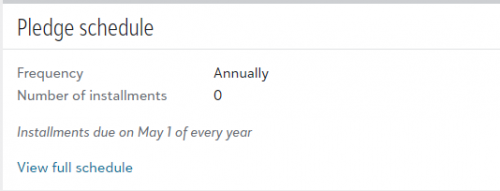
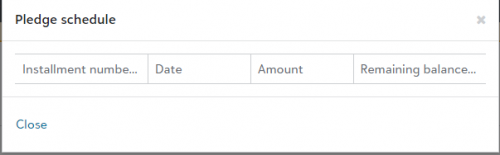
Alex - I tried the call a few different ways through the developer console without success. On the original pledge POST, I'm able to denote recurrence and start date in the schedule section, but unable to add the number of installments so nothing appears when viewing installments… even though the pledge says annual. Using the AddPledgeInstallments POST, I got the same required argument error that you did.
 0
0 -
I think this is a workflow clarification thing. We are currently expecting this to be done with 2 calls and we hope to have it adjusted to be able to do it in one down the road. Right now we will for sure need a call to create the pledge and then a second call to setup the installments.
0 -
Thanks for the clarification. 2 calls is fine, if we can get it to work. I tried creating the pledge without any installment array info. Then when using the AddPledgeInstallments separate call is when the required argument error appears. If you know of a way to supply a JSON body to AddPledgesInstallments successfully, we are interested in learning more.
0 -
Yep, I am looking into that part of the issue now and hopefully I have something for you both soon.
1 -
We are successfully able to get this into the system using the following workflow. Give this a try and let me know your results.
Use the create endpoint to create the pledge gift
Then the preview endpoint to add the installments with these parameters below
{
"installments": [
{
"amount": 23.06,
"year": 2021,
"date": "2022-05-01T00:00:00Z",
"sequence": 1
}
]
}0 -
Hi just gave this a try and getting a different error.
where 1453964 is the gift system id from the earlier pledge create call
{
"installments": [
{
"amount": 5000,
"year": 2022,
"date": "2022-05-21T00:00:00.0000000",
"sequence": 1
}
]
}
this is the request body
Error I received:
status code: 400
[
{
"message": "The required argument 'installments' was not assigned a value.",
"error_name": "RequiredArgumentNotAssignedValue",
"error_code": 2,
"raw_message": "The required argument 'installments' was not assigned a value."
}
]
0 -
We made a change to the error message to hopefully make it make more sense, so that is what you are seeing now. You are essentially running into the exact same issue.
Are you going thru your own tool to make this call or are you testing it out in our developer portal? We are not able to duplicate this at all so we are thinking that the json is not coming thru formatted correctly if it is outside of our portal.
0 -
Hi, I'm using Power Automate action HTTP to make the call to create pledge and add installment.
Please see the raw input and output I used on the HTTP action:
I attached the raw input/output from a run of this on Power Automate. Note that after the Create Pledge, I was able to use the “gift v1” power automate connectors to add gift custom fields without any issue, the system id works no problem.
HTTP Action - Create Pledge Raw Input.txt
HTTP Action - Create Pledge Raw Output.txt
HTTP Action - Add Installment Raw Input.txt
HTTP Action - Add Installment Raw Output.txt
I'm not sure if this is the issue, but I presume I was given access to these PREVIEW API on my alex.wong@fidf.org login, however, when making these calls, I was using auto.sender@fidf.org login. This is the login I use in production for making all automation against RE NXT. Can you see if you can provide same access to auto.sender@fidf.org so I can give it a try to iron out permission issue?
Actually nevermind on the above, if auto.sender@fidf.org wasn't able to get to Giftv2, then I wouldn't have been able to call Giftv2 to create the pledge to begin with. I think the Giftv2 PREVIEW access is probably given to the tenancy as a whole then.
0 -
Hi,
I was able to boil down to the exact problem, though I still do not know why and who is causing it (PowerAutomate or SKY API endpoint).
When I use a dynamic content on the “Year” part of the Request Body, I get the error mentioned in the previous post. When I put the actual year (i.e. 2022), then I do not get failure. Note that when I check the actual Flow Run, the Request Body is EXACTLY the same.
After finding that out, and trying out different “year” vs “date” field on the Requset Body JSON, I notice that this “year” field doesn't seems to affect anything. So I did the unthinkable, I remove the “year” field from the Request Body JSON altogether, and it is now working like a charm.
While I still don't know why the error is happening and on which end is it happening, I was able to get this to work, so I guess everything is OK now. HOWEVER, can you tell me what is this “year” field for in the Installment JSON object?
0 -
Noticing another problem:
There is currently no support for the “Send Reminder” field to be checked. So I have a process to do global change on pledges created via API. HOwever, the global change is failing. So I try to do it directly on the gift and got the same error:
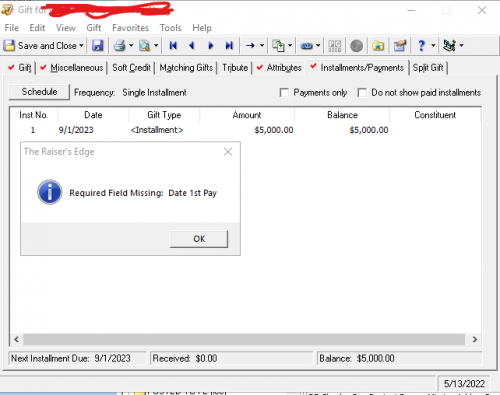
If I were to go to installment and reSchedule the installment, then I'm able to save with the Send Reminder checkbox checked.
Am I doing something wrong?
0 -
There are quite a few questions in here and I am not sure what isn't answered yet but I will speak to this most recent post. The send reminder update is coming soon, we should have that out in the next 4(ish) weeks. I am not really sure what is going on with the global change, is the does the record open and save successfully before you perform the global change? If so, I would probably hold off until we can get the reminder update out.
0 -
Hi Anthony,
Thanks for the response.
1 question and 1 issues:
- Question on the year field in the JSON for creating installment, what is it for?
- Issue around the pledge gift record that was created via the API. It's not related to Send Reminder field actually. I am not able to make any changes to the pledge gift record and click Save. Save will always result in the “Required Field Missing: Date 1st Pay” error message. Only after I reschedule in the gift record, then i'm able to save without the error message. It seems like somehow the installment created isn't being “recognized".
0 -
For #2, are you creating the installment for the pledge after you are creating the pledge? There are 2 mandatory calls as it is constructed right now. One to create the pledge and another to set the installments, even if it is just one installment.
0 -
Yes, I did do 2 API calls. 1 for pledge create, then a installment add (1 installment).
I even see the installment in the pledge gift record in the database view
0 -
Follow up for the “Year” field. This endpoint was originally built for our conversions folks to input data. The year field is a DB term used in RE7 and not in NXT so we added it for full coverage in the event that it was necessary but for your purposes, it is probably not needed. That field may have even been deprecated from RE7 at some point but we added it in just in case there was legacy data that had the field present.
0 -
Hi Anthony,
Thank you for the followup. It's good to know that the Year field isn't needed, so my 2nd API to add installment is called correctly.
Please let me know what you were able to find out about the error I reported earlier about after 1st API create pledge, and 2nd API to add installment, still getting an error Required Field Missing: Date 1st Pay when trying to save the pledge report in database view.
Thank you,
Alex0







Categories
- All Categories
- 6 Blackbaud Community Help
- 213 bbcon®
- 1.4K Blackbaud Altru®
- 403 Blackbaud Award Management™ and Blackbaud Stewardship Management™
- 1.1K Blackbaud CRM™ and Blackbaud Internet Solutions™
- 15 donorCentrics®
- 360 Blackbaud eTapestry®
- 2.6K Blackbaud Financial Edge NXT®
- 656 Blackbaud Grantmaking™
- 576 Blackbaud Education Management Solutions for Higher Education
- 3.2K Blackbaud Education Management Solutions for K-12 Schools
- 939 Blackbaud Luminate Online® and Blackbaud TeamRaiser®
- 84 JustGiving® from Blackbaud®
- 6.6K Blackbaud Raiser's Edge NXT®
- 3.7K SKY Developer
- 248 ResearchPoint™
- 119 Blackbaud Tuition Management™
- 165 Organizational Best Practices
- 241 Member Lounge (Just for Fun)
- 34 Blackbaud Community Challenges
- 34 PowerUp Challenges
- 3 (Open) PowerUp Challenge: Chat for Blackbaud AI
- 3 (Closed) PowerUp Challenge: Data Health
- 3 (Closed) Raiser's Edge NXT PowerUp Challenge: Product Update Briefing
- 3 (Closed) Raiser's Edge NXT PowerUp Challenge: Standard Reports+
- 3 (Closed) Raiser's Edge NXT PowerUp Challenge: Email Marketing
- 3 (Closed) Raiser's Edge NXT PowerUp Challenge: Gift Management
- 4 (Closed) Raiser's Edge NXT PowerUp Challenge: Event Management
- 3 (Closed) Raiser's Edge NXT PowerUp Challenge: Home Page
- 4 (Closed) Raiser's Edge NXT PowerUp Challenge: Standard Reports
- 4 (Closed) Raiser's Edge NXT PowerUp Challenge: Query
- 794 Community News
- 2.9K Jobs Board
- 54 Blackbaud SKY® Reporting Announcements
- 47 Blackbaud CRM Higher Ed Product Advisory Group (HE PAG)
- 19 Blackbaud CRM Product Advisory Group (BBCRM PAG)