Documents created but not in Documents section?





When I create a writeup and save it on my desktop to edit and after editing I click on the “Documents” tab to replace it, but it's not there. This has been happening the last two days. Is anyone else experiencing this? I have to upload the writeup as a new document. Let me know if you need further clarification, I know it sounds weird. Thank you!
Comments
-
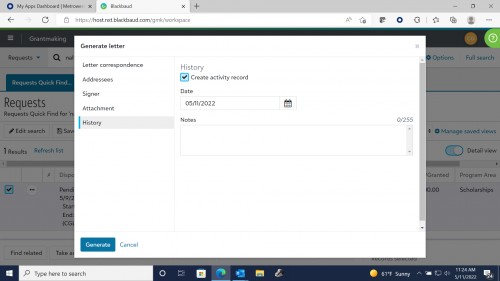
Yes, I have. I was told it was an engineering problem. You have to select the correspondence template and go into the History, the box to create an activity record needs to be checked. See below. It’s a one-time fix so you don’t have to do it every time.
 0
0 -
Thank you!
Disappointed that I even have to do that. Now need to go into ALL of the templates that i use. Not sure why BB continues to mess with things that are working just fine. As a user this is so frustrating.
2 -
I don't think you have to go into all the templates. Test it first. I did it for one and another template I used was fine.
1 -
It's not in the template settings. It's when you generate any document or email, you have to make sure the History box is checked. Typically, it's checked by default. I put an idea in to ask they move the History check box to the first page of the pop-up box so we don't have to go to a separate page. Too many clicks.
1






Categories
- All Categories
- 6 Blackbaud Community Help
- 211 bbcon®
- 1.4K Blackbaud Altru®
- 402 Blackbaud Award Management™ and Blackbaud Stewardship Management™
- 1.1K Blackbaud CRM™ and Blackbaud Internet Solutions™
- 15 donorCentrics®
- 360 Blackbaud eTapestry®
- 2.6K Blackbaud Financial Edge NXT®
- 655 Blackbaud Grantmaking™
- 576 Blackbaud Education Management Solutions for Higher Education
- 3.2K Blackbaud Education Management Solutions for K-12 Schools
- 941 Blackbaud Luminate Online® and Blackbaud TeamRaiser®
- 84 JustGiving® from Blackbaud®
- 6.7K Blackbaud Raiser's Edge NXT®
- 3.7K SKY Developer
- 248 ResearchPoint™
- 120 Blackbaud Tuition Management™
- 165 Organizational Best Practices
- 240 Member Lounge (Just for Fun)
- 34 Blackbaud Community Challenges
- 37 PowerUp Challenges
- 3 (Open) PowerUp Challenge: Grid View Batch
- 3 (Closed) PowerUp Challenge: Chat for Blackbaud AI
- 3 (Closed) PowerUp Challenge: Data Health
- 3 (Closed) Raiser's Edge NXT PowerUp Challenge: Product Update Briefing
- 3 (Closed) Raiser's Edge NXT PowerUp Challenge: Standard Reports+
- 3 (Closed) Raiser's Edge NXT PowerUp Challenge: Email Marketing
- 3 (Closed) Raiser's Edge NXT PowerUp Challenge: Gift Management
- 4 (Closed) Raiser's Edge NXT PowerUp Challenge: Event Management
- 3 (Closed) Raiser's Edge NXT PowerUp Challenge: Home Page
- 4 (Closed) Raiser's Edge NXT PowerUp Challenge: Standard Reports
- 4 (Closed) Raiser's Edge NXT PowerUp Challenge: Query
- 796 Community News
- 3K Jobs Board
- 54 Blackbaud SKY® Reporting Announcements
- 47 Blackbaud CRM Higher Ed Product Advisory Group (HE PAG)
- 19 Blackbaud CRM Product Advisory Group (BBCRM PAG)