Attribute Category data type of Constituent Record - Looking for input on how to work with it





Hello,
I created a new attribute category with the Data Type Constituent Record. I am building a datalist and need to pull in the details associated to that constituent. Can someone provide some input on this please?
Comments
-
Hi Pam,
There's a session at the BB Developers' Conference on Advanced Configuration. It's a skills lab so you could ask our team there if you don't get an answer before then
Name
Making the Most of Design Mode for Blackbaud CRM™
Date & Time
Wednesday, June 8, 2022, 3:30 PM - 4:30 PM
Description
In this Skills Lab, the team from BrightVine Solutions will walk you through advanced configuration approaches with Design Mode. This is a Skills Lab suitable for administrators and business analysts.
1 -
Thank you so much for this info. I will be sure to attend this session.
0 -
It depends a little bit on whether you choose the “Allow only one per record” option.
I'll go through both scenarios. I've created two attributes (screenshots below). One is “Best friend”, and it's “only one". The other is “Other friends”, and more than one of those are allowed.
When you create those attributes, CRM will automatically generate a table name for each one. You can see the table names by running this query:
SELECT
AC.[NAME], TC.TABLENAME
FROM
ATTRIBUTECATEGORY AC
JOIN TABLECATALOG TC ON TC.ID = AC.TABLECATALOGID
WHERE AC.[NAME] IN('BEST FRIEND','OTHER FRIENDS')Both tables will have a CONSTITUENTVALUEID, which contains the Constituent ID of the “Best friend” or the “Other friend”. The only difference between the two tables is that the “Best friend” table can be joined directly to the CONSTITUENT table on the ID column, but the “Other friend” attribute must be joined by the CONSTITUENTID column (because there can be more than one).
So, your Datalist might use SQL like this:
--This will return only one row per constituent
SELECT
CON.[NAME] AS CONSTITUENTNAME
,BESTFRIEND.[NAME] AS BESTFRIENDNAME
FROM
CONSTITUENT CON
--This table came from the earlier query; yours will be different
LEFT JOIN ATTRIBUTECFB911E5380D4D0394E7B00EA34C8782 BF ON BF.ID = CON.ID
LEFT JOIN CONSTITUENT BESTFRIEND ON BESTFRIEND.ID = BF.CONSTITUENTVALUEID--This may return any number of rows per constituent
SELECT
CON.[NAME] AS CONSTITUENTNAME
,OTHERFRIEND.[NAME] AS OTHERFRIENDNAME
FROM
CONSTITUENT CON
--This table came from the earlier query; yours will be different
LEFT JOIN ATTRIBUTE147BEB11AA0E485CB1829658618CAE74 OTF ON OTF.CONSTITUENTID = CON.ID
LEFT JOIN CONSTITUENT OTHERFRIEND ON OTHERFRIEND.ID = OTF.CONSTITUENTVALUEIDSome things to keep in mind:
- CRM generates the table names on the fly. If you manually create the attribute in two different environments, the table names will be different in the two places. That can lead to errors when you promote code from a test environment to production. Two solutions to that are: 1) Create the attribute in production, then refresh the database in lower environments or 2) Use a SQL Script to generate the attributes in a way that you can control the table names. Ping me if you need such a script, I can dig one up.
- For a datalist, you may want to consider pulling “many” style attributes as a CSV list. That way you can keep one row per constituent, but have a single column with all their attribute values in one place
- You get attributes for “free” in the ad-hoc query tool. You can create a query there, then save that query as a datalist if you want CRM to deal with the table names for you.
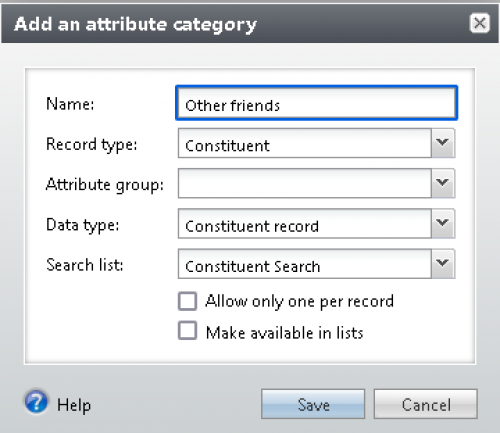
Other friends - you can have as many as you like. 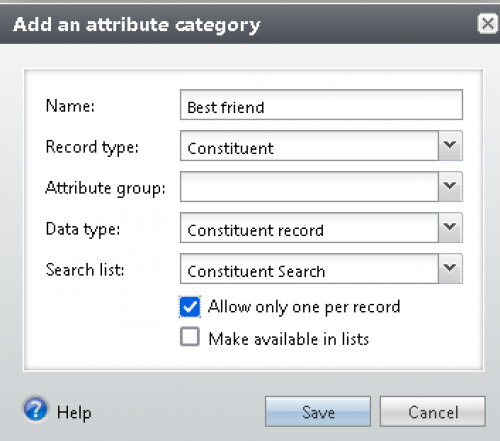
Best friend attribute - only one allowed! 0





Categories
- All Categories
- 6 Blackbaud Community Help
- 213 bbcon®
- 1.4K Blackbaud Altru®
- 402 Blackbaud Award Management™ and Blackbaud Stewardship Management™
- 1.1K Blackbaud CRM™ and Blackbaud Internet Solutions™
- 15 donorCentrics®
- 360 Blackbaud eTapestry®
- 2.6K Blackbaud Financial Edge NXT®
- 655 Blackbaud Grantmaking™
- 576 Blackbaud Education Management Solutions for Higher Education
- 3.2K Blackbaud Education Management Solutions for K-12 Schools
- 939 Blackbaud Luminate Online® and Blackbaud TeamRaiser®
- 84 JustGiving® from Blackbaud®
- 6.6K Blackbaud Raiser's Edge NXT®
- 3.7K SKY Developer
- 248 ResearchPoint™
- 119 Blackbaud Tuition Management™
- 165 Organizational Best Practices
- 241 Member Lounge (Just for Fun)
- 34 Blackbaud Community Challenges
- 34 PowerUp Challenges
- 3 (Open) PowerUp Challenge: Chat for Blackbaud AI
- 3 (Closed) PowerUp Challenge: Data Health
- 3 (Closed) Raiser's Edge NXT PowerUp Challenge: Product Update Briefing
- 3 (Closed) Raiser's Edge NXT PowerUp Challenge: Standard Reports+
- 3 (Closed) Raiser's Edge NXT PowerUp Challenge: Email Marketing
- 3 (Closed) Raiser's Edge NXT PowerUp Challenge: Gift Management
- 4 (Closed) Raiser's Edge NXT PowerUp Challenge: Event Management
- 3 (Closed) Raiser's Edge NXT PowerUp Challenge: Home Page
- 4 (Closed) Raiser's Edge NXT PowerUp Challenge: Standard Reports
- 4 (Closed) Raiser's Edge NXT PowerUp Challenge: Query
- 792 Community News
- 2.9K Jobs Board
- 53 Blackbaud SKY® Reporting Announcements
- 47 Blackbaud CRM Higher Ed Product Advisory Group (HE PAG)
- 19 Blackbaud CRM Product Advisory Group (BBCRM PAG)