How to schedule Lunch but associate it to a different teacher?





We are exploring scheduling side of Blackbaud this year. I am working basically to replicate what we have on paper and make it digital for this year. We have slots called Lunch, Recess, and Dismissal. These are usually when another teacher other than the homeroom teacher is on duty with the students. What is the best way to create this in Blackbaud? We have created a Course for each of these and associated meeting times to them. However, I can only choose one teacher to be with that course which then are connected to all the meeting times. The end goal would be to create duty schedules for all the teachers.
Devi
Comments
-
@Devi Innerarity - I think that you need a separate section of the lunch “class” for each day, with the teacher(s) on duty that day assigned to the section. You can schedule all of the sections into the same block, and cancel all but one of the class meetings for each section.
We do this for MS study halls. Each student will be assigned to a study hall for any class period that is otherwise unscheduled. We have many, many study hall sections - one or more for each class period during a rotation.
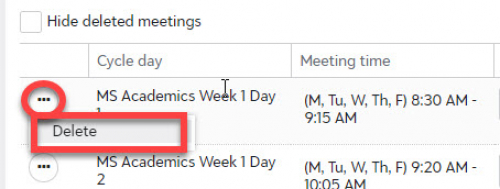
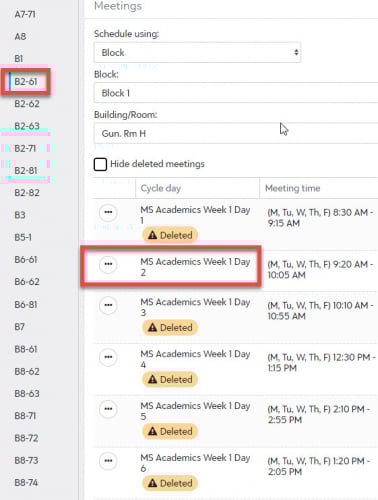
In your case, you could assign teachers to the section that represents their assignment in the duty rotation. If you need these “classes” to appear on student schedules (or if you need to record attendance), you will have to assign students to a sections for each day of the duty rotation.
The section set-up is tedious for the first year, but the sections can be rolled over in subsequent years.
Make the section identifier meaningful - include the rotation day in the identifier name. In the study halls shown above, B2-61 is a section that meets on B day, second period, for 6th graders. It is one of three sections for 6th graders that meets that period. (The other sections are B2-62 and B2-63.)
From year to year, don't delete a section that isn't needed that year. Just don't assign anyone to it that year. Keep it so that it's available in subsequent years (and therefore does not have to be recreated).
Our MS does something similar to schedule grade-level meetings for teachers - one class period per rotation. There is a course named Team Meeting. There are three sections (6, 7, and 8 - one for each grade level). All teachers who should be in that meeting are assigned as a teacher in that section. The sections have no students, so it appears only on the teachers' schedules.
3 -
@Brian Gray - This is perfect! Just what I was thinking too! Thank you so much!
Do you have any suggestions on how to make schedules work with enriched teachers? For example, we have an Art teacher that teaches preschool through middle school. For some reason her schedule is not showing up some of the classes. I keep making sure they have the correct meeting time but some reason something with the cross divisional is causing issues.
1 -
Where do you expect to see the teacher's classes but don't? (The teacher's calendar page? The teacher's Groups list? Set Section Info page?)
Who can't see it? (The teacher? Other teachers? Scheduling Manager?)
The first thing that I would check is the visibility dates on all of the schedule sets in all of the divisions involved.
0 -
Actually, I found out why it was not showing on teacher schedule correctly. The schedule sets needed to be edited for the Date Span. I placed it at the default at first but the problem was my Start Day. It was at 1 but needed to be set to 3.
Thank you so much for all your help!
Devi
0 -
Glad to hear that you found it. Schedule sets can be tricky - mostly because you don't have to work with them very often
0





Categories
- All Categories
- 6 Blackbaud Community Help
- 213 bbcon®
- 1.4K Blackbaud Altru®
- 403 Blackbaud Award Management™ and Blackbaud Stewardship Management™
- 1.1K Blackbaud CRM™ and Blackbaud Internet Solutions™
- 15 donorCentrics®
- 360 Blackbaud eTapestry®
- 2.6K Blackbaud Financial Edge NXT®
- 656 Blackbaud Grantmaking™
- 577 Blackbaud Education Management Solutions for Higher Education
- 3.2K Blackbaud Education Management Solutions for K-12 Schools
- 939 Blackbaud Luminate Online® and Blackbaud TeamRaiser®
- 84 JustGiving® from Blackbaud®
- 6.6K Blackbaud Raiser's Edge NXT®
- 3.7K SKY Developer
- 248 ResearchPoint™
- 119 Blackbaud Tuition Management™
- 165 Organizational Best Practices
- 241 Member Lounge (Just for Fun)
- 34 Blackbaud Community Challenges
- 37 PowerUp Challenges
- 3 (Open) PowerUp Challenge: Grid View Batch
- 3 (Closed) PowerUp Challenge: Chat for Blackbaud AI
- 3 (Closed) PowerUp Challenge: Data Health
- 3 (Closed) Raiser's Edge NXT PowerUp Challenge: Product Update Briefing
- 3 (Closed) Raiser's Edge NXT PowerUp Challenge: Standard Reports+
- 3 (Closed) Raiser's Edge NXT PowerUp Challenge: Email Marketing
- 3 (Closed) Raiser's Edge NXT PowerUp Challenge: Gift Management
- 4 (Closed) Raiser's Edge NXT PowerUp Challenge: Event Management
- 3 (Closed) Raiser's Edge NXT PowerUp Challenge: Home Page
- 4 (Closed) Raiser's Edge NXT PowerUp Challenge: Standard Reports
- 4 (Closed) Raiser's Edge NXT PowerUp Challenge: Query
- 794 Community News
- 2.9K Jobs Board
- 54 Blackbaud SKY® Reporting Announcements
- 47 Blackbaud CRM Higher Ed Product Advisory Group (HE PAG)
- 19 Blackbaud CRM Product Advisory Group (BBCRM PAG)