Power BI app not connecting to desktop or NXT





Hello, has anyone else run into issues at the final steps of connecting Power BI to NXT?
I am not seeing Blackbaud as an option when I get data and I do not see applications in my menu in NXT. I've searched this forum and have checked my settings.
Comments
-
@Ben Lambert, @Glen Hutson, @Matt Thacker - Any thoughts?
2 -
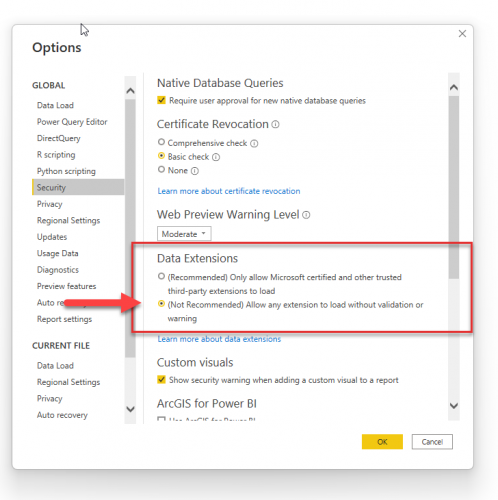
Hey @Jovana SanchezMelendez, have you followed the set-up steps here? If so, and you still don't see Blackbaud as a data source, you probably need to change the settings in your Power BI desktop application to allow for non-certified connects.
In File → Options and Settings → Security
Make sure ‘Allow any extension’ is checked. Restart Power BI and the Blackbaud connector should show up as a data source.
(another thing to check, ensure the .mez file is located with the file path Documents/Power BI Desktop/Custom Connectors/fileName.mez) It has to be this exact file path for Power BI Desktop to find custom connectors.
 1
1 -
@Matt Thacker
Hi Matt, yes, I have followed those steps and have changed the security settings for data extensions but do not see Blackbaud as an option when I get data. I've been trying since last week so it's been restarted a few times. I did see somewhere that it may take some time for the data to be accessible but I think by now I should see it.0 -
@Jovana SanchezMelendez, do you have time, maybe tomorrow, to hop on a Teams and troubleshoot it? Also, just out of curiosity, are you trying to set up the connector locally or on a virtual machine?
0 -
@Matt Thacker Yes, that would be great if we could connect. I would like to include my IT support since they were stumped too. I am connecting to my machine.
0 -
@Jovana SanchezMelendez awesome, my email is matt@matt-thacker.com.
I’m pretty open tomorrow, so just let me know a time that works for you all.
1 -
@Jovana SanchezMelendez
Great, contacting you now. Thank you!0 -
I'm having a similar problem. But I am able to get a little further than Jovana. I have the connector set-up to RE and now I'm working on the one for FE.
Black RENXT SkyApi (Beta) is listed as a data source, but when I try to connect to it, PowerBI doesn't want to recognize my credentials or that I'm signed in. It says to delete my credentials and try again later.
Any ideas on how to get past this?
0 -
@Jovana SanchezMelendez did you ever get this working? I seem to be stuck in the same spot you were!
0











Categories
- All Categories
- 6 Blackbaud Community Help
- 211 bbcon®
- 1.4K Blackbaud Altru®
- 402 Blackbaud Award Management™ and Blackbaud Stewardship Management™
- 1.1K Blackbaud CRM™ and Blackbaud Internet Solutions™
- 15 donorCentrics®
- 360 Blackbaud eTapestry®
- 2.6K Blackbaud Financial Edge NXT®
- 655 Blackbaud Grantmaking™
- 576 Blackbaud Education Management Solutions for Higher Education
- 3.2K Blackbaud Education Management Solutions for K-12 Schools
- 940 Blackbaud Luminate Online® and Blackbaud TeamRaiser®
- 84 JustGiving® from Blackbaud®
- 6.7K Blackbaud Raiser's Edge NXT®
- 3.7K SKY Developer
- 248 ResearchPoint™
- 120 Blackbaud Tuition Management™
- 165 Organizational Best Practices
- 240 Member Lounge (Just for Fun)
- 34 Blackbaud Community Challenges
- 37 PowerUp Challenges
- 3 (Open) PowerUp Challenge: Grid View Batch
- 3 (Closed) PowerUp Challenge: Chat for Blackbaud AI
- 3 (Closed) PowerUp Challenge: Data Health
- 3 (Closed) Raiser's Edge NXT PowerUp Challenge: Product Update Briefing
- 3 (Closed) Raiser's Edge NXT PowerUp Challenge: Standard Reports+
- 3 (Closed) Raiser's Edge NXT PowerUp Challenge: Email Marketing
- 3 (Closed) Raiser's Edge NXT PowerUp Challenge: Gift Management
- 4 (Closed) Raiser's Edge NXT PowerUp Challenge: Event Management
- 3 (Closed) Raiser's Edge NXT PowerUp Challenge: Home Page
- 4 (Closed) Raiser's Edge NXT PowerUp Challenge: Standard Reports
- 4 (Closed) Raiser's Edge NXT PowerUp Challenge: Query
- 796 Community News
- 3K Jobs Board
- 54 Blackbaud SKY® Reporting Announcements
- 47 Blackbaud CRM Higher Ed Product Advisory Group (HE PAG)
- 19 Blackbaud CRM Product Advisory Group (BBCRM PAG)