Authorization Token Keeps Expiring




Currently using python to access campaign data through the apis provided.
When I try to change the following header template to include the expires_in parameter the token still expires. Below I'm using 31536000 as an example but how can I fix this header so that the token does not expire in 1hr?
headers = {
# Request headers
'Content-Type': 'application/json',
'Bb-Api-Subscription-Key': {},
'Authorization': 'Bearer {}',
'expires_in': 31536000,
}
Comments
-
@Peter Kungania You can't set the longevity of the Access Token; expires_in is a returned field, not a request parameter.
Access Tokens expire in 60 min (at time of writing). Refresh Tokens have a 365 day validity (also at time of writing) unless you request that it doesn't roll over on each request (using preserve_refresh_token).
This page explains much of what you might be missing.
I hope that helps.
Cheers,
Steve Cinquegrana | CEO and Principal Developer | Protégé Solutions
2 -
@Steven Cinquegrana
Thanks Steven that was helpful but what I am interested in is creating a scheduled calls with blackbaud's sky api! After going through the article you shared I saw examples on how to create applications that qould still require for manual authorization in order to refresh the access token.
<\\p>
Are there any examples that explain the process required to set up an automated authorization?
<\\p>
I would like to avoid the need of having to manually request and authorize for a new access token each time I pull data through sky apis<\\p>0 -
@Peter Kungania You'll always have to manually authorize initially, either within your integration/app or externally to it (then providing fresh Refresh and Access Tokens to the app for subsequent maintenance).
You should do a search of the Community for “headless” and “unattended” and you'll see some posts - from myself and others - addressing this requirement. It's one of the limitations of oAuth 2 that you can't simply provide static authorization credentials like you can with, say, HTTP Basic Authentication; you always have to go through an initial manual authentication/authorization routine, and repeat that if ever your Refresh Token goes stale or gets out-of-sync or corrupted or is inaccessible (eg if stored in a network location), etc.
0 -
@Peter Kungania If your development platform is .NET, I'd suggest having a play around with our SKYLib•NET code library and SDK which takes care of all of the authorization rigmarole for you (once you provide your Blackbaud SKY credentials). It's free to use in rate-limited mode (unlicensed) and can help get you started. The demo applications (VB and C#) can be used to obtain your initial Access and Refresh Tokens for use in any headless/unattended app as well.
0 -
@Steven Cinquegrana I'm the product manager for SmartPO and we're a Blackbaud integration partner. We have a new issue that’s come up recently with our customers becoming disconnected from the FENXT API regularly and frequently. This has never been an issue before, and we have not changed anything about our connection process. Has something changed in your API related to this? It appears that the refresh token we’re getting back when they become authenticated is getting unauthenticated and it's not clear why. We’ve had 4 of our purchasing locations start reporting this recently right around the same time and they have 50+ users integrating with Blackbaud through SmartPO.
We would like to get on a call with someone on the API team who can help with this and we can show what we’re seeing from our customer’s accounts. We have several new customers going live in the next week or so that will be connected to Blackbaud and we would like to get this solved asap.
0 -
@Steven Cinquegrana Thanks for that has been helpful. I am using python to work on retrieving the access tokens. I'm currently using the following script to retrieve the token the very first time:
headers = {
'Content-Type': 'application/x-www-form-urlencoded',
'grant_type': 'authorization_code',
'redirect_uri': config_json['redirect_uri'],
'code': config_json['app_secret'],
'Authorization': config_json['access_token']
}
try:
conn = http.client.HTTPSConnection('oauth2.sky.blackbaud.com')
conn.request("POST", "/token", "{body}", headers)
response = conn.getresponse()
data = response.read()
conn.close()
except Exception as e:
print("[Errno {0}] {1}".format(e.errno, e.strerror))
but still keep getting the following error:
b'{"error":"unsupported_grant_type","error_description":"The value specified for the grant_type parameter \\'\\' was not valid."}'
0 -
@Peter Kungania code isn't your Application/Client Secret, it's the temporary authorization code you receive following successful completion of manual authorization.
0 -
@Zachary Thigpen Hi. I'm not with Blackbaud, I'm a private developer/consultant. Sorry. I'd suggest logging a support case if the problem persists, though often they will just send you back to the Community so you might have to insist on the case being logged. The issue might have been remedied by now.
0 -
@Peter Kungania
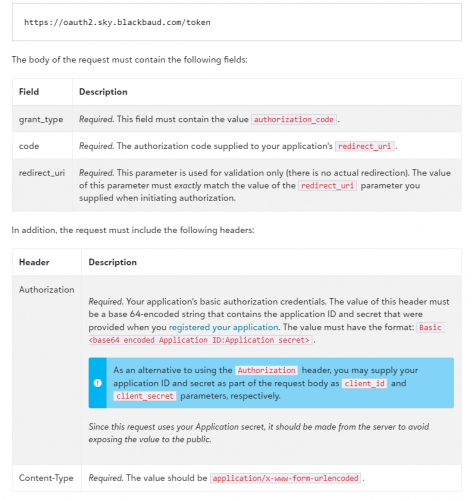
You may find authorization code flow documentation helpful to successfully make requests.The values for grant_type, redirect_uri, and code should be passed in the body of the HTTP request. The Authorization header should be `Basic` Base64 encoded `client_id:client_secret`
 0
0







Categories
- All Categories
- 6 Blackbaud Community Help
- 213 bbcon®
- 1.4K Blackbaud Altru®
- 401 Blackbaud Award Management™ and Blackbaud Stewardship Management™
- 1.1K Blackbaud CRM™ and Blackbaud Internet Solutions™
- 15 donorCentrics®
- 360 Blackbaud eTapestry®
- 2.6K Blackbaud Financial Edge NXT®
- 655 Blackbaud Grantmaking™
- 576 Blackbaud Education Management Solutions for Higher Education
- 3.2K Blackbaud Education Management Solutions for K-12 Schools
- 939 Blackbaud Luminate Online® and Blackbaud TeamRaiser®
- 84 JustGiving® from Blackbaud®
- 6.6K Blackbaud Raiser's Edge NXT®
- 3.7K SKY Developer
- 248 ResearchPoint™
- 119 Blackbaud Tuition Management™
- 165 Organizational Best Practices
- 241 Member Lounge (Just for Fun)
- 34 Blackbaud Community Challenges
- 34 PowerUp Challenges
- 3 (Open) PowerUp Challenge: Chat for Blackbaud AI
- 3 (Closed) PowerUp Challenge: Data Health
- 3 (Closed) Raiser's Edge NXT PowerUp Challenge: Product Update Briefing
- 3 (Closed) Raiser's Edge NXT PowerUp Challenge: Standard Reports+
- 3 (Closed) Raiser's Edge NXT PowerUp Challenge: Email Marketing
- 3 (Closed) Raiser's Edge NXT PowerUp Challenge: Gift Management
- 4 (Closed) Raiser's Edge NXT PowerUp Challenge: Event Management
- 3 (Closed) Raiser's Edge NXT PowerUp Challenge: Home Page
- 4 (Closed) Raiser's Edge NXT PowerUp Challenge: Standard Reports
- 4 (Closed) Raiser's Edge NXT PowerUp Challenge: Query
- 791 Community News
- 2.9K Jobs Board
- 53 Blackbaud SKY® Reporting Announcements
- 47 Blackbaud CRM Higher Ed Product Advisory Group (HE PAG)
- 19 Blackbaud CRM Product Advisory Group (BBCRM PAG)