User Interface Issues and Consistency --- Giving Up





We're going into our third year of using the new K12 after having been on Legacy forever. On a near daily basis I am disappointed in the lack of care being put into the design and experience of the most basic destinations in the K12 product. While weekly updates continue to add “features” that are trivial (a new column in a report, a new way to sort a table), major usability flaws make implementation brutal, and every new hiring year it repeats itself. If I'm wrong on any of these, I would genuinely appreciate a correction. Some examples:
- The circular logic and complete disarray of the contact card/profile/student information pages is disturbing. Multiple paths to the same data leave users with similar but different views of critical and basic information (schedules, learning profiles, contact info)
- No rhyme or reason to when you're looking at a “profile” or a “contact card”
- In rosters and other “card” style views, the mouse responds as if a clickable area exists when it doesn't. Some icons are clickable (medical), others are not (Learning Profiles).
- Learning Profiles still appear in at least three different ways:
- on a roster card as a blue icon that cannot be clicked
- in a gradebook as a blue icon that CAN be clicked
- in an assignment as a letter L and something to the effect of “this student has a learning profile.” Seriously, Blackbaud? It's an icon… it would be a tiny fix to make this consistent
- When turning in assignments and attaching a document, two LARGE buttons appear for Upload and Google Drive. Each responds as if it's a button. When using the Google Drive option, students must click on the actual tiny Drive icon to “push” the button.
- filtering/dates/views still don't hold values when navigating the site
- there is still no way for a teacher to see what turned in, ungraded assignments exist across classes.
- There is still no notification (with a back link) option for when a student simply turns in work.
- when creating a “links” section in a page/bulletin board, the system arbitrarily cuts off lists with 3+ items requiring students to click a “view all” button, even when no space constraints exist.
- Assessments simply don't work and there appears to be no plan to fix them.
- Blackbaud ID with SSO creates a loop half the time that brings the user right back to enter their email address again.
- Preferred names are sometimes shown in quotes, sometimes in parentheses, and sometimes optional.
The weekly “look at the great stuff we did” emails are, frankly, insulting to those of us who spend our time trying to train users to work around poor design. I don't remember the last time I got an update that appeared to fix a genuine problem or really add new functionality - instead it's little cosmetic changes or “pat us on the back for including data in a table that should have been there in the first place.”
Until the BB dev team releases a public development roadmap, or bug tracker, or ticket system that can be searched, viewed, etc… we'll all end up in the same ridiculous loop asking support the same questions and getting the same “I'll need to look into this further and get back to you,” aka “In two weeks you'll get an email saying that what you wanted doesn't work.”
Browsing these forums, it's clear that even really popular ideas languish for long times before being addressed. Is anyone experiencing this differently than I am? Am I simply confused or missing the “real” features somewhere?
For two years I've been pushing back on teacher requests, explaining that a lot more goes into software development than is apparent from a quick glance, but starting this school year and seeing so little improvement to the system leaves me wondering why I'm defending it at all.
Comments
-
@David Sartory - I'm right there with you…the UI inconsistencies make it hard to use, and hard to train other teachers to use, and they are impossible to defend.
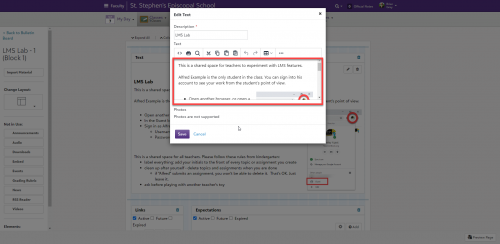
My least favorite UI quirk is an text editing window (outlined in red below) that is a small fraction of the available screen area. This is just sloppy. I hate it and my teachers hate it.
 7
7 -
@David Sartory right there with you!!! We are 5 years into this product - moved from Education Edge and the limitations in the new K12 suite are terrible! The product updates aren't exciting anymore - I just shake my head as there is SO MUCH more they can be working on than a new way to sort a list (export into excel and manipulate like other lists). I laugh when support says “Vote” or “Add” to idea board - the area where Ideas die.
Brian is correct - text boxes across the platform are aweful for teachers; for form designers; for note writers (they create note in word then copy/paste into a note - wow - because they time out writing a well thought through note)
8 -
@David Sartory thank you for putting into words the frustrations that many of us have on a daily basis. There are so many of these tiny little things scattered throughout the product that it makes sense that the dev team would tackle the bigger issues which require more time to update. However, all of these little quibbles add up and make the overall experience less than it should be. To @Brian Gray's point, the size of a text box is such a small thing that would take five minutes to adjust, but since it's so small, my impression is that it is so far down the list that it's never addressed, and around and around we go again.
If nothing else, a roadmap would be wonderful, or at the very least, having staff be more responsive in the idea bank. When there are ideas with hundreds of upvotes, it is inexcusable for there to be no response from BB staff. If you're not going to respond to ideas that so many customers have recommended, what's the purpose of having an idea bank in the first place?
And if a suggestion is in process, tell us that! The only reason I know that contact cards are in the process of being upgraded across the K12 product is because I heard it firsthand at a meetup months ago. I've yet to see anything on the forums, in the idea bank, or anywhere else telling people that yes, we know that this is a problem, we are working to address it, and here's the tentative timetable. This is just basic customer service, an incredibly low bar that somehow fails to be cleared on a daily basis.
The EAPs for new products are great. They allow users to shape the UX in a way that we aren't able to do with other things. It's great that going forward, new elements are quality tested by actual users before going live. What we desperately need is an EAP-style review of the entire product. Take the best parts of what makes an EAP worthwhile and apply those strategies to what's already in the wild and has fallen through the cracks. I promise it would be a win for every stakeholder.
7 -
Hi David:
Thank you for your post. And for articulating well, that which many of us continue to experience, whether we are new to the product (I'm 3 yrs. in) or seasoned users.
While I want to be compassionate, I find it frustrating that even when searching the knowledge base (to avoid having to create a case or make a phone call) in many instances the answers/solutions provided just “touch the service” and don’t actually provided deep dive instructions into how to actually accomplish the searched question/task.
I especially appreciate your comments regarding “look at the great stuff we did” emails. It’s as if we are continually being placated. It wasn’t until I read your post that I realized I’ve not been the only one who has experienced non-answers, or the weeks of wait to finally receive a response that simply reads it can’t be done.
Having said that, the many times I’ve called support the person on the line has always been kind, courteous and most helpful. However, I wish I didn’t have to hold the line for 45 minutes, if not longer to obtain the answer I’m needing.
I worked in Advancement for many years prior to my role as SIS manager and registrar. I’ve had my share of experiences with good software and really bad software. And while no software can ever be perfect, I’m in agreement that the subtle cosmetic changes and “enhancements”, as they are often referred to, in the grand picture don’t resolve any real issues and/or needs of the end user(s).
I’ll be on the look out to see if your post, and our colleague’s reply’s receive any traction.
7 -
I think my blood pressure just went 30% closer to normal after reading this.
Thank you!Yes! I There are serious problems with this system. I kind see three main areas:
- Deficiencies in functionality. [most prominent: the inability to create a robust, customizable “sky” list. ] But, as an EE user significant S/W Engineering experience, it astonishes me that, even after waiting a couple of years before switching from EE, and then suffering through 3 years since then, that we still are left far short.
- Inconsistencies in UI. A couple examples [among many]
- Why, e.g. is it I can do a wildcard search in some places but not in others?!? This should be available EVERYWHERE
- Why do the advisory group management pages look so different from academic groups? [aren't they very similar?]
- Quality
- I'm really frustrated by things that get broken with the paltry weekly feature changes. E.g. this week, we discovered that the feature of naming a teacher assistant on a class is broken.
I get the feeling that there are about 2-3 engineers working on this product, in about 4 locations who never talk to each other and, most of all, don't listen to domain experts [analysts] about how things should work. [if indeed there are any].
And don't get me started on the fact that the prescribed way to report a bug is to enter an idea…
4 -
Good morning all,
Apologies in advance for the long reply!
First and foremost, know that we do hear you: in the idea bank, in the community, and with the specific feedback you all have shared in this thread. Many of the items you bring up are either in flight, in our upcoming to-do lists, or in our personal dream jar lists as Product Managers of each area of the product. I’ll get into a few more specifics for the items you brought up, but first wanted to make sure to highlight a couple of pieces.
Our roadmaps are shared through what is called Product Update Briefings. You can see past briefings and register for our upcoming session in October at this link: https://www.blackbaud.com/products/product-update-briefings-overview
These sessions do primarily cover our larger initiatives so know that each team has many small projects they are working on at the same time that may not be highlighted in the briefing.For the idea bank, we are always striving to make sure we’re updating (at the very least) the status of the ideas as we know we are considering or working on them and will make sure we continue to be better with that. Each of my colleagues and I do get the ideas sent directly to us so we review each one (and each comment) as they come in. The idea bank truly is somewhere we go to both for determining our big projects as well as smaller improvements we can do at any time.
Now for the details! (All timelines are subject to change as critical priority items may come up)
Contact Card on profiles: We are taking the first step with the 360 Student Profile (Admin view) that is currently in Early Adopter Program (EAP). The goal of the 360 project is to provide Academic admins a single profile to access all information regarding a student – no more going to the Faculty view for some information. An updated contact card is part of this work and we plan to surface that same new contact card into the existing Core and Enrollment Management profiles as well. EAP is in progress now and we hope to be in general availability by the end of December. If you are interested in learning more or joining the EAP, reach out to me at Jacqueline.koca@blackbaud.com
Learning Profile icons: Originally icons were meant to be informational only and not provide access to the reports. Based on feedback we learned that direct access to the reports would be beneficial and began implementing that in areas as we worked on them. No timeframe to share but the Learning Management team has added this to their list of small projects and will work on updating these to consistently load the report.
Buttons when turning in: Agree that it is reasonable that students would expect the whole button to be clickable. We currently have plans to update the entire screen before the end of the year and updating those buttons will be included as part of that.
Filtering/Dates/View: This is one of my personal pet projects and as a whole product we are constantly looking to support this where it makes sense. It will take us time to tackle each page/area, but do know we are working to add this! For example, in Academics the Home page will remember any changes to the tile organization. The new 360 Student profile will also support this – users can reorganize the tiles on the page or minimize/maximize them and that will be remembered between profiles and when the user logs back in.
Assessments: Our LMS team has been hard at work giving Assessments a complete overhaul. This is now in EAP and hoping for general availability early next year. If you are interested in learning more or potentially joining the EAP, reach out to michael.morrissette@blackbaud.com
Other LMS items: Reporting on turned in/ungraded assignments, notification option for student turning in work, and the bulletin boards. The assignment reporting and bulletin boards are both areas Mike and the LMS team knows need some love and are highly requested areas. We don’t have anything committed to on the roadmap in the next 6 months but will look for smaller improvements we may be able to tackle.
Text window size: These are always areas we’re looking to improve. If it’s just a matter of the area being too small, do make sure to add that to the idea bank calling out the specific area. Many times adjusting window sizes can be a very small change for us to make depending on the workflow of the screen.
For timing out while writing in text areas, we have begun to implement some auto-save draft functionality. We will be looking to expand this to other areas (such as grade comments and official notes) in the future.Lists: Coming from supporting EE myself, I fully understand the desire for a clean, easy to use, and robust way to report out data. We are definitely in a growing stage of solving this problem (thus having advanced lists, sky lists, Insights, etc). We are working hard to ensure that we narrow down and provide the right access to your data in the right ways.
Group management pages: Good news in this area as well. We are in the process of updating these pages to be consistent. Athletics is the next area we are tackling and work is beginning on that this fall. We hope to follow with the Advisory and Activities setup areas not long after.
Thank you again for providing feedback through this community, the idea bank, participating in discovery/EAPs, and by reaching out to support (we use that data as well!). It is invaluable to myself and my fellow product managers as you all are the experts in what you need to be successful.
-Jacqueline
Senior Product Manager, Student Information System16 -
@David Sartory I wholeheartedly agree. I have been a long-time Blackbaud user (and former software instructor) and there are SO MANY things that are almost impossible to defend at this point. Having to explain to faculty why certain parts of the system look relatively user-friendly while others (any podium pages) are a nightmare. I created a whole other thread on Advanced Lists with a similar complaint, and have been told improvements are “in development” for some time now. At the end of the day, sunsetting EE while K12 lacks equivalent functionality was poor planning.
4 -
@Jacqueline Koca Hi, Jacqueline -
While I appreciate the detailed response, it's really not an answer to my observations or the comments of other folks that followed. If anything, it confirms the problems.
Many of your answers essentially say something like "we're working on it, thanks." This is why I bring up a proper roadmap. The Product Update Briefings are interesting, but they have a sales-oriented approach, not a technical one. They're also essentially firewalled by making them "events" that you have to register for and attend. I'm talking about documentation - telling active customers your plans and giving them visibility into the successes and failures of staying on the timeline. By avoiding a public plan or a public bug/workaround search, you ensure that each of your customers repeats the same frustrations, tying them up in work while also multiplying your support team's work. Assessments are a perfect example - they are known to be broken, but no one tells you that until you've gone many, many layers deep with support and had multple failures with your teachers.
This leads to the "Idea Bank," which, while I understand the idea, borders on insulting considering how every answer tells customers to go there, but it clearly isn't actively maintained or considered. Just look at item number one on your "Under Consideration" list. 972 votes on an "idea" posted in 2015. If that's the attention the number one "Under Consideration" item gets, why would we even bother trying something new? If it's not going to happen, just be honest and make a reasonable attempt to explain why (I can actually think of plenty... on that particular one). Giving you the benefit of the doubt, I instead went to the "Planned" list. Your number one "Planned" item was suggested 32 months ago and has ZERO comments from Blackbaud.
With regard to student profiles/contact cards: a student profile is exactly that -- a profile of the student. It should be one thing, then filtered by permissions. As it currently stands, it's not inconvenient to have differing views -- it's confusing and dangerous. Administrators and student-facing counselors don't even see allergies when they open a student profile, even with medical view rights! This goes directly to my earlier point of patting yourselves on the back for fixing basic functionality. Calling it the "360 Student Profile" might sell nicely, but it's not a substitute for simple, expected functionality.
On to the "little stuff" and pet projects. Things like filters holding values, mouse/cursor behavior, and the like are UI/UX standards, not features or perks. They're what makes software feel natural to use. You have so many of these issues, with many (if not all) documented in the "ideas" site, and yet they aren't on the pipeline. You even make reference to how easy some could be (window sizing), but instead, you're developing new features like reorganizable and collapsible contact cards or panes. I spent about 10 minutes searching the ideas pages for any requests to "reorganize" the panels in these views and found zero. Did anyone ask for either of these features? I can find hundreds of people asking for data to be clearer on the cards that already exist.
So, as the expert in what I need to succeed, what I'm asking for is that Blackbaud does some housekeeping. The car needs repair, but it's stuck in the shop getting a fresh coat of paint and some new rims. The day to day experience matters more than these big dev pushes. For those of us whose job it is to train and support our staff on your product, you leave us with little choice but to apologize and offer our own sloppy workarounds. I can explain to regular folks why certain design decisions carry far into the future and sometimes limit what is possible, but I can't make excuses for what is essentially a simple unwillingness to chip away at easy problems.
My original message was sincere - I asked folks if I was wrong--if I was missing something. It's clear from the responses that I'm not. Please consider starting with the ideas list, and working down from most popular. Just answer them. And if you're not going to, then please just bite the bullet and shut down the ideas site. It's disingenous.
I am actually sorry about my tone; I'd prefer to be more positive, but I'm really not able to write this any other way. This is a really big problem and your message was essentially “hold tight, we're working on it, and use the ideas board.” I've done that already. I'm looking for something better.
Thank you sincerely for your attention to this thread.
Dave
9 -
@David Sartory concerning the idea board - it is a perfect example of something little that could be fixed. When you go to page 2+ of ideas, why doesn't it take you back to the top of the page instead of leaving you at the bottom and having to scroll up? Same for if you select an idea to view that's near the bottom of the page, it looks like the page is blank until you scroll up to see that the idea only takes up a small portion of the entire page length. Either BB doesn't have the same view we do or it doesn't matter to them that the functionality that every other website has (even a site like Dollar Tree) isn't important enough to fix.
2 -
Cf. @David Sartory's point:
With regard to student profiles/contact cards: a student profile is exactly that -- a profile of the student. It should be one thing, then filtered by permissions. As it currently stands, it's not inconvenient to have differing views -- it's confusing and dangerous.
This point approaches what I think is a fundamental problem with the basic organization [and UI] of the system: it's what I might call path-based instead of object-based. [I use object-based in a less-than-formal way.]
What I mean is: a student is a student is a student. [and poss. also a former candidate]: We should not have to view a student's academics in one screen, then, when we need something like the students user-id, have to:
- bounce out of Academics
- Go into another whole subsystem, [Core]
- RETYPE the student's name to refetch the record(s)
- Find the user-id in another , different view
These steps are what I call a “Path”. You have to follow the proper path through the pages of the system to operate on an object.
I think it should simply be a matter of seeing/finding the user-id in the current view simply because it is part of a the object “student”.This [often circuitous] path approach is really illustrated at the beginning of nearly every support call. For [hypothetical] example:
User: I can't find how to delete a diploma
Analyst: Where exactly are you going to do this?
User: “Academics”, then “People Finder”, then “Requirements”, then I see the diploma, but I don't know how to manipulate it.
Analyst: Oh. You have to click the little blue three-dotted button and choose “delete”.
[BTW, that button doesn't really look like similar buttons elsewhere in the system]In EE, because the system is built around the student object, and because all views have a consistent, predictable layout, the conversation would be much simpler:
User: I can't find how to delete a diploma
Analyst: Open up the student, find the diploma [maybe it's in a [logically-organized] tab], select it, as you would any other object, press the “Delete” key or Delete from a popup.6 -
The text editing window is definitely one item that should have a resizable window. I don't know how many times I have deleted things by accident because the window is so small.
3 -
@David Sartory re: The SSO loop. We had a few users with this issue, updating browser to latest version solved it.
1 -
Many of the simple user interface items mentioned were the reason I created a user script that implements those changes client-side.
The fact that I had to switch between Core/Academics/Enrollment Management and then search for a student again really bothered me, so that was one of the first things I did with the user script--add links to the top of profile pages for jumping between those views for that specific user. The tiny text editor boxes was another item that I addressed in the script.
It's obviously limited to things that can be done client-side, but I've made dozens of improvements to the efficiency of things I do in this system. There's a generic version of the user script that can be installed by anyone and used in seconds…maybe this'll help restore some sanity while waiting for Blackbaud to implement changes on their end. Here's my original community thread:
And the script info on Github:
(Some of the script features are years old, so are probably outdated, as Blackbaud has made changes to the affected areas.)
2 -
@David Sartory I am also in the same boat, we are 10 years in with blackbaud. We are only using 10-15% of all the features blackbaud provides. Only our staff uses blackbaud and they are not happy, can't imagine the feedback we will get having all our teacher uses it. We haven't use anything else is because it is just bad. Somethings are so simple and they still couldn't fix it. For example, we want to collect points for student. Max is 10 points. After everything is setup. I see a drop down of 0, 1, 10, 2, 3, 4, 5, 6, 7, 8 9. Which is not acceptable to any teachers to see. When I reach out to support, they say they will escalate it, which mean they will get back to you in six months. I won't brother to go in to all the work around we have to do…….
2 -
@David Sartory Very well articulated. I've been out on maternity leave and just stumbled on this thread from September. We've been in the “new” LMS for 6+ years. When we made the switch, we were coming from teachers using simple Google Sites for posting assignment information and EE. We were thrilled at all the “bells and whistles” that were demoed to us but it wasn't until we had fully committed that we realized how difficult it was to use.
80% of my work is assisting teachers with (what we call) onCampus. I spent a good portion of our first year creating help documentation for our teachers on things like, “When I add an assignment, what do all the settings mean?” because documentation for teachers simply doesn't exist. Whenever a new update comes out I either update or create a new document or video on the new feature but have to include qualifiers such as “This is what SHOULD be happening, but it doesn't work.” I then have to include all the various workarounds.
There are way too many ways that Blackbaud communicates with its customers. You have to attend events to learn about upcoming features. To know about those events, you have to be subscribed to the right forum, community thread, blog, who knows anymore. When I expressed frustration to our Customer Success Manager that I could never find the information I was looking for, she sent me an email about all the various ways that Blackbaud communicates and proved my point. She also encouraged me to visit the K12 Hub more often because “I think we are trending toward posting information there.” ?
Using Blackbaud LMS during the pandemic was a nightmare because of inconsistencies between the teacher and student views (due dates/times, how to view grades/comments/assessment results, teachers not knowing what a student sees).
I maintain a Google Doc with a list of ideas from the Ideas that our faculty care about and keep them updated when an idea changes status (only two were updated during my four month leave).The only big update that happened during my leave was the assignment annotation tools and they're disappointing. Most of my teachers will continue utilizing Google Doc/Google Assignment ways of giving feedback.
While I think our development office is married to Blackbaud, our academic team is having serious conversations about making the jump to a different LMS. Part of this process is creating a running list of “pain points” that we're experiencing and this thread definitely gave me a jump start on my list.
2 -
@Megan Day:
80% of my work is assisting teachers with (what we call) onCampus. I spent a good portion of our first year creating help documentation for our teachers on things like, “When I add an assignment, what do all the settings mean?” because documentation for teachers simply doesn't existHave you seen the tutorials, videos, and faculty resources posted at:
Additionally, all the content on this help center is available to anyone; they don't even need to be logged with a BBID to access it. Some of this information also appears in the KB and in the product's embedded help (we copy it to multiple locations). The “Academics” and “Extracurricular” tabs at the top (and Search) sometimes have information that teachers also find valuable; it's not just for admins. If you find something in this site that you want to share with teachers or to link to your school's documentation, you can share it from here, just copy the URL address.
For best results if you Search, use keywords ("add assignment") instead of full sentences (not "How do I add an assignment to my Math class?" ). Make sure your internet browser has spell check enabled. Use generic teams and dates (current year, athletic team, grade level, etc.) instead of school specific ones (not: 2022-2023, Basketball team, freshmen, etc.)
At the bottom of the help topics, you can submit anonymous feedback that our tech writers (Strategic Content Design team) review as we work to update and improve the documentation for users. Since it is anonymous, we don't reply directly, but we do read and use the feedback.
0 -
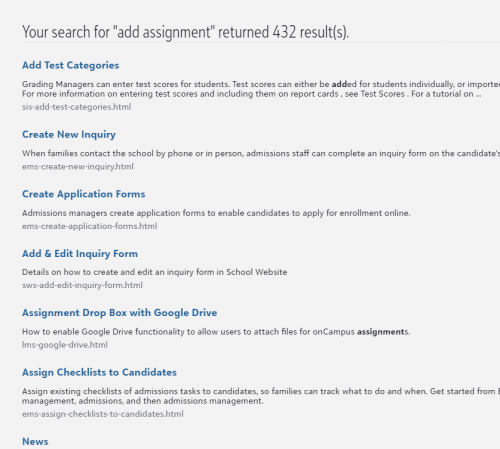
@Bryna Gleich I think it's safe to assume that anyone who ended up here figured out how to find the help section first and found it lacking. It's not that the content isn't there… For example, taking your advice, I searched for “add assignment”… guess what's not in the results? Sure, if you go into “Assignments Overview” you can then find “Add Assignment" in there (no idea why that didn't come up in the search) but this is not the kind of thing basic users do, and expecting them to be search pros is unrealistic. Your search engine should remove words like “how do I" and small articles of speech, not actually scan your database for them. For better or worse, people have been trained on search engines and they're used to asking questions like that.
Speaking again to the larger problem, your quote says it all:
“Some of this information also appears in the KB and in the product's embedded help (we copy it to multiple locations). The “Academics” and “Extracurricular” tabs at the top (and Search) sometimes have information that teachers also find valuable”
Some of it is copied, some isn't, some is in a different place, maybe, sometimes. Even Blackbaud's recent change for the “What's New” content is bizarre… you send an email, telling people that you made a post in the community with the info, but then the content is actually in the BLOG (no idea why) instead of just sending it to people in the first place.
And again, you suggest writing in to one place or another… but the fact remains (and no one will answer to it) that the PRIMARY location for suggesting, the Ideas forum, is loaded with proof of inaction on BB's part. Again - the TOP suggestion is 7 years old and has no answer from BB. What's the point of adding more to that system?
1 -
@David Sartory again, brilliantly articulated.
@Bryna Gleich I find your response a bit insulting. I know how to use a search engine. However, since you took the time to respond, I'll follow your advice to show another example of how lacking the resources are for teachers and how poorly organized. The “Teacher Resources” link you shared isn't helpful. I've yet to find a single file/result/page/I don't know what these even are…. useful.
For example, the way the LMS handles extra credit has always been confusing for our faculty. Regularly I have teachers coming to me asking why their extra credit assignment isn't calculating in the grade book.
If a teacher follows your “best practices” and searches “extra credit”, NONE of the results explain how extra credit assignments are calculated within assignment types but the results do include “Sports and Teams”. (Why? Who knows…) I even took the time to go through the first 4 search results.
The first, “Working with Gradebooks” does mention examples of extra credit. It's under Gradebook settings > Grade calculation > Pick a calculation method > Calculation Example. However, just because the words “extra credit” are use, it doesn't answer the teacher's question.
The second “Individual Gradebook Setup” has the same regurgitated text as the first result.
The third “Assignments”, mentions extra credit but simply says “Select if the assignment should be extra credit”. It also includes a “tip” about extra credit not negatively impacting a student's grade. (That's not a tip. It's what extra credit means.)
The fourth “Gradebook calculations” is again the same regurgitated text from the first two search results.
In summary, it is not possible for the teacher to find the information they're looking for in “Teacher Resources”. However, if a teacher searches “extra credit” in the Blackbaud Knowledgebase the first search result is ‘How does Extra Credit calculate in the grade book?" (Interesting that knowledgebase articles are titled as questions but you’ve told me to “not search full sentences”.) This knowledgebase article mentions “Additionally, the calculation follows the calculation method the teacher is using and there must be at least 1 non-extra credit assignment graded in the assignment category for the marking period.” NOW we're getting somewhere! However, I'd still argue that this doesn't adequately answer the question for the teacher. It's in Blackbaud speak and I can definitely see some of my teachers not understanding what that means.
If we open the 4th search result in the knowledgebase (if searching without filtering by product), we finally find what we've been looking for and the answer is written in a way that teachers can understand. This is the ONLY Blackbaud created resource that I give to our teachers. I send this to them when they're frustrated and ask “How was I supposed to know that the extra credit presentation my students completed wouldn't calculate because I used the “Presentation” assignment type and I don't and won't use that assignment type for anything else?!?" (I'm paraphrasing but I answer this question every year, multiple times).
Another place I've been sent to before “Faculty Resources”. Not helpful.
Lastly, I tried to look for the K12 hub that the previous rep mentioned but it looks like it doesn't even exist anymore or maybe was renamed? The link was k12hub.blackbaud.com but now redirects.
I'd love to know if you have any teachers on your Strategic Content Design Team. If the resources are for teachers, they should be written by teachers.
2 -
Hi @David Sartory,
Thank you for the specific feedback. I currently don't normally work on assignments. (I did in the past though.) I used assignments as an example because I thought it would be a more universal example than my current, normal area. Please forgive me. I should have tested the specific example before mentioning it.
Having said that, there is action I can and will take immediately to try to improve this specific example. I'll update the meta data properties for the Assignments overview topic. I think that should improve this specific search result. You should see this change go live with next week's release (possibly sooner).
I think we do have some “stop words” that are automatically ignored/removed from search (including “a, an, the,” and some others). Users are unique and creative, so we can't account for all cases. I would hate to ignore every “how” and end up accidentally ignoring “slideshow” (as a generic, hypothetical example).
We have some synonyms in effect for search too ("remove" and “delete,” for example).
The point I'd hoped to make was: For best search results, use keywords, do not use full sentences, use spell check, and use generic instead of specifics. It's not Google.
--
For What's New, many clients have multiple BB solutions. Previously, some solutions sent emails, others posted to the blog, etc. We're trying to make things standardized and consistent.
If we were to rely only on email, then not everyone gets the message, as not all users are on the email distribution list.
The community has a wide reach and the blog is part of the community. With the user community blog, more users have an opportunity to get the What's New message. Plus, it encourages users to join the community and to follow the blog, so they can interact with peers and get other tips and tricks.
If you want to opt-in to an email, you can subscribe to the community and to its blogs.
Meanwhile, I'll make note of your feedback.
--
Regarding the top idea, as a former teacher (both virtual and brick & mortar), I understand the reason for that request and empathize. The system I taught with (not a BB solution) didn't enable impersonation for teachers to see all student/parent views either. I know our workaround was to login as “demo” users instead. It wasn't ideal, but that's what we did when I taught.
I know it is frustrating to see the top idea currently marked “under consideration” instead of “planned/shipped/implemented.” In the comments section of the top idea, I recognize the names of some of my BB coworkers who have entered replies along the way, not just 7 years ago. I also know that idea is not simple, it is still discussed, it is still investigated, it is not forgotten, and I believe new things are built/enhanced with that idea in mind (such as the student preview for assignments).
As for future details of that or any other idea, it's not my place to comment more. That's a product manager area.
----
Hi @Megan Day,
No insult was intended. I'm sorry it came across that way.
I see some of the terms people use when they search.
I have seen multiple instances of people who search for “Contest type" when they meant “Content type,” or entered multiple sentences including telling me the names of students, or wrote “call me!” in the feedback, yet left no email address nor phone number. All normal, honest, understandable mistakes.
I'm glad you understand search. Not all do.
As for “extra credit” mysteriously returning “sports" in search results, I see that's because it's in “EXTRAcurricular" and thus it's hitting a “partial word match.” Mystery solved. Meanwhile, I'll make note and see what I can do improve that one, even though it is not my normal area. Thank you for the examples.
--
Articles native to the KB do often start with “how." The KB is written by support and runs on a different platform, with a different search engine, than the in product help and resource center. Content I work on is copied to the KB, but is not native to the KB. I am not in the support department.
Likewise k12hub.blackbaud.com was more marketing department, I think. I know some content I worked on was linked there, but again, not native to it.
I wish I could make them all the same system. At this time, however, they aren't.
Different departments have different responsibilities and needs, thus different tools to best meet those needs. For example, I need a tool that has variables and conditions, advanced source and version control, publishes to multiple formats and locations, helps me track how content is linked and interconnected, make bulk changes rapidly, interacts well with translation services, etc. My spouse jokingly calls it “object oriented.” He sends his computer science interns my way sometimes and I talk with them about things like branching, merging, and git.
--
As for teachers on the strategic design team, I was a teacher (both virtual and brick & mortar) and I am not the only one. We also have former teachers in UX design, PM, support, and more. They are not all former teachers, but some are. At least one member of SCD is also a current teacher.
--
I know things are not perfect, but we are listening and working on improvements.
Thank you again for the documentation and search feedback. I will do my best. I can't make it Google, but I can listen and help.
The area of documentation I currently, normally work on is Core (including roles and tasks). We have improvements in the works there. I hope to show some soon.
I also work on a BB solution called CSRconnect, which is part of YourCause.
Best wishes,
Bryna Gleich (Technical Writer)
PS. I heard an interesting podcast episode recently that goes into search. It's episode 507 of “99% invisible" hosted by Roman Mars. If search interests you too, consider checking it out.
1 -
I posted a list of pages that have an edit dialog that should be resizable to an Idea Bank entry from more than a year ago.
More votes might help…
2 -
@Bryna Gleich Thank you for the transparency of Blackbaud's inner workings. I had suspected that part of the reason we have been so unhappy is because of how Blackbaud is structured. It's a big company with lots of “solutions”. Some of your customers have lots of pieces and some might only have one piece. Unfortunately, this still means your customers can't easily find what they're looking for. Since it seems like most of my complains have to deal with an area of the system you're not deeply involved with, I'll leave it there.
Looking forward to improvements on the documentation for roles and tasks you mentioned. Thats a huge headache for us as well.
@Brian Gray Thank you for taking the time to document all of the areas that have tiny edit dialog windows. Hoping some progress will be made there soon!
0


























Categories
- All Categories
- 6 Blackbaud Community Help
- 211 bbcon®
- 1.4K Blackbaud Altru®
- 403 Blackbaud Award Management™ and Blackbaud Stewardship Management™
- 1.2K Blackbaud CRM™ and Blackbaud Internet Solutions™
- 15 donorCentrics®
- 360 Blackbaud eTapestry®
- 2.6K Blackbaud Financial Edge NXT®
- 659 Blackbaud Grantmaking™
- 579 Blackbaud Education Management Solutions for Higher Education
- 3.2K Blackbaud Education Management Solutions for K-12 Schools
- 943 Blackbaud Luminate Online® and Blackbaud TeamRaiser®
- 84 JustGiving® from Blackbaud®
- 6.7K Blackbaud Raiser's Edge NXT®
- 3.8K SKY Developer
- 250 ResearchPoint™
- 120 Blackbaud Tuition Management™
- 165 Organizational Best Practices
- 241 Member Lounge (Just for Fun)
- 36 Blackbaud Community Challenges
- 37 PowerUp Challenges
- 3 (Open) PowerUp Challenge: Grid View Batch
- 3 (Closed) PowerUp Challenge: Chat for Blackbaud AI
- 3 (Closed) PowerUp Challenge: Data Health
- 3 (Closed) Raiser's Edge NXT PowerUp Challenge: Product Update Briefing
- 3 (Closed) Raiser's Edge NXT PowerUp Challenge: Standard Reports+
- 3 (Closed) Raiser's Edge NXT PowerUp Challenge: Email Marketing
- 3 (Closed) Raiser's Edge NXT PowerUp Challenge: Gift Management
- 4 (Closed) Raiser's Edge NXT PowerUp Challenge: Event Management
- 3 (Closed) Raiser's Edge NXT PowerUp Challenge: Home Page
- 4 (Closed) Raiser's Edge NXT PowerUp Challenge: Standard Reports
- 4 (Closed) Raiser's Edge NXT PowerUp Challenge: Query
- 798 Community News
- 3K Jobs Board
- 56 Blackbaud SKY® Reporting Announcements
- 47 Blackbaud CRM Higher Ed Product Advisory Group (HE PAG)
- 19 Blackbaud CRM Product Advisory Group (BBCRM PAG)