moving from one student to another



I need to check data (or add data) for a group of students (all seniors). Is there a way I can move through the group of seniors, one to the next in alphabetical order, without having to search for each student?
Comments
-
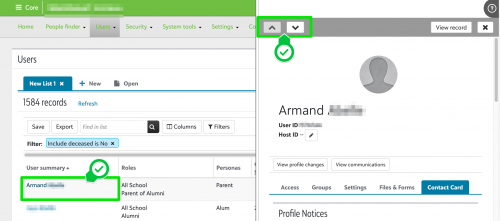
@William Roundey - you can navigate from record to record (after setting up your filters) on a user list in Core. Click on the “User Summary” to get the “Flyout” menu and use the navigation buttons.
You do have the ability to bulk-add data to a record via a data import.
2 -
This is very useful, but it doesn't seem to be possible with student lists, where you might want to iterate through student-type information. [e.g. edit the enrollment of a bunch of students who fit certain criteria].
Is it?
0 -
Hi @john ronan the “Flyout” is currently only available on User Lists in Core or Candidate Lists in Enrollment Management.
0 -
Are there plans to complete this?
1 -
I sort of accomplished this with one of the features in my user script. It works for advanced lists, and turns User IDs (when added as an output field) in the list into links that open (in a new tab) to a user-selectable (e.g. Core→Access or Enrollment Management→Financial Aid) profile page for that user record.
0








Categories
- All Categories
- 6 Blackbaud Community Help
- 211 bbcon®
- 1.4K Blackbaud Altru®
- 402 Blackbaud Award Management™ and Blackbaud Stewardship Management™
- 1.1K Blackbaud CRM™ and Blackbaud Internet Solutions™
- 15 donorCentrics®
- 360 Blackbaud eTapestry®
- 2.6K Blackbaud Financial Edge NXT®
- 657 Blackbaud Grantmaking™
- 577 Blackbaud Education Management Solutions for Higher Education
- 3.2K Blackbaud Education Management Solutions for K-12 Schools
- 941 Blackbaud Luminate Online® and Blackbaud TeamRaiser®
- 84 JustGiving® from Blackbaud®
- 6.7K Blackbaud Raiser's Edge NXT®
- 3.7K SKY Developer
- 248 ResearchPoint™
- 120 Blackbaud Tuition Management™
- 165 Organizational Best Practices
- 240 Member Lounge (Just for Fun)
- 34 Blackbaud Community Challenges
- 37 PowerUp Challenges
- 3 (Open) PowerUp Challenge: Grid View Batch
- 3 (Closed) PowerUp Challenge: Chat for Blackbaud AI
- 3 (Closed) PowerUp Challenge: Data Health
- 3 (Closed) Raiser's Edge NXT PowerUp Challenge: Product Update Briefing
- 3 (Closed) Raiser's Edge NXT PowerUp Challenge: Standard Reports+
- 3 (Closed) Raiser's Edge NXT PowerUp Challenge: Email Marketing
- 3 (Closed) Raiser's Edge NXT PowerUp Challenge: Gift Management
- 4 (Closed) Raiser's Edge NXT PowerUp Challenge: Event Management
- 3 (Closed) Raiser's Edge NXT PowerUp Challenge: Home Page
- 4 (Closed) Raiser's Edge NXT PowerUp Challenge: Standard Reports
- 4 (Closed) Raiser's Edge NXT PowerUp Challenge: Query
- 796 Community News
- 3K Jobs Board
- 54 Blackbaud SKY® Reporting Announcements
- 47 Blackbaud CRM Higher Ed Product Advisory Group (HE PAG)
- 19 Blackbaud CRM Product Advisory Group (BBCRM PAG)