Question on calculating single-term course grades mixed in with multi-term courses





Our school year is 4 quarters long (students get a grade and report card each quarter), and 2 semesters total (each semester is 2 quarters, semester grade awarded at the end of 2nd and 4th quarters).
A handful of courses are 1 quarter in length, rotating to a different course every quarter so the semester grade would just be that quarter grade itself. For example, this is a report card from our old system; the first row is for a course that took place for 1 quarter/only the 3rd quarter (the second row is for a course that spanned the first two quarters).

We are nearing the end of Q2, but I'm just wondering what's the best way to go about populating semester grades for those single-term Q1 courses.
In faculty grading, I see Semester 1 populate under Calculate

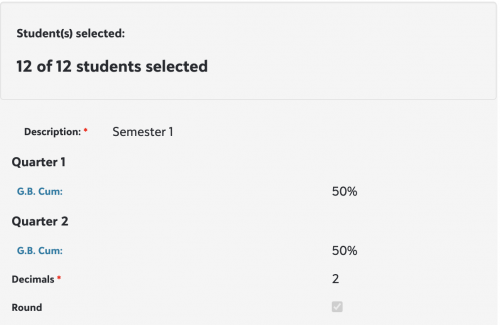
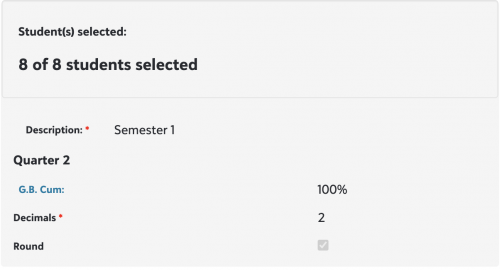
But since Q1 passed, I can't access the Calculate button for Quarter 1. I presume this is supposed to be done before Q1 closes? I didn't have foresight at the time to also have to calculate in Semester 1 grades for Q1-only courses; before on our old system Semester 1 would just pull from it, so as another solution I was looking at Manage Grades and seeing if I should just enter them there:
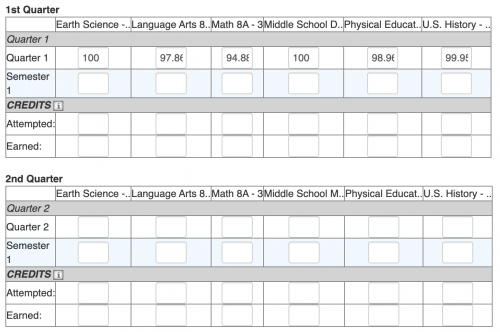
Out of those classes, only one is single-quarter and rotates--Middle School D(rama) rotating to Middle School M(usic), and the others span 2 quarters. What is confusing to me is that Semester 1 entry boxes appear under all of the other courses in Quarter 1 like English/Math/Science, which are multi-term. Should I just enter the Semester 1 Grade under 1st quarter for Middle School D for example and ignore the others?
As we close the semester I am sending out a notice for teachers to also hit Calculate for the Semester grades to be calculated--but I'm assuming in the future, teachers who teach the one quarter courses should also hit Calculate Semester 1 in their Q1 grading?
The only issue is I don't want to confuse teachers if the Semester 1 Calculate button will appear for all courses including those that are multi-term, and those should only be getting the Semester 1 grade after 2 quarters.
Hoping that all made sense--been awfully confused how to reconcile grading having mixed 1-quarter and 2-quarter courses; most of all want to make it an easier process for teachers. On our old system teachers only had to input Quarter grades, and the grading system pulled Semester grades automatically; averaging the semester grade if it was 2 quarters and 2 grades, or just taking the grade if it was 1 quarter-long.
Thank you for your help.
Comments
-
@Nathan Ong - we have a similar situation with a few of our courses.
We have three terms - no semesters. Transcripts report final grades only, so a one-term course must have a column for the term grade and another column for the final grade.
We have a separate Grade Plan Group for single-term courses. The GPG has columns for the marking period grade, the exam grade (for fall and spring), the term grade, and the final grade.
The final grade is a copy of the term grade. The calculation for it is 100% of the term report card grade (so it just copies whatever is in the term grade column).
For us, this got complicated enough that we enlisted the help of our Blackbaud consultant (that we pay a retainer fee for). The consulting fees are cheaper than the cost of the liquor required to do it on your own.
1 -
@Brian Gray
Thank you for the response--a separate grade plan group seems like it would be the best way to go about this.0 -
I second the motion for a second, separate grade plan group (GPG).
We had a similar sitch where we had a handful of courses that were shorter than the vast majority of courses. I tried over a couple of years to have them reside in the same GPG. It was never quite right.
The way it would work is, as Brian [I think] suggested, you just define a calc where Q1 is 100% of Sem1 and have the teachers do that ‘calculation' at end-of-Q1.
Now, having said all this, and suggesting that you separate these short courses out, I'm not sure fi the system will let you change the GPG once there are grades there.
If this is true, and you do need to change the GPG, you may need to:
- Set up the new GPG
- Save off the students and their grades [from the original course]
- Drop the students from this course
- Create a new course record that has the new GPG
- Enroll the students [prob. via an import]
- Import the grades
It sounds like a lot of work, but the computer does most of it. And if you're not facile with importing, it's worth the investment of time to learn it.
Hope this helps.
-jr
0







Categories
- All Categories
- 6 Blackbaud Community Help
- 213 bbcon®
- 1.4K Blackbaud Altru®
- 402 Blackbaud Award Management™ and Blackbaud Stewardship Management™
- 1.1K Blackbaud CRM™ and Blackbaud Internet Solutions™
- 15 donorCentrics®
- 360 Blackbaud eTapestry®
- 2.6K Blackbaud Financial Edge NXT®
- 655 Blackbaud Grantmaking™
- 576 Blackbaud Education Management Solutions for Higher Education
- 3.2K Blackbaud Education Management Solutions for K-12 Schools
- 939 Blackbaud Luminate Online® and Blackbaud TeamRaiser®
- 84 JustGiving® from Blackbaud®
- 6.6K Blackbaud Raiser's Edge NXT®
- 3.7K SKY Developer
- 248 ResearchPoint™
- 119 Blackbaud Tuition Management™
- 165 Organizational Best Practices
- 241 Member Lounge (Just for Fun)
- 34 Blackbaud Community Challenges
- 34 PowerUp Challenges
- 3 (Open) PowerUp Challenge: Chat for Blackbaud AI
- 3 (Closed) PowerUp Challenge: Data Health
- 3 (Closed) Raiser's Edge NXT PowerUp Challenge: Product Update Briefing
- 3 (Closed) Raiser's Edge NXT PowerUp Challenge: Standard Reports+
- 3 (Closed) Raiser's Edge NXT PowerUp Challenge: Email Marketing
- 3 (Closed) Raiser's Edge NXT PowerUp Challenge: Gift Management
- 4 (Closed) Raiser's Edge NXT PowerUp Challenge: Event Management
- 3 (Closed) Raiser's Edge NXT PowerUp Challenge: Home Page
- 4 (Closed) Raiser's Edge NXT PowerUp Challenge: Standard Reports
- 4 (Closed) Raiser's Edge NXT PowerUp Challenge: Query
- 792 Community News
- 2.9K Jobs Board
- 54 Blackbaud SKY® Reporting Announcements
- 47 Blackbaud CRM Higher Ed Product Advisory Group (HE PAG)
- 19 Blackbaud CRM Product Advisory Group (BBCRM PAG)