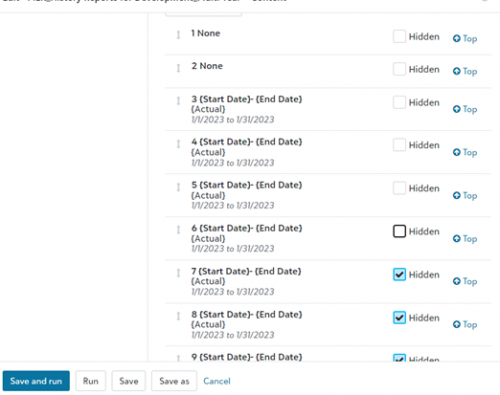
Reports - Date range of all columns in Content have changed to January 1 - January 31 2023





Has anyone experienced this? I am running an existing report in FE NXT and just changed the filter to run on a specific fund (project) and unchecked a few hidden columns in the Content area, but the data range in every single column has changed to 1-1-2023 to 1-31-2023. I didn't change the date range, and this has happened within to two existing reports so far. These reports have worked perfectly before.
Here's a screen grab:
Comments
-
@Terrie Sampson
Yes, we are experiencing the same issue. Preset filters or changes are not saving, they continue to default back to the same dates you have listed. The format tab is also changing preset settings.1 -
@Terrie Sampson
on the actual columns, what is the value on the date range, is it “This Period” where it would just find the date / period? Or is it something like Specific Range, where you define a specific start/end date, and should hold if saved.1 -
@Terrie Sampson
Just heard there was an update that may have impacted reports. FE Support just published this KB :1 -
@Kevin Brazell do they send notifications of these things, like an email or somethihg. I would never know to look there..
1 -
@Kevin Brazell Thank you! I will check out the article
1 -
@Kevin Brazell Hi Kevin, it's the second scenario - custom range with specific start/end date that should hold when saved. Also, am not able to save reports now. Hopefully the article has some solutions/options. I am reading it now. Thank you!
3 -
@Terrie Sampson I am also having the same issue. It doesn't matter what I change the dates to, it won't save it, just keeps reverting to Jan 2023
1 -
@Terrie Sampson I have been running the exact same report every day of this week for our close and suddenly the report output in garbage - missing data for of revenue - understating all expense - and now it seems that the BB FE IT has simply gone home with NO RESOLUTION!!!!!!!!!!!!!!
1 -
@Carthelle Lyons
We are also experiencing the same issue. Has FENXT responded???? I do not see a resolutiuon.0 -
@Terrie Sampson
Just started to experience this issue and have resorted to running reports in database mode.I've also had issues with saving, but have posted another thread on it as I was thinking it had something to do with file size, but I can't export to excel. We have other reports we have saved and exported to excel and they show up fine.
It's almost like clock work, FE updated with some ‘improvement’ and it breaks.
I'm seriously going to be looking at moving away from this program. I'm glad we never integrated RE into FE.
1 -
@Kevin Brazell
Thanks…I thought I was losing my mind because I keep getting this error. I can, however, run reports directly as Excel Data Only. This only works if I don't need to change the dates on the report though.0 -
@Terrie Sampson
Has anyone gotten a response from Blackbaud on why this is happening?0 -
@David Clisham
It is supposed to be corrected but I'm still having the same problem. It was suggested that I clear cookies and cache but that did not resolve the issue.0 -
@Don Wheat
From Support - “I am seeing that we're still seeing clients are being affected by this; I am working with our internal team currently to let them know you've been affected by this.”0 -
@Terrie Sampson
Same issue here, cleared cache, still shows January dates for us..0















Categories
- All Categories
- 6 Blackbaud Community Help
- 211 bbcon®
- 1.4K Blackbaud Altru®
- 402 Blackbaud Award Management™ and Blackbaud Stewardship Management™
- 1.1K Blackbaud CRM™ and Blackbaud Internet Solutions™
- 15 donorCentrics®
- 360 Blackbaud eTapestry®
- 2.6K Blackbaud Financial Edge NXT®
- 655 Blackbaud Grantmaking™
- 576 Blackbaud Education Management Solutions for Higher Education
- 3.2K Blackbaud Education Management Solutions for K-12 Schools
- 940 Blackbaud Luminate Online® and Blackbaud TeamRaiser®
- 84 JustGiving® from Blackbaud®
- 6.7K Blackbaud Raiser's Edge NXT®
- 3.7K SKY Developer
- 248 ResearchPoint™
- 120 Blackbaud Tuition Management™
- 165 Organizational Best Practices
- 240 Member Lounge (Just for Fun)
- 34 Blackbaud Community Challenges
- 37 PowerUp Challenges
- 3 (Open) PowerUp Challenge: Grid View Batch
- 3 (Closed) PowerUp Challenge: Chat for Blackbaud AI
- 3 (Closed) PowerUp Challenge: Data Health
- 3 (Closed) Raiser's Edge NXT PowerUp Challenge: Product Update Briefing
- 3 (Closed) Raiser's Edge NXT PowerUp Challenge: Standard Reports+
- 3 (Closed) Raiser's Edge NXT PowerUp Challenge: Email Marketing
- 3 (Closed) Raiser's Edge NXT PowerUp Challenge: Gift Management
- 4 (Closed) Raiser's Edge NXT PowerUp Challenge: Event Management
- 3 (Closed) Raiser's Edge NXT PowerUp Challenge: Home Page
- 4 (Closed) Raiser's Edge NXT PowerUp Challenge: Standard Reports
- 4 (Closed) Raiser's Edge NXT PowerUp Challenge: Query
- 796 Community News
- 3K Jobs Board
- 54 Blackbaud SKY® Reporting Announcements
- 47 Blackbaud CRM Higher Ed Product Advisory Group (HE PAG)
- 19 Blackbaud CRM Product Advisory Group (BBCRM PAG)